System Trading

Maximize Your Trading with Gonna Scalp: The Ultimate Scalping EA for MetaTrader 4
MetaTrader4
Maximize Your Trading with Gonna Scalp: The Ultimate Scalping EA for MetaTrader 4

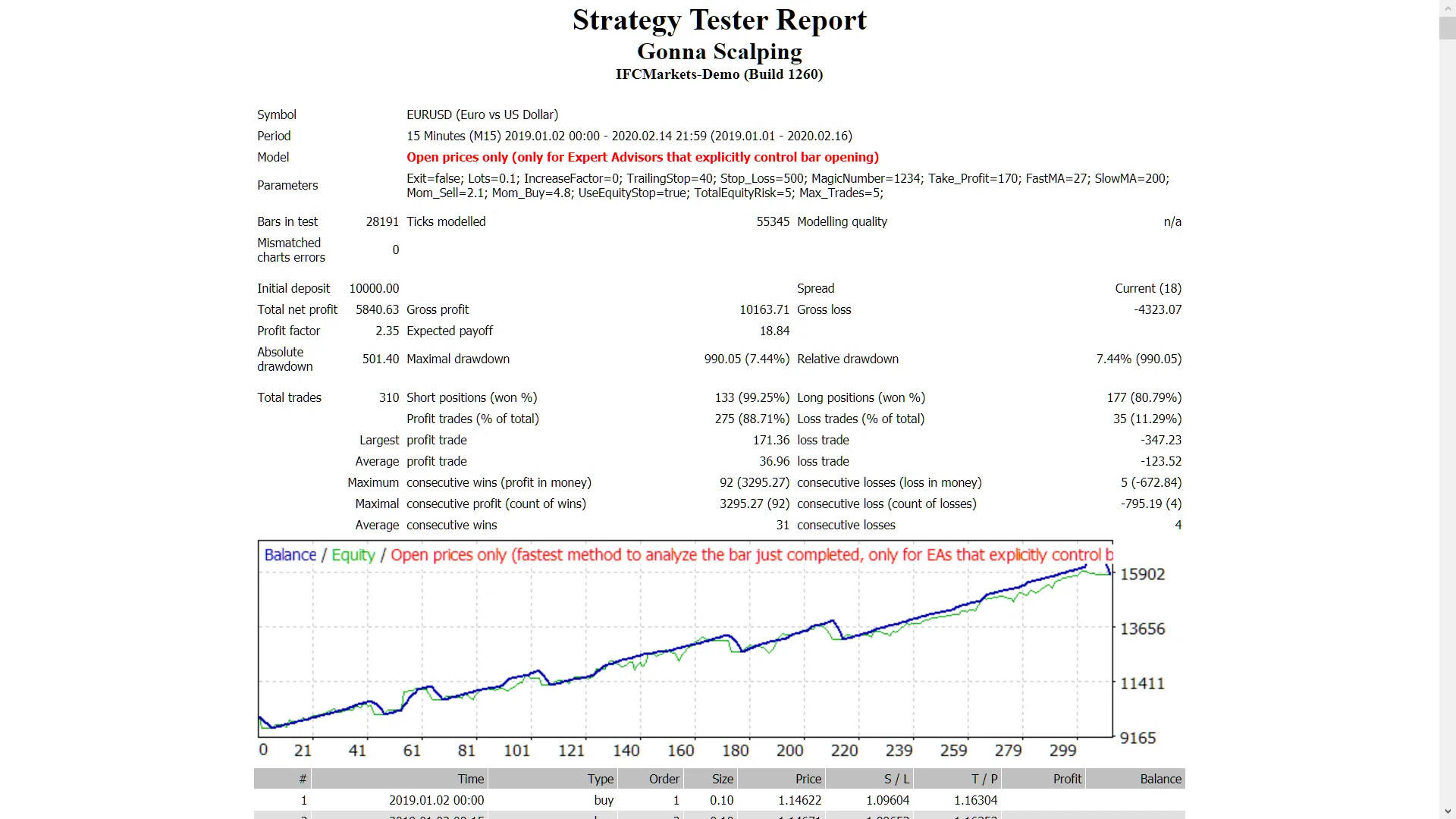
Hey there, fellow traders! If you’re on the lookout for a reliable scalping tool, let me introduce you to the Gonna Scalp Expert Advisor (EA). This powerhouse works across all time frames and is compatible with major forex pairs as well as stocks on NASDAQ. Key Features of Gonna Scalp Demo Test First: Always try it on a demo account before diving in with real money. Open Candle Trading: This EA executes trades based solely on the price of the open candle! No Lot Size Increase: If you prefer not to increase lot sizes after a losing trade, simply set IncreaseFactor=0. Inputs You Can Customize Use_TP_In_Money: Enable Take Profit in money (true/false). TP_In_Money: Set your Take Profit in money (values: 10-100). Use_TP_In_Percent: Enable Take Profit in percent (true/false). TP_In_Percent: Set your Take Profit in percent (values: 10-100). ------------Money Trailing Stop for Multiple Trades---------------------- Enable_Trailing: Activate trailing with money (true/false). Take Profit In Money: Set in current currency (values: 25-200). Stop Loss In Money: Set in current currency (values: 1-20). -------------------------------------------------------------------------------------- Exit: Close trades if the trend is against you to manage drawdown (true/false). Lots: Choose your lot size (values: 0.01-1). Lots Size Exponent: (values: 1.01-2). IncreaseFactor: Determines how much to increase lots from total margin after a loss (values: 0.001-0.1). Stop_Loss: Set Stop Loss (values: 30-500). Set value 600 for multiple trades. MagicNumber: Assign a magic number (values: 1-100000). TakeProfit: Set Take Profit (values: 50-200). Set value 600 for multiple trades. FastMA: Fast Moving Average (values: 1-20). SlowMA: Slow Moving Average (values: 50-200). Mom_Sell: Momentum Sell trigger (values: 0.1-0.9). Mom_Buy: Momentum Buy trigger (values: 0.1-0.9). ---------------------Control Draw Down----------------------------- UseEquityStop: (values:true/false). TotalEquityRisk: (values: 0.01-20). ------------------------------------------------------------------------------- Max_Trades: Set max trades (1-12). ----------------If Using Only 1 Trade:----------------------- ////////////////////////////////////////////////// TrailingStop: Set a value from 40 to 100 to activate trailing stop loss & take profit; "0" will not activate trailing stop loss. Enable "Break Even": (true/false). Move "Break Even": (values: 5-30). How Much Pips to Move "Break Even": (values: 5-30). Make sure to optimize this EA every few months, using the same settings as mentioned above. Whether you decide to use it as a hedging grid EA or for single trades, it's a versatile tool in your trading arsenal. Want to backtest it? Check out this backtesting guide.

2019.11.10
Mastering Martingale: Optimizing Your EA on MetaTrader 4
MetaTrader4
Mastering Martingale: Optimizing Your EA on MetaTrader 4

Hey there, fellow traders! Today, let’s dive into the world of Expert Advisors (EAs) and how you can optimize your Martingale strategy on MetaTrader 4. This EA is designed to execute a set of N trades, and here's how it works: Scaling Up: If all trades in the set result in consecutive losses, the EA will scale up the lot size. Once you experience a set of consecutive wins, it resets back to the original lot size. Set Size: You can adjust the number of trades per set using the parameter (N_trades_per_set). Maintaining Lot Size: If you encounter fewer consecutive wins or losses, the EA will maintain the previous lot size for the new set. The goal here is to increase the N_trades_per_set to enhance the EA’s safety. A good starting point is to test it in the strategy tester with N set to 3, then gradually increase it if the EA isn’t performing as expected. Keep in mind, the effectiveness of your settings will hinge on factors like the currency pair you're trading and your take profit (TP) to stop loss (SL) ratio. A TP and SL of around 50 pips (for 4-digit pips) is a solid starting point, but don’t hesitate to try 100 pips as well. When it comes to scaling, the martingale method typically involves doubling your lot size, for example, 2x. As for your initial lot size, it’s calculated based on your equity: for instance, $1,000 divided by $100,000 gives you a lot size of 0.01, and $3,000 divided by $100,000 will give you 0.03. USDJPY backtest without closing trades on equity control points ---------------------------------------------------------------------------------------------------------------------------------------------------------------------------------------------------------- Now, let’s talk about the second EA file: the N trades per set Martingale + close and reset on equity increase. This version includes an additional parameter, and from what I’ve seen, it tends to be more consistent and stable than the previous one. The default setting for this EA is to close trades and reset if your equity increases by $10 compared to the previous highest equity. Here’s a backtest result for USDJPY using standard settings for the N trades per set Martingale + close and reset on equity increase from 2016 to 2019, starting with an equity of $2,000.

2019.11.09
Unlock Your Trading Potential with Smart AC Trader for MetaTrader 4
MetaTrader4
Unlock Your Trading Potential with Smart AC Trader for MetaTrader 4

If you're looking to up your trading game, the Smart AC Trader EA is definitely worth a look. This Expert Advisor leverages Currency Strength to identify the strongest and weakest currencies among the eight major players. It combines this insight with moving averages and a variety of indicators, making it a versatile tool for trading across all time frames on major Forex pairs. Key Features of Smart AC Trader Start with a Demo: Always test it out on a demo account first to get a feel for its performance. Open Candle Trading: This EA only trades based on the price of the open candle, so you can make more informed decisions. Control Lot Sizes: If you prefer not to increase your lot size after a losing trade, simply set IncreaseFactor=0. Inputs to Customize Your Strategy Use_TP_In_Money: Enable or disable Take Profit in money (values: true/false). TP_In_Money: Set your Take Profit in monetary terms (values: 10-100). Use_TP_In_percent: Enable or disable Take Profit in percentage (values: true/false). TP_In_Percent: Set your Take Profit in percentage (values: 10-100). ---------------------Money Trailing Stop for Multiple Trades---------------------- Enable_Trailing: Turn on money trailing (values: true/false). Take Profit In Money: Set your trailing Take Profit (values: 25-100). Stop Loss In Money: Set your Stop Loss (values: 1-20). ------------------------------------------------------------------------------------ Exit: Close trades if the trend goes against you to control drawdown (values: true/false). Lots: Choose your lot size (values: 0.01-1). Lots Size Exponent: Set the values (1.01-2). IncreaseFactor: Determine how much to increase lots from total margin after a loss (values: 0.001-0.1). Stop_Loss: Define your Stop Loss (values: 30-500, or set to 600 for multiple trades). MagicNumber: Assign a magic number (values: 1-100000). TakeProfit: Set your Take Profit (values: 50-200, or set to 600 for multiple trades). FastMA: Define your fast moving average (values: 1-20). SlowMA: Define your slow moving average (values: 50-200). MA3: Set the currency strength moving average (values: 1-200). Mom_Sell: Set the momentum sell trigger (values: 0.1-0.9). Mom_Buy: Set the momentum buy trigger (values: 0.1-0.9). ---------------------Control Drawdown----------------------------- UseEquityStop: Turn on equity stop (values: true/false). TotalEquityRisk: Set your total equity risk (values: 0.01-30). ------------------------------------------------------------------------------ Max_Trades: Decide the maximum number of trades (1-12). --------------------If You Use Only 1 Trade:------------------------- ////////////////////////////////////////////////// USETRAILINGSTOP: Enable if using trailing stop (values: true/false). WHENTOTRAIL: Set when to trail (values: 40-100). TRAILAMOUNT: Define the trail amount (values: 40-100). Distance From Candle: Set distance from candle (values: 1-100). USECANDELTRAIL: Enable if using candle trailing stop (values: true/false). X: Set the number of candles (values: 1-100). Enable "Break Even": Turn on if you want to use it (values: true/false). When Move "Break Even": Set the criteria for moving to break even (values: 5-30). How Much Pips Move "Break Even": Define the pip amount (values: 5-30). Remember, it’s crucial to optimize this EA every few months and stick to the outlined inputs above. You can use it as a hedging grid EA or as a single trade EA. For detailed backtesting, check out this guide: Backtesting Guide.

2019.11.03
Unlock Your Trading Potential with Martingale Smart for MetaTrader 4
MetaTrader4
Unlock Your Trading Potential with Martingale Smart for MetaTrader 4

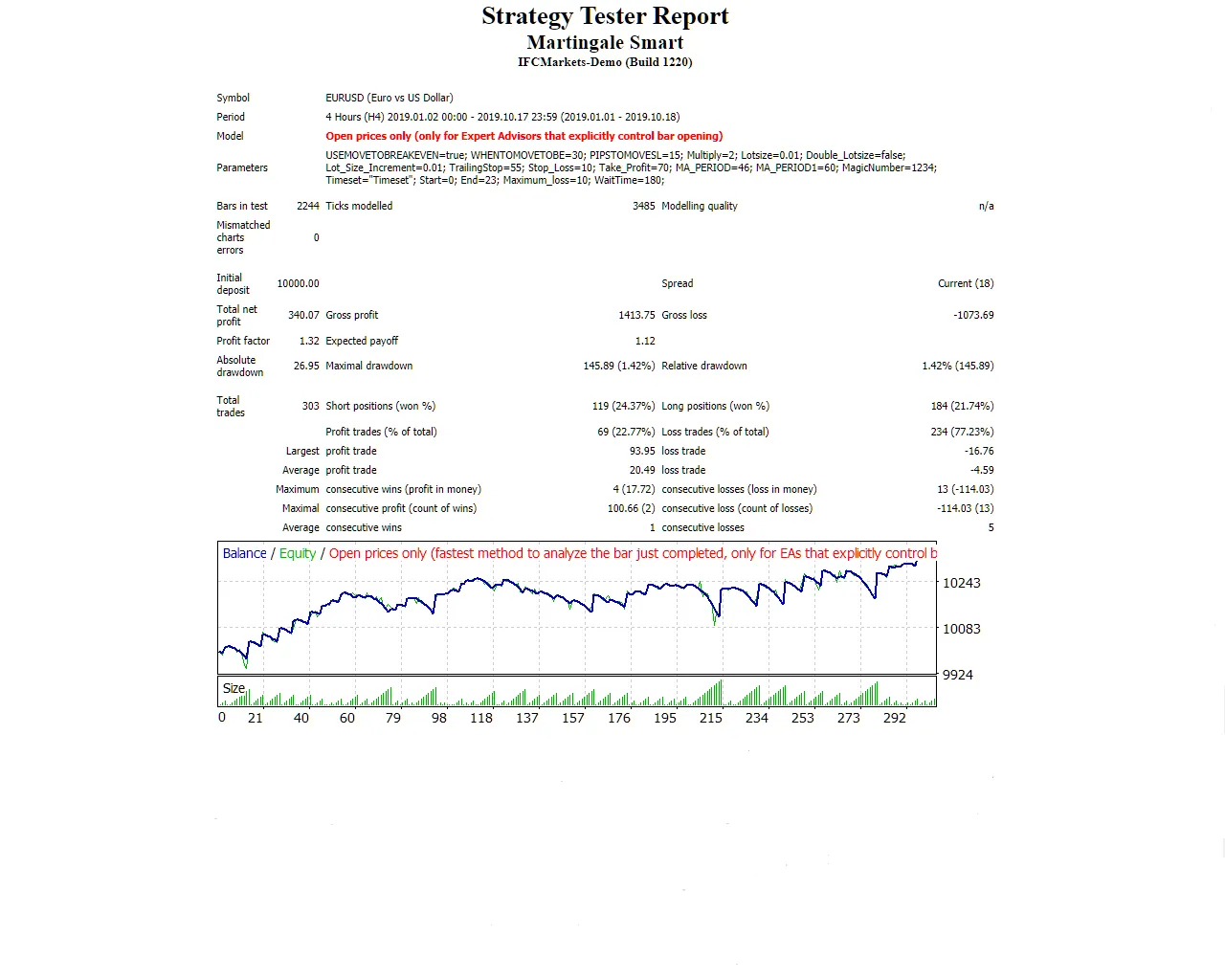
Meet Martingale Smart: Your New Trading Ally Hey there, fellow traders! If you're looking to up your trading game, let me introduce you to the Martingale Smart EA. This expert advisor is designed to adapt your trading strategy on the fly, especially when things don’t go as planned. If you happen to hit a losing trade, don’t sweat it! The Martingale Smart will switch gears and take a new position with a larger lot size to help recover losses. Key Features of Martingale Smart This EA works with all currency pairs and timeframes. For optimal performance, the daily timeframe is recommended. Start trading with a modest 0.01 lot. It only trades based on the opening price of each candle! Always test it out on a demo account before going live. Input Settings Use_TP_In_Money: Enable Take Profit in money (true/false). TP_In_Money: Set Take Profit in money (10-100). Use_TP_In_percent: Enable Take Profit in percent (true/false). TP_In_Percent: Set Take Profit in percent (10-100). Enable_Trailing: Enable trailing with money (true/false). Take Profit in Money: (25-100). Stop Loss in Money: (1-20). Exit: Close trades if the trend is against you (true/false). USEMOVETOBREAKEVEN: Enable "no loss" break-even system (0-1). WHENTOMOVETOBE: When to move to break-even (10-100). PIPSTOMOVESL: Pips to move stop loss (10-100). Multiply: Multiplier for Martingale (2-4). Lotsize: Lot size (0.01-10). TrailingStop: Set a value from 10 to 100 to activate trailing stop loss & take profit. Stop_Loss: Stop Loss pips distance (10-100). Take_Profit: Take Profit pips distance (10-100). MA_period: Moving Average period (10-200). MagicNumber: Magic number (1-100000). Start: Start hour (0-24). End: End hour (0-24). Maximum_loss: Maximum loss (0-10). WaitTime: Wait time for loss in minutes (0-999999). It's a good idea to optimize your EA every few months and stick to the settings mentioned above. You can use it as a hedging grid or as a single trade EA. How to Backtest Martingale Smart Looking to backtest? Check out this guide for a step-by-step approach. Explore More Efficient EA Options Want to level up your trading even further? Here are some links to more efficient versions available in the Market: Hybrid Candlesticks Rate of Price Change Fast Turtle Ichimoku Breakout Fibo Price Change Trend Pullback

2019.10.21
Master Your Trades with the ROC EA for MetaTrader 4
MetaTrader4
Master Your Trades with the ROC EA for MetaTrader 4

Unlocking the Power of the ROC Expert Advisor Meet the ROC Expert Advisor (EA), a powerful tool designed for MetaTrader 4 that leverages the ROC indicator to optimize your trading strategy. With features like Trailing Stop Loss and Take Profit, this EA works seamlessly across all time frames for major forex pairs and NASDAQ stocks. Key Features Demo Testing: Always start with a demo account to get a feel for the EA. Trade Logic: This EA trades based solely on the price of the opening candle! Lot Size Control: If you prefer not to increase your lot size on losing trades, simply set IncreaseFactor=0. Input Parameters Use_TP_In_Money: Set to true/false for Take Profit in money. TP_In_Money: Enter values between 10-100 for Take Profit in money. Use_TP_In_percent: Set to true/false for Take Profit in percent. TP_In_Percent: Enter values between 10-100 for Take Profit in percent. Enable_Trailing: Activate money trailing stop (true/false). Take Profit In Money: Enter values between 25-200 in your current currency. Stop Loss In Money: Set values between 1-20 in your current currency. Period_MA_0: Define the period of the supporting MA (1-50). Period_MA_1: Set the period for the calculated MA (1-50). Bars_V: Amount of bars for calculation (1-50). Aver_Bars: Average bars (1-50). K: Amplifier gain (1-5). Exit: Choose whether to close trades if the trend is against you (true/false). Lots: Specify lot size (0.01-1). IncreaseFactor: Set how much to increase lots after a loss (0.001-0.1). Stop_Loss: Set your stop loss (30-500), with 600 for multiple trades. MagicNumber: Define a unique magic number for trades (1-100000). TakeProfit: Set take profit (50-200), with 600 for multiple trades. FastMA: Fast moving average period (1-20). SlowMA: Slow moving average period (50-200). Mom_Sell: Momentum sell trigger (0.1-0.9). Mom_Buy: Momentum buy trigger (0.1-0.9). UseEquityStop: Activate equity stop (true/false). TotalEquityRisk: Total equity risk (0.01-20). Max_Trades: Maximum number of trades (1-12). FractalNum: Number of highs and lows (1-10). Optimize Your EA It’s essential to optimize this EA every few months using the parameters mentioned above. Whether you prefer to use it as a hedging grid EA or for single trades, it’s versatile enough to fit your trading style. Backtesting Your Strategy Want to see how the ROC EA performs? Check out this guide on backtesting to optimize your trading strategy.

2019.10.21
Mastering MetaTrader 4: Your Go-To Guide for a Trailing Stop Expert Advisor
MetaTrader4
Mastering MetaTrader 4: Your Go-To Guide for a Trailing Stop Expert Advisor

Hey there, fellow traders! Today, I want to share with you a fully functional Expert Advisor (EA) designed for MetaTrader 4 that features a trailing stop. However, before you dive in, let's get one thing straight: this EA is not meant for actual trading just yet. It lacks any defined entry or exit rules and a few other essential elements! What’s a Trailing Stop? If you’re new to trading, you might be wondering what a trailing stop is. Simply put, it’s a dynamic stop-loss that moves with the market price. This means it helps you lock in profits while allowing your trades some room to breathe. It’s a great tool for managing risk as it can minimize losses and maximize gains. Why Use an Expert Advisor? Expert Advisors can automate your trading strategies, helping you execute trades without the need for constant monitoring. They’re particularly useful for traders who want to take a hands-off approach or those who can’t afford to sit in front of their screens all day. Getting Started with This EA Even though this EA isn’t ready for live trading, it’s a fantastic way to familiarize yourself with how trailing stops work in MetaTrader 4. You can tweak the settings and see how it behaves in different market conditions. Final Thoughts While this EA is a useful tool for learning, remember to develop your own entry and exit strategies before hitting the ‘trade’ button. Trading is a journey, and having a solid plan is key to success. Happy trading!

2019.10.07
Maximize Your Trading Potential with GridderEA for MetaTrader 4
MetaTrader4
Maximize Your Trading Potential with GridderEA for MetaTrader 4

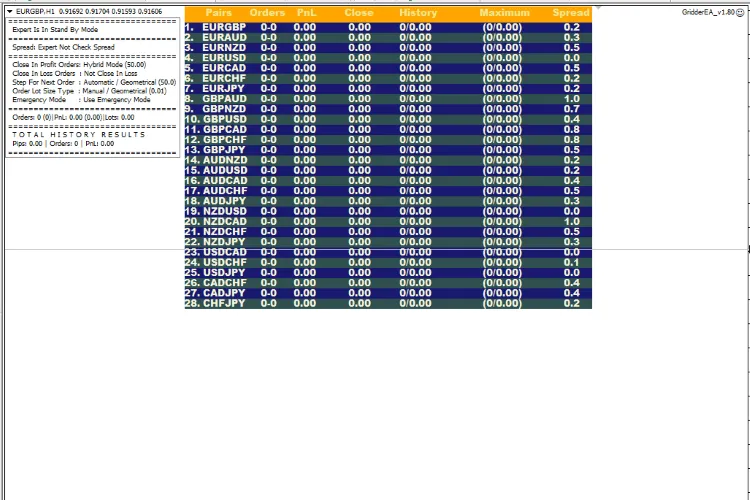
Are you ready to take your trading game to the next level? Meet GridderEA, a powerful multi-currency grid and martingale system designed specifically for trading on MetaTrader 4. With this expert advisor, you can trade multiple currency pairs from a single chart, making your trading experience more streamlined and efficient. This expert will automatically close all orders for each currency pair once it reaches a predefined profit level, helping you secure those gains with ease. And here's the kicker: GridderEA can manage up to 100 different pairs simultaneously, opening up a world of trading opportunities! Important Information To get the best results, it’s crucial to choose a broker that offers fast execution and low spreads. These factors can make all the difference in your trading success. Before diving into the real thing, I highly recommend testing GridderEA on a demo account. This way, you can familiarize yourself with the system's behavior without risking your hard-earned capital. For a lot size of 0.01 and leverage of 1:500, ensure you have an initial balance of at least £10,000 for each pair you intend to trade safely. Remember, this is a grid system, which means that GridderEA can open 10 or more orders for each pair. If you choose to trade multiple pairs, double-check that your broker can handle proportionate order placements simultaneously. GridderEA automatically selects the optimal chart and time frame for trading. For backtesting, make sure to set it to the H1 time frame!

2019.08.16
Unlocking the Power of NewsReleaseEA for MetaTrader 4: Your Ultimate Trading Companion
MetaTrader4
Unlocking the Power of NewsReleaseEA for MetaTrader 4: Your Ultimate Trading Companion

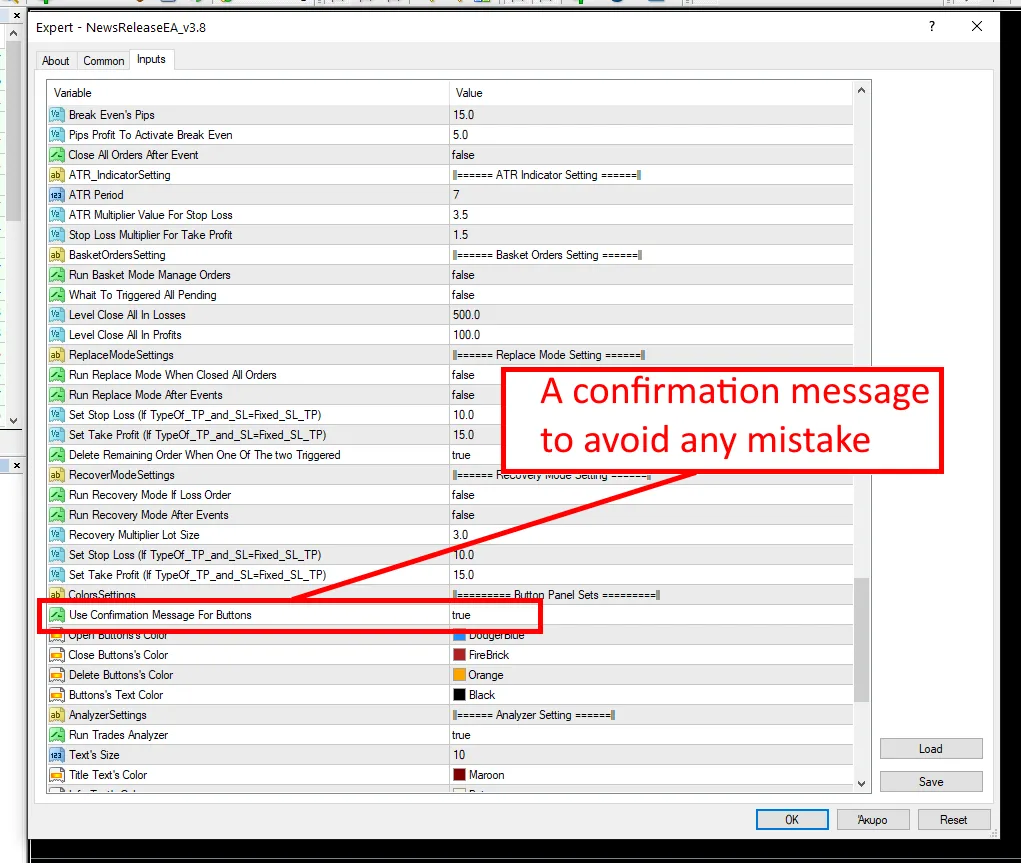
Are you ready to take your trading game to the next level? Meet NewsReleaseEA, your go-to expert advisor for MetaTrader 4! With this powerful tool, you can trade up to 28 currency pairs from a single chart (or 31 if you include the yuan!). What’s great about NewsReleaseEA is its flexibility. You can either follow your own manual trading strategy or leverage one of the five built-in strategies that come with the package. This means you have the freedom to choose what suits your trading style best! But that’s not all! NewsReleaseEA also includes an analyzer that provides valuable insights for any trade. Whether you’re looking at specific currencies or pairs, this feature helps you make more informed decisions and refine your trading strategy. Important: Don’t forget to check out my guide on how to set the GMT offset in my blog for optimal performance! What’s New in the Latest Updates? Version 3.5: Fixed a critical bug that was preventing order placements. Version 3.6: Minor bug fix regarding event impact displays. Version 3.7: New option to open orders manually from the chart panel. Version 3.8: Added the ability to set stop loss and take profit based on the ATR indicator, plus a confirmation option for button operations. Version 3.81: Corrected some typographical errors. With these updates, NewsReleaseEA is more powerful than ever. So why wait? Dive in and make the most of your trading journey!

2019.08.14
First Previous 13 14 15 16 17 18 19 20 21 22 23 Next Last