System Trading

Mastering the Doji Candlestick Pattern: Your Go-To Tool for MetaTrader 4
MetaTrader4
Mastering the Doji Candlestick Pattern: Your Go-To Tool for MetaTrader 4

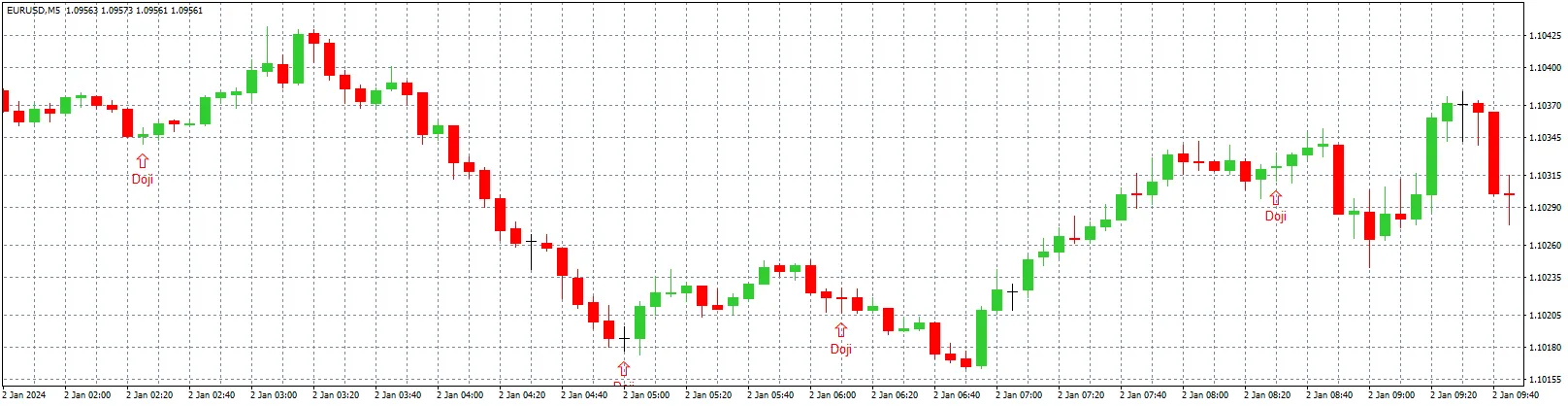
Hey there, fellow traders! If you're diving into the world of candlestick patterns, you'll want to get familiar with the Doji Pattern Detector EA. This handy tool is built to spot the classic Doji candlestick pattern on any chart you’re analyzing. So, what’s a Doji, you ask? It happens when the opening and closing prices of a candle are pretty much neck and neck, signaling a bit of indecision in the market. Why Use the Doji Pattern Detector EA? This EA is a game changer for traders looking to add Doji patterns to their strategy. It smartly identifies Doji candles where the open and close prices are within a tight range and nestled right at the midpoint of the candle's high and low. Key Features: Doji Detection: The EA checks if the difference between the open and close prices is less than 3 points. It also confirms that the open and close are hovering near the midpoint of the candle’s range, allowing for a 10% tolerance. Chart Marking: When a Doji is spotted, a red arrow appears 5 points below the candle’s low. A label saying "Doji" is placed 3 points below the arrow to make it easy to spot. Alerts and Notifications: This EA sends an alert and pops up a message when it detects a Doji pattern on the last closed candle. In a nutshell, the Doji Pattern Detector EA is a fantastic tool for traders who want to incorporate Doji patterns into their trading approach. It gives you a clear visual and audible cue of market indecision or possible reversals, helping you make better trading decisions!

2024.09.22
Maximize Your Trading Efficiency with the Market Watch Panel for MetaTrader 5
MetaTrader5
Maximize Your Trading Efficiency with the Market Watch Panel for MetaTrader 5

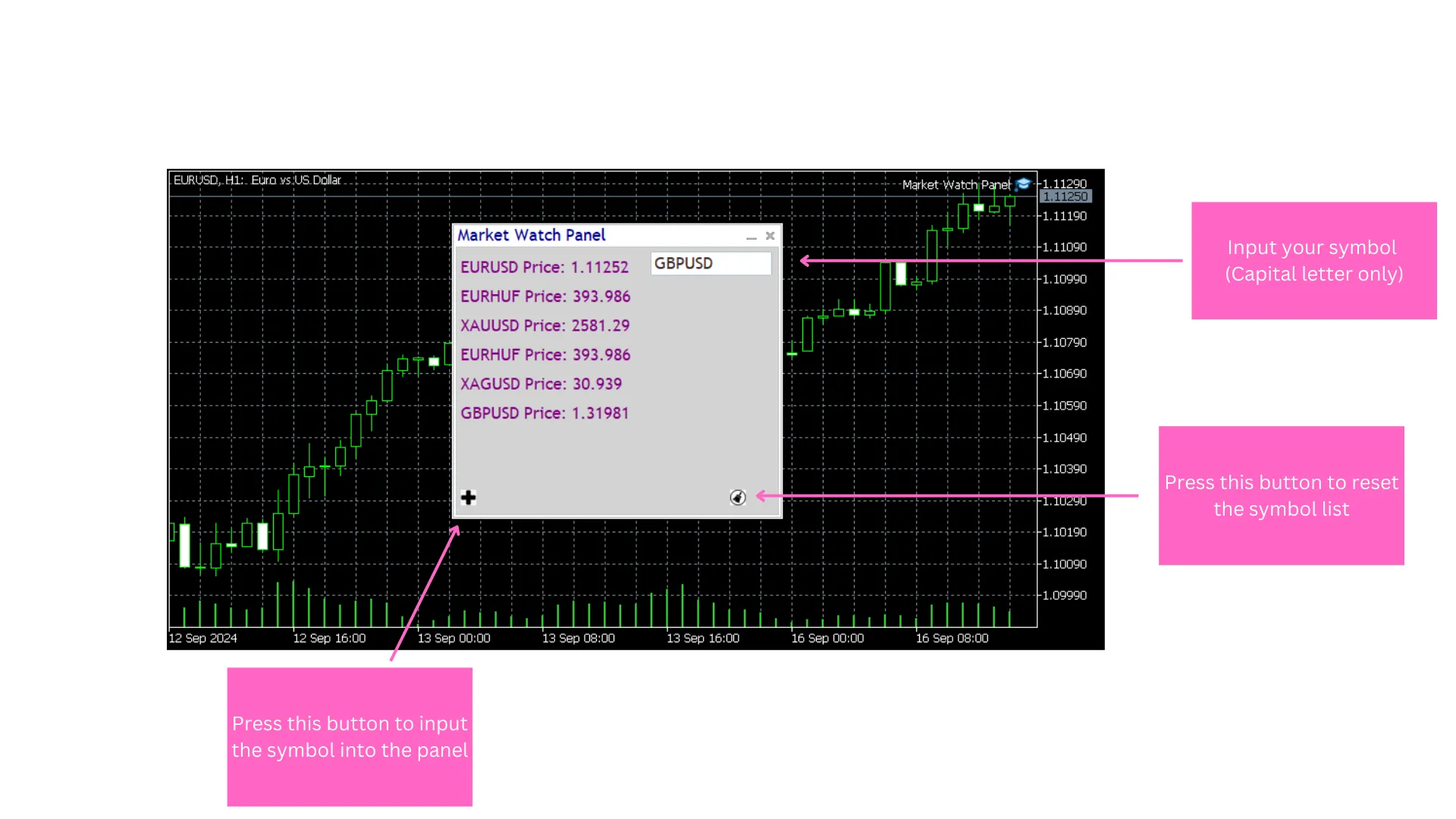
Hey fellow traders! If you're looking to boost your trading game, let’s talk about the Market Watch Panel Utility for MetaTrader 5. This nifty tool is designed to give you real-time insights into financial symbols, displaying essential data like close prices in a smooth and user-friendly interface.With this utility, switching between symbols is a breeze. You can stack multiple symbols and filter your list for a more focused market analysis. It’s all about giving you a streamlined, customizable trading experience so you can keep an eye on market movements and make informed decisions without breaking a sweat.One cool feature is the ability to save your symbols in a text file. This means that each time you open the panel, it loads with your saved symbols, saving you precious time! Plus, you can reset your symbol list or customize the panel’s look by changing text and window colors. It works just like a traditional market data window, making it simple to monitor prices and stay on top of your trades.Main Input Settings:Panel background color: Adjusts the entire panel’s background color (default: White).Panel text color: Sets the color of the text displayed on the panel (default: DarkBlue).Panel client background: Changes the background color of the client area within the panel (default: LightGray).Panel main text color: Defines the main text color within the panel (default: Purple).Whether you're a seasoned pro or just starting out, the Market Watch Panel Utility can really enhance your trading experience. Check it out and see how it can make your trading life a whole lot easier!

2024.09.16
Unlock Trading Success with AdaptiveTrader Pro EA for MetaTrader 5
MetaTrader5
Unlock Trading Success with AdaptiveTrader Pro EA for MetaTrader 5

If you're looking for a trading tool that can really up your game, the AdaptiveTrader Pro EA is just what you need. This automated system is perfect for both newbies and seasoned traders seeking a strategy that flexes with market conditions. How It Works This EA employs a smart, multi-step approach that includes: Signal Detection: It keeps a close eye on the market, using the RSI to spot overbought or oversold conditions while leveraging moving averages to pinpoint trends. Plus, it utilizes the ATR indicator to measure market volatility, dynamically adjusting trading parameters as needed. Risk Management: Solid risk management is key here. The EA calculates lot sizes based on your account balance and selected risk percentage, setting stop-loss and take-profit levels in line with current market conditions. Its trailing stop feature helps lock in profits while minimizing potential losses as trades move in your favor. Dynamic Parameter Optimization: It doesn't just sit back; this EA regularly optimizes its trading parameters such as RSI periods, ATR multipliers, and trailing stop levels to keep pace with market changes. It even adjusts risk levels based on its win/loss stats, ramping up or dialing down exposure as needed to protect your account. Market Conditions Check: The EA is smart about trade execution, incorporating spread checks and avoiding high-impact news events. It ensures that trades only go live when conditions are optimal, helping you steer clear of unnecessary risks. This EA is highly adaptable, equipped with features to respond to different market environments. Just remember, it's a good idea to test and optimize the EA in a demo account before you go live.

2024.09.16
Unlock Trading Potential with Neurotest: Your Go-To EA for MetaTrader 5
MetaTrader5
Unlock Trading Potential with Neurotest: Your Go-To EA for MetaTrader 5

Introducing Neurotest: Your New Trading Ally Hey fellow traders! If you’re looking to step up your game in the trading arena, let’s talk about Neurotest – an innovative Expert Advisor (EA) designed specifically for MetaTrader 5. This isn't just any ordinary trading tool; it’s powered by a neural network that’s built to analyze historical market data and predict future price movements with impressive accuracy.   How Does Neurotest Work? The magic of Neurotest lies in its ability to adapt and learn just like we do. With a hidden layer in its neural network, it fine-tunes its strategies by adjusting its weights during training. This means it’s constantly improving, making it a valuable asset in your trading toolkit.   Smart Stop Loss Mechanism One of the standout features of Neurotest is its dynamic stop loss, calculated using the Average True Range (ATR) indicator. This helps protect your investments by adapting to market volatility, ensuring that you have a safety net in place.   Built-in Protection Features We all know that trading can come with its risks, and that’s why Neurotest includes several protection mechanisms. It has built-in limits for daily and total losses to safeguard your capital. This way, you can trade with confidence, knowing that your losses are capped.   Save and Reload Parameters Another great feature is the ability to save your net parameters. This means you can easily reload them later to continue your training sessions without missing a beat. It’s all about convenience and making your trading experience seamless.   Conclusion In a nutshell, if you’re serious about enhancing your trading strategies, Neurotest could be the game-changer you’ve been looking for. With its cutting-edge technology and protective features, it’s built to help you navigate the complexities of the trading world. Why not give it a try and see how it can fit into your trading journey?

2024.09.16
QuickTrend Scalper: Your Go-To EA for MetaTrader 5
MetaTrader5
QuickTrend Scalper: Your Go-To EA for MetaTrader 5

Unlock Your Trading Potential with QuickTrend Scalper Key Features: Signal Detection: This EA expertly identifies key market conditions, spotting oversold (RSI < 30) and overbought (RSI > 70) scenarios using engulfing patterns. It’s designed to help you find those perfect entry points. Dynamic Risk Management: QuickTrend employs the Average True Range (ATR) to smartly adjust your stop loss, take profit, and trailing stop levels—keeping you in tune with ever-changing market dynamics. Spread Filter: Say goodbye to trading in high-spread environments! This feature ensures you’re only taking trades that offer better risk control. Visual Indicators: Enjoy easy monitoring with clear buy (green arrow) and sell (red arrow) signals displayed right on your chart. Recommended Symbols: Forex: Stick with major pairs like EUR/USD, GBP/USD, USD/JPY, and USD/CHF for the best results. Crypto: Focus on liquid cryptocurrencies such as BTC/USD and ETH/USD—these pairs provide great trading opportunities. Recommended Parameters for M1 Trading: InpPeriodRSI = 6: A quick RSI setting for capturing rapid market movements. InpMAPeriod = 2: A short-period moving average to help you detect trends effectively. MaxSpread = 15-20 points: This keeps you out of the market during those high spread moments, ensuring better entries. InpLot = 0.01: Start small with a low lot size on the 1-minute chart for a safer trading experience. Getting Started: First things first—adjust the parameters to fit your trading style and the current market conditions. Always test on a demo account before going live. Use the recommended symbols to get a feel for how the EA behaves and fine-tune your settings. Keep an eye on performance, and don’t hesitate to refine your parameters for optimal results. The QuickTrend Scalper EA is user-friendly, adaptable, and perfect for both newbies and seasoned traders looking for a solid automated trading strategy focused on short-term gains.

2024.09.13
Maximize Your Crypto Trading with the Free 2-Pair Correlation EA
MetaTrader5
Maximize Your Crypto Trading with the Free 2-Pair Correlation EA

Unlock the potential of automated crypto trading with the 2-Pair Correlation EA, a fully self-adaptive trading system designed for BTC/USD and ETH/USD pairs. Whether you’re just dipping your toes in the trading waters or you’ve been in the game for a while, this EA is crafted to help you seize market opportunities while keeping your risk in check. The Best Part? It’s Completely Free! Head over to MQL5 to download this EA at no cost. It’s a fantastic tool for those eager to explore the world of crypto trading automation without breaking the bank. Key Features of the 2-Pair Correlation EA: Correlation-Based Trading Strategy: The EA keeps an eye on the price relationship between BTC/USD and ETH/USD, capitalizing on their close correlation. It identifies when their usual relationship deviates and places trades to profit when they realign. This strategy is perfect for those looking to benefit from market inefficiencies without having to guess the market direction. Automatic Lot Sizing for Safe Risk Management: This EA boasts a dynamic lot-sizing mechanism that adjusts your lot size based on your account balance and a preset risk percentage, ensuring you’re always trading safely, no matter your account size. Built-In Volatility Control: Using the ATR (Average True Range) indicator, the EA measures market volatility. If volatility spikes, it pauses trading to protect your capital from sudden market swings—especially handy in the often turbulent crypto space. Drawdown Protection: Concerned about losing too much during a downturn? The 2-Pair Correlation EA includes a maximum drawdown limit. If your account hits the specified drawdown percentage, trading pauses to safeguard your funds. Once your account recovers, the EA resumes trading automatically. Fully Customizable Settings: Despite being free, this EA is loaded with customization options. From adjusting lot sizes and risk percentages to setting slippage and volatility filters, you have full control over your trading strategy. Why Should You Download the 2-Pair Correlation EA? Free and Powerful: It’s available at no cost, providing a chance to automate your trading without any upfront investment. Whether you’re testing automated trading for the first time or seeking a reliable tool to manage your crypto portfolio, this EA is a great starting point. Perfect for Crypto Traders: Designed specifically for BTC/USD and ETH/USD, the two largest cryptocurrencies by market cap, this EA is tailored for traders who want to maximize their crypto trading potential. Built-In Risk Management: The EA employs advanced techniques for risk management, such as automatic lot sizing, volatility filtering, and drawdown protection—features you’d usually find in paid EAs. User-Friendly: With an intuitive interface and a simple setup process, you can start trading with this EA in a matter of minutes. No complicated configurations or expert-level knowledge needed. Features Overview: Trade Pairs: BTC/USD, ETH/USD Dynamic Lot Sizing: Automatically adjusts based on account balance and risk ATR Volatility Filter: Pauses trading during high volatility Max Drawdown Protection: Stops further losses if your drawdown exceeds the set percentage Profit Locking: Closes trades when profit targets are reached User-Friendly Customization: Tailor the EA to fit your trading style Who Is This EA For? New Traders: If you’re just starting with automated trading, this EA is a perfect introduction, offering minimal risk at zero cost. Crypto Enthusiasts: Targeted at traders focusing on BTC/USD and ETH/USD, this EA is ideal for those diving into crypto. Experienced Traders: For seasoned traders looking for a reliable and free EA to enhance their toolkit, the 2-Pair Correlation EA delivers solid performance and adaptability. How to Get Started: Download for Free: Visit MQL5.com and grab the 2-Pair Correlation EA at no cost. Install and Customize: Attach the EA to your BTC/USD and ETH/USD charts, tweak the settings, and let the EA take over your trading. Monitor and Profit: Sit back and relax as the EA handles your trades automatically, locking in profits while managing your risk. Download the 2-Pair Correlation EA Now – It’s Free! Ready to elevate your crypto trading game? Download the 2-Pair Correlation EA for free today on MQL5.com and start trading with confidence. With its advanced features and cost-free access, it's the perfect tool to help you trade smarter, safer, and more efficiently.

2024.09.11
Unlocking Arbitrage: The EURGBP-EURUSD-GBPUSD Strategy for MT5 Traders
MetaTrader5
Unlocking Arbitrage: The EURGBP-EURUSD-GBPUSD Strategy for MT5 Traders

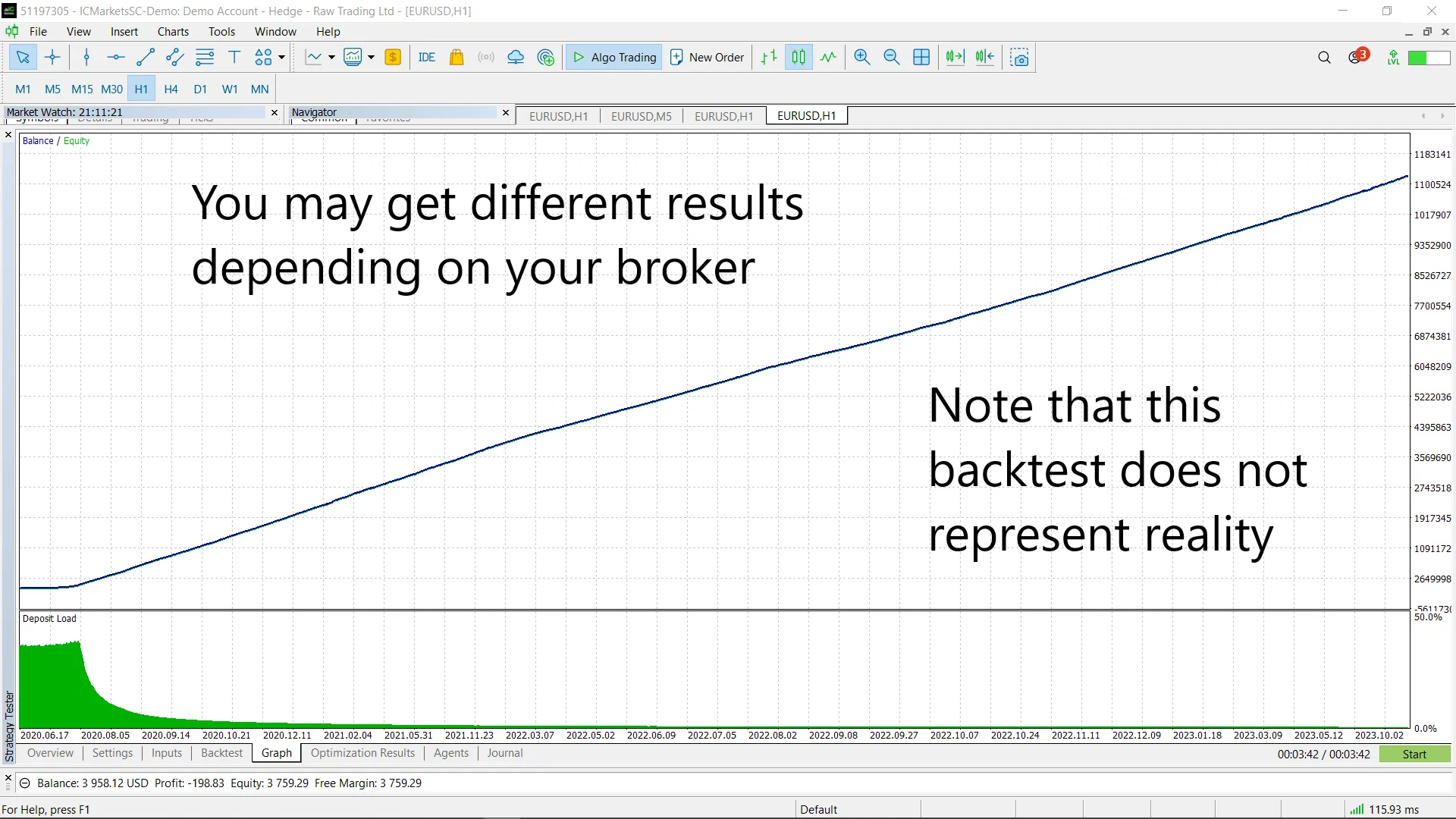
Key Features: Automatic Detection of Arbitrage Opportunities: This system leverages live currency pair data to pinpoint profitable arbitrage situations. Dynamic Trade Management: It actively opens and closes trades based on the calculated arbitrage potential, ensuring your positions are optimized for maximum profit. Plotting Functionality: Optionally, you can track the maximum observed price discrepancy for deeper analysis. Input Parameters: Lot Size per Thousand (default: 0.01): Adjusts the lot size for every $1,000 in your account, so your trade sizes scale with your balance. Total Commission for Lot Traded (default: 7.0): This parameter accounts for the expected commission per lot, ensuring your arbitrage calculations remain profitable after fees. Plot Max Difference (default: false): Enable this option, and the EA will log and display the maximum observed price discrepancy in the Expert tab. Trading Logic: The EA calculates theoretical cross rates and compares them with the actual market rates for EURUSD, GBPUSD, and EURGBP. It assesses whether the difference between these rates, adjusted for commission and spread, creates a viable arbitrage opportunity. If an opportunity is identified, the EA executes trades across the three currencies, minimizing inherent risk and locking in a risk-free profit when the market aligns with the arbitrage calculation. Two helper functions, ClosePosSide() and CloseNegSide(), manage the closure of profitable and loss-making positions, allowing the strategy to adapt in real-time to market shifts. This EA is a powerful tool for traders keen on exploring arbitrage opportunities in the Forex market. It takes a calculated approach, capitalizing on price inefficiencies among correlated currency pairs. It's perfect for advanced traders looking to enhance their strategies with effective arbitrage techniques. Note: While backtesting might show impressive profits, remember that real market conditions—execution speed, liquidity, and broker-specific factors—can significantly influence the success of these arbitrage strategies. Be sure to conduct thorough testing in a demo account before going live.

2024.07.24
How to Identify the First Friday of the Month for NFP Trading
MetaTrader4
How to Identify the First Friday of the Month for NFP Trading

Hey traders! If you’re looking to get a jump on the Non-Farm Payroll (NFP) data, knowing how to pinpoint the first Friday of the month is crucial. This guide will walk you through a handy script you can use with MetaTrader 4 that makes this process a breeze. Why Is the First Friday Important? The first Friday of each month brings the NFP report, a major event for traders. It can lead to significant price movements in the forex market, so being prepared is key. Using the Script Below is a simple script to detect whether it's the first Friday of the month. This will help you get ready for the NFP announcements. Let's break it down: #property copyright "Copyright 2023, MetaQuotes Ltd." #property link "https://www.mql5.com" #property version "1.00" #property strict datetime lastTime = 0; // Variable to store the time of the last detected candle int OnInit() { lastTime = iTime(Symbol(), PERIOD_D1, 0); return(INIT_SUCCEEDED); } void OnDeinit(const int reason) { // Clean up if necessary } void OnTick() { datetime currentTime = iTime(NULL, PERIOD_D1, 0); // Get the current candle time if (IsFirstFriday() && currentTime != lastTime) { Print("This is the Friday of The First Week of The Month"); lastTime = currentTime; // Update lastTime to the current candle time } } bool IsFirstFriday() { int dayOfWeek = TimeDayOfWeek(TimeCurrent()); // Get current day of the week int dayOfMonth = TimeDay(TimeCurrent()); // Get current day of the month if (dayOfWeek == 5) { // Check if today is Friday if (dayOfMonth >= 1 && dayOfMonth

2024.07.23
Unlock Trading Success with the Raymond Cloudy Day Indicator for MetaTrader 5
MetaTrader5
Unlock Trading Success with the Raymond Cloudy Day Indicator for MetaTrader 5

Discover the Raymond Cloudy Day Indicator Hey fellow traders! If you're looking for a tool that can elevate your trading game, let me introduce you to the Raymond Cloudy Day Indicator for MetaTrader 5. This powerful indicator is designed to give you insights that can help you make smarter trading decisions. Key Features Innovative Calculation Method: The heart of the Raymond Cloudy Day indicator lies in its unique calculation method, which provides highly accurate and reliable signals. This means you can trade with more confidence! Extended for Buy/Sell: This indicator not only confirms potential trend extensions for buying or selling but also indicates when the price might return to the main calculated point, giving you strategic insights. Take Profit (TP) Points: Use TP points to either secure your profits or as consistent reference points for your trading decisions, adding flexibility to your strategy. Support/Resistance Lines: All calculated points act as support or resistance lines, providing you with a deeper understanding of potential price movements and market behavior. Benefits Enhanced Accuracy: Thanks to the innovative calculation method and advanced algorithms, you can expect more precise trend identification, which boosts your overall decision-making process. Versatile Functionality: Whether you're a beginner or a seasoned trader, the Raymond Cloudy Day indicator is tailored to fit your needs, offering both simplicity and advanced features. Custom Trading Strategies Just a heads-up: the strategy included in the EA is a demo and hasn't been extensively tested. I highly recommend that you integrate your own trading strategies to get the most out of the Raymond Cloudy Day indicator. Play around with different approaches and customize it to match your trading style for the best results! Experience the magic of Raymond's vision combined with our top-notch coding skills through the Raymond Cloudy Day indicator. Optimize your trading strategy and boost your success in the markets with this cutting-edge tool!

2024.07.14
Beginner's Guide to Moving Average Crossover: EA with and without Martingale for MetaTrader 5
MetaTrader5
Beginner's Guide to Moving Average Crossover: EA with and without Martingale for MetaTrader 5

In this post, we’re diving into the nuts and bolts of two different Expert Advisors (EAs) that utilize moving average crossovers for trade entries. The key difference? One employs a Martingale strategy when trades go south, while the other sticks to a more conservative approach. Before we get started, I want to stress that these EAs are primarily for learning and demonstration purposes. I wouldn’t recommend using them on a live account just yet. Inputs for the Simple Moving Average EA: MAPeriod: This determines the period of the Moving Average indicator. LotSize: This is the size of the lot for each trade. TPPoints: Points at which you’ll take your profit. SLPoints: Points at which you'll set your stop loss. Inputs for the Moving Average EA with Martingale: MAPeriod: Again, this sets the period for the Moving Average indicator. StartingLot: This is the lot size for the first trade; it will increase after a loss. MaxLot: This caps the maximum lot size. The StartingLot can only grow until it hits this limit. TPPoints: Take profit points, which will adjust upward after a loss. SLPoints: Stop loss points that will also increase following a loss. LotMultiplier: This value determines how much your lot size will grow after a losing trade, provided you haven’t hit the MaxLot limit. TPMultiplier: This factor increases both the Take Profit and Stop Loss after a loss, giving you a fighting chance to recover through both position sizing and larger profit targets. I've included comments in the code to help you grasp everything, and there's also a YouTube video where I break it all down for you. Happy trading, and thanks for stopping by!

2024.06.10
Maximize Your Trading with Grid EA Pro for MetaTrader 4
MetaTrader4
Maximize Your Trading with Grid EA Pro for MetaTrader 4

Hey fellow traders! If you're looking to step up your game, let me introduce you to the Grid EA Pro, a professional advisor designed specifically for MetaTrader 4. This tool leverages the Relative Strength Index (RSI) to help you navigate the market more effectively. One of the standout features of this EA is its ability to reduce drawdown. It works by overlapping unprofitable orders, which can really help keep your account in the green. Plus, the chart displays real-time profit information, making it a handy tool for manual trading as well! ⚡ If you're serious about trading, I highly recommend using an ECN broker with low spreads. Some great options include IC Markets, Exness, NordFX, FXPRIMUS, Alpari, and FXTM. ⚡ Give this EA a spin with a demo account before diving in! It’s a smart way to test the waters. ⚡ Also, consider pairing it with Buy/Sell Signals to follow trends more effectively. This way, you can set it to work semi-automatically, focusing on either buy or sell strategies based on market conditions. Key Features: RSI_PERIOD - This is the period for calculating the relative strength index; UP_LEVEL - The upper threshold for RSI; DN_LEVEL - The lower threshold for RSI; RSI_TIMEFRAME - The timeframe used for calculations; START_LOT - Your initial lot size; LOT_MULTIPLIER - The multiplier for lots in the order grid; MAX_LOT - The maximum lot size allowed; STEP_ORDERS - The step size for orders in the grid; STEP_MULTIPLIER - The multiplication factor for the order step (set to -1 if not used); MAX_STEP - The maximum step size for order grids; OVERLAP_ORDERS - The order from which the overlap function is activated; OVERLAP_PIPS - The minimum profit in pips required to close unprofitable orders; STOPLOSS, TAKEPROFIT - Set your stop loss and take profit in pips (set to -1 if not used); BREAKEVEN_STOP, BREAKEVEN_STEP - Define levels and steps for breakeven (set to -1 if not used); TRAILING_STOP, TRAILING_STEP - Set the trailing stop level and step (set to -1 if not used); MAGIC_NUMBER, ORDERS_COMMENT - Unique identifiers for your orders and any comments; START_TIME, END_TIME - Specify the time range for opening orders (set to '00:00' if not used).

2024.05.19
Mastering Prop Firm Challenges: Breakout Strategy with Handy Helper Functions for MT5
MetaTrader5
Mastering Prop Firm Challenges: Breakout Strategy with Handy Helper Functions for MT5

Hey traders, Today, I’m excited to share an update on the Simple Yet Effective Breakout Strategy. I've added some nifty helper functions that are perfect for tackling prop firm challenges. When it comes to passing a prop firm challenge, there are three key criteria you need to hit: Target Profit Maximum Daily Loss - Don't go over this! Overall Maximum Loss - Stay within your limits! This script includes two main functions: one to check if you’ve hit your target profit and another to alert you when you're close to violating your maximum daily loss. When this happens, it will automatically exit all open positions and cancel any pending orders. As for the overall maximum loss, that really hinges on your individual strategy and risk management, so it’s not specifically coded into this MQL5 script. //+------------------------------------------------------------------+ //| Prop Firm Helper Functions | //+------------------------------------------------------------------+ // Delete all pending orders and exit all positions void ClearAll(string message) { &nbsp;&nbsp; Comment(message); &nbsp;&nbsp; for (int i = OrdersTotal() - 1; i &gt;= 0; i--) &nbsp;&nbsp; { &nbsp;&nbsp;&nbsp;&nbsp;&nbsp;&nbsp;ulong orderTicket = OrderGetTicket(i); &nbsp;&nbsp;&nbsp;&nbsp;&nbsp;&nbsp;if (OrderSelect(orderTicket)) &nbsp;&nbsp;&nbsp;&nbsp;&nbsp;&nbsp;{ &nbsp;&nbsp;&nbsp;&nbsp;&nbsp;&nbsp;&nbsp;&nbsp; trade.OrderDelete(orderTicket); &nbsp;&nbsp;&nbsp;&nbsp;&nbsp;&nbsp;} &nbsp;&nbsp; } &nbsp;&nbsp; for (int i = PositionsTotal() - 1; i &gt;= 0; i--) &nbsp;&nbsp; { &nbsp;&nbsp;&nbsp;&nbsp;&nbsp;&nbsp;ulong posTicket = PositionGetTicket(i); &nbsp;&nbsp;&nbsp;&nbsp;&nbsp;&nbsp;trade.PositionClose(posTicket); &nbsp;&nbsp; } } // Check if we have achieved profit target bool isPassed() { &nbsp;&nbsp; return AccountInfoDouble(ACCOUNT_EQUITY) &gt; PASS_CRITERIA; } // Check if we are about to violate maximum daily loss bool isDailyLimit() { &nbsp;&nbsp; MqlDateTime date_time; &nbsp;&nbsp; TimeToStruct(TimeCurrent(), date_time); &nbsp;&nbsp; int current_day = date_time.day, current_month = date_time.mon, current_year = date_time.year; &nbsp;&nbsp; &nbsp;&nbsp; // Current balance &nbsp;&nbsp; double current_balance = AccountInfoDouble(ACCOUNT_BALANCE); &nbsp;&nbsp; &nbsp;&nbsp; // Get today's closed trades PL &nbsp;&nbsp; HistorySelect(0, TimeCurrent()); &nbsp;&nbsp; int orders = HistoryDealsTotal(); &nbsp;&nbsp; &nbsp;&nbsp; double PL = 0.0; &nbsp;&nbsp; for (int i = orders - 1; i &gt;= 0; i--) &nbsp;&nbsp; { &nbsp;&nbsp;&nbsp;&nbsp;&nbsp;&nbsp;ulong ticket=HistoryDealGetTicket(i); &nbsp;&nbsp;&nbsp;&nbsp;&nbsp;&nbsp;if(ticket==0) &nbsp;&nbsp;&nbsp;&nbsp;&nbsp;&nbsp;{ &nbsp;&nbsp;&nbsp;&nbsp;&nbsp;&nbsp;&nbsp;&nbsp; Print("HistoryDealGetTicket failed, no trade history"); &nbsp;&nbsp;&nbsp;&nbsp;&nbsp;&nbsp;&nbsp;&nbsp; break; &nbsp;&nbsp;&nbsp;&nbsp;&nbsp;&nbsp;} &nbsp;&nbsp;&nbsp;&nbsp;&nbsp;&nbsp;double profit = HistoryDealGetDouble(ticket,DEAL_PROFIT); &nbsp;&nbsp;&nbsp;&nbsp;&nbsp;&nbsp;if (profit != 0) &nbsp;&nbsp;&nbsp;&nbsp;&nbsp;&nbsp;{ &nbsp;&nbsp;&nbsp;&nbsp;&nbsp;&nbsp;&nbsp;&nbsp; // Get deal datetime &nbsp;&nbsp;&nbsp;&nbsp;&nbsp;&nbsp;&nbsp;&nbsp; MqlDateTime deal_time; &nbsp;&nbsp;&nbsp;&nbsp;&nbsp;&nbsp;&nbsp;&nbsp; TimeToStruct(HistoryDealGetInteger(ticket, DEAL_TIME), deal_time); &nbsp;&nbsp;&nbsp;&nbsp;&nbsp;&nbsp;&nbsp;&nbsp; // Check deal time &nbsp;&nbsp;&nbsp;&nbsp;&nbsp;&nbsp;&nbsp;&nbsp; if (deal_time.day == current_day &amp;&amp; deal_time.mon == current_month &amp;&amp; deal_time.year == current_year) &nbsp;&nbsp;&nbsp;&nbsp;&nbsp;&nbsp;&nbsp;&nbsp; { &nbsp;&nbsp;&nbsp;&nbsp;&nbsp;&nbsp;&nbsp;&nbsp;&nbsp;&nbsp;&nbsp;&nbsp;PL += profit; &nbsp;&nbsp;&nbsp;&nbsp;&nbsp;&nbsp;&nbsp;&nbsp; } &nbsp;&nbsp;&nbsp;&nbsp;&nbsp;&nbsp;&nbsp;&nbsp; else &nbsp;&nbsp;&nbsp;&nbsp;&nbsp;&nbsp;&nbsp;&nbsp;&nbsp;&nbsp;&nbsp;&nbsp;break; &nbsp;&nbsp;&nbsp;&nbsp;&nbsp;&nbsp;} &nbsp;&nbsp; } &nbsp;&nbsp; double starting_balance = current_balance - PL; &nbsp;&nbsp; double current_equity&nbsp;&nbsp; = AccountInfoDouble(ACCOUNT_EQUITY); &nbsp;&nbsp; return current_equity &lt; starting_balance - DAILY_LOSS_LIMIT; } Don’t forget to set the following parameters: input string dd = "-------------PROP FIRM CHALLENGE-----------------"; input bool&nbsp;&nbsp; isChallenge = false; input double PASS_CRITERIA = 110100; input double DAILY_LOSS_LIMIT = 4500; I hope you find this script valuable in your trading journey! Let’s make those trades count!

2024.05.11
Mastering MQL4: Implementing onTrade Event Handlers for MetaTrader 4
MetaTrader4
Mastering MQL4: Implementing onTrade Event Handlers for MetaTrader 4

Hey there, fellow traders! Today, we’re diving into a crucial aspect of MQL4 programming: implementing the onTrade event handler. This handy little feature helps us keep tabs on our active orders, making our trading experience much smoother. To kick things off, we’re using a CArrayInt to track order tickets. By monitoring changes to this list in the onTimer function, we can trigger specific event handlers whenever certain actions take place. Here’s a quick rundown: //+------------------------------------------------------------------+ //| Event handler when stop loss is hit&nbsp;&nbsp;&nbsp;&nbsp;&nbsp;&nbsp;&nbsp;&nbsp;&nbsp;&nbsp;&nbsp;&nbsp;&nbsp;&nbsp;&nbsp;&nbsp;&nbsp;&nbsp;&nbsp;&nbsp;&nbsp;&nbsp;&nbsp;&nbsp;&nbsp;&nbsp;&nbsp;&nbsp;&nbsp;&nbsp;| //+------------------------------------------------------------------+ void onStopLoss(ulong ticket); //+------------------------------------------------------------------+ //| Event handler when take profit is hit&nbsp;&nbsp;&nbsp;&nbsp;&nbsp;&nbsp;&nbsp;&nbsp;&nbsp;&nbsp;&nbsp;&nbsp;&nbsp;&nbsp;&nbsp;&nbsp;&nbsp;&nbsp;&nbsp;&nbsp;&nbsp;&nbsp;&nbsp;&nbsp;&nbsp;&nbsp;&nbsp;&nbsp;| //+------------------------------------------------------------------+ void onTakeProfit(ulong ticket); //+------------------------------------------------------------------+ //| Event handler when a new order is opened&nbsp;&nbsp;&nbsp;&nbsp;&nbsp;&nbsp;&nbsp;&nbsp;&nbsp;&nbsp;&nbsp;&nbsp;&nbsp;&nbsp;&nbsp;&nbsp;&nbsp;&nbsp;&nbsp;&nbsp;&nbsp;&nbsp;&nbsp;&nbsp; | //+------------------------------------------------------------------+ void onTradeEntry(ulong ticket); //+------------------------------------------------------------------+ //| Event handler when an order is closed(removed)&nbsp;&nbsp;&nbsp;&nbsp;&nbsp;&nbsp;&nbsp;&nbsp;&nbsp;&nbsp;&nbsp;&nbsp;&nbsp;&nbsp;&nbsp;&nbsp;&nbsp;&nbsp; | //+------------------------------------------------------------------+ void onTradeExit(ulong ticket); Note: This implementation doesn’t cover all the bells and whistles of the MQL5 onTradeTransaction handler. Think of it as a solid starting point! Check out the output log for the EA in the screenshot below: So there you have it! With these event handlers in your toolkit, you’ll be better equipped to manage your trades effectively. Happy trading!

2024.04.29
First Previous 1 2 3 4 5 6 7 8 9 10 11 Next Last