
Welcome, fellow traders! Today, we're diving into the Alligator Indicator, a fantastic tool for those of you using MetaTrader 5. If you're just starting out, fear not—this guide will help you wrap your head around it.
What is the Alligator Indicator?
The Alligator Indicator, developed by Bill Williams, is designed to help you spot trends in the market. It uses three moving averages that represent the jaws, teeth, and lips of an alligator, hence the name. When these lines are aligned, it indicates that the market is trending, making it easier for you to make informed trading decisions.
Setting Up the Alligator Indicator
To add the Alligator Indicator to your MetaTrader 5 platform, follow these simple steps:
- Open your MetaTrader 5 terminal.
- Go to the "Insert" menu, then select "Indicators."
- Look for "Bill Williams" and choose "Alligator."
- Click "OK" to apply it to your chart.
Understanding the Indicator
Once you've got the Alligator Indicator on your chart, you'll see three lines:
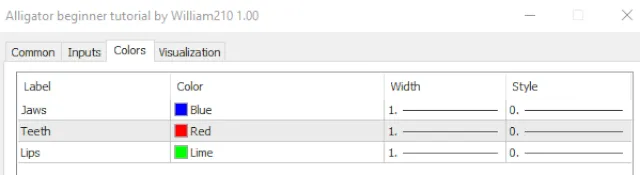
- Jaw (Blue Line): This is the slowest line and helps you identify long-term trends.
- Teeth (Red Line): This line is faster and indicates medium-term trends.
- Lips (Green Line): The fastest line, showing short-term movements.
When the lines are intertwined, it means the market is consolidating, and it might be a good time to wait for clearer signals. But when they spread apart, it’s usually a sign of a strong trend.
Customizing the Alligator Settings
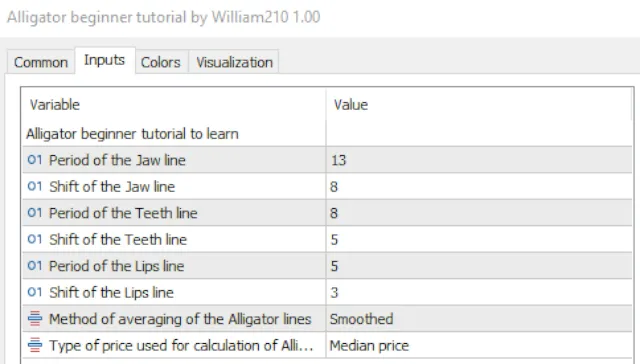
You can tweak the Alligator's parameters based on your trading style. Here’s how:
- Right-click on the indicator in your chart.
- Select "Settings" to adjust the periods for each line.
- Feel free to play around with the colors to make it visually appealing for you!
Conclusion
The Alligator Indicator can be a game-changer for your trading strategy, especially if you grasp its nuances. Remember, practice makes perfect—so don’t hesitate to test it out on a demo account first!





Comments 0