
Purpose
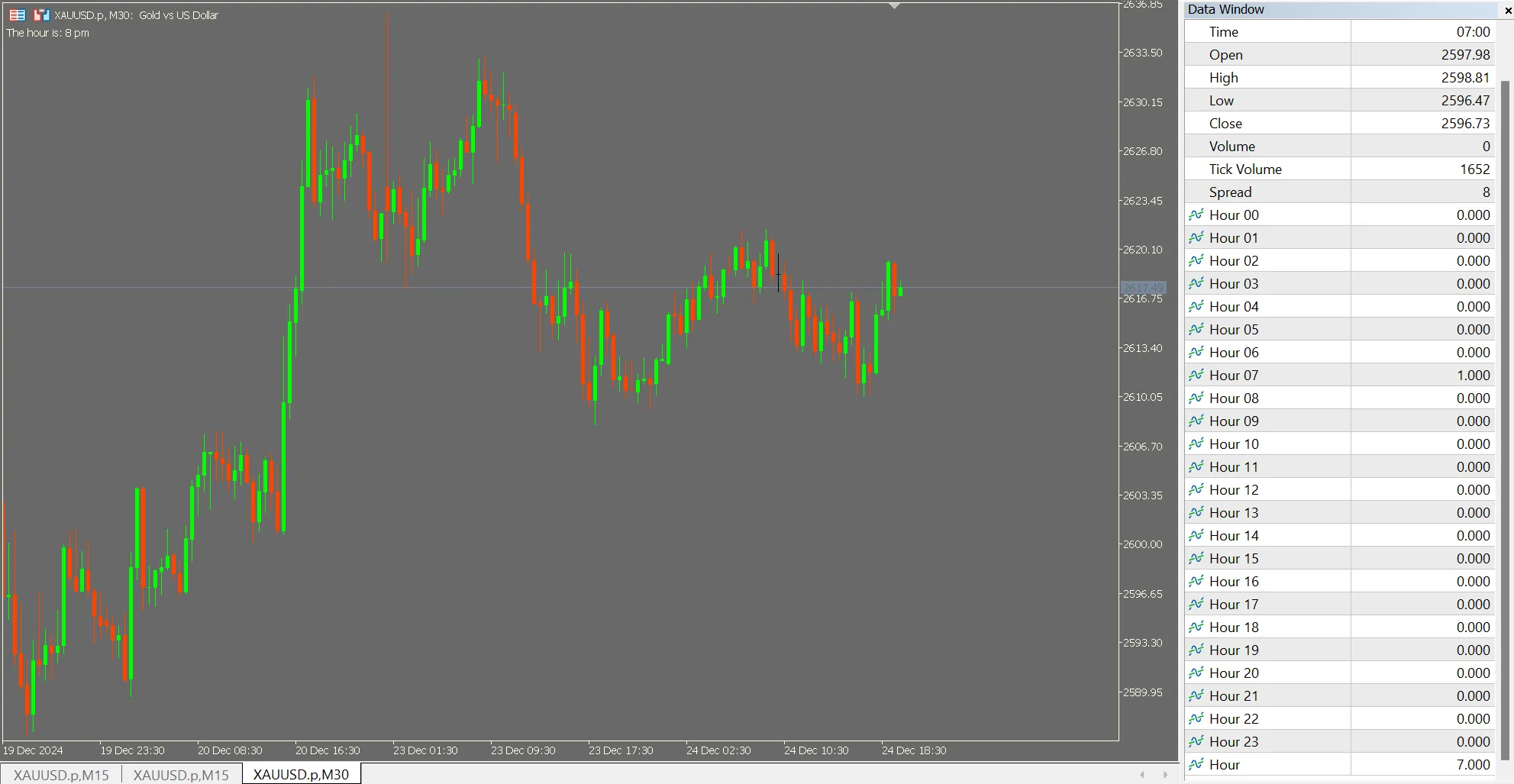
As traders, we often need to collect data for analysis and strategy modeling. This straightforward indicator will help you create hourly buffers in a binary format, making it easy to gather data for your models. The indicator offers a buffer array for each hour (0-23) and includes an additional buffer to store the hour itself.
If you're collecting data from other indicators into a CSV using functions like CopyBuffer, this tool allows you to add extra columns for the hour, enhancing your dataset.
- This simple code is great for those involved in data collection for machine learning or other modeling efforts, providing you with ready-to-use dummy variables (buffers 0 to 23) and an hour variable (buffer 24).
Walking through the Code
- We begin by declaring the buffer and plot numbers, setting them to 25:
#property indicator_chart_window
#property indicator_buffers 25
#property indicator_plots 25
Buffer Labelling
- Next, we define the buffer labels for the data window:
#property indicator_label1 "Hour 00"
#property indicator_label2 "Hour 01"
#property indicator_label3 "Hour 02"
#property indicator_label4 "Hour 03"
#property indicator_label5 "Hour 04"
#property indicator_label6 "Hour 05"
#property indicator_label7 "Hour 06"
#property indicator_label8 "Hour 07"
#property indicator_label9 "Hour 08"
#property indicator_label10 "Hour 09"
#property indicator_label11 "Hour 10"
#property indicator_label12 "Hour 11"
#property indicator_label13 "Hour 12"
#property indicator_label14 "Hour 13"
#property indicator_label15 "Hour 14"
#property indicator_label16 "Hour 15"
#property indicator_label17 "Hour 16"
#property indicator_label18 "Hour 17"
#property indicator_label19 "Hour 18"
#property indicator_label20 "Hour 19"
#property indicator_label21 "Hour 20"
#property indicator_label22 "Hour 21"
#property indicator_label23 "Hour 22"
#property indicator_label24 "Hour 23"
#property indicator_label25 "Hour"
Buffer Declarations
- Next, we declare the buffers and an integer variable to hold the hour of the day:
double hourBuffer0[];
double hourBuffer1[];
double hourBuffer2[];
double hourBuffer3[];
double hourBuffer4[];
double hourBuffer5[];
double hourBuffer6[];
double hourBuffer7[];
double hourBuffer8[];
double hourBuffer9[];
double hourBuffer10[];
double hourBuffer11[];
double hourBuffer12[];
double hourBuffer13[];
double hourBuffer14[];
double hourBuffer15[];
double hourBuffer16[];
double hourBuffer17[];
double hourBuffer18[];
double hourBuffer19[];
double hourBuffer20[];
double hourBuffer21[];
double hourBuffer22[];
double hourBuffer23[];
double hourBuffer[];

int bar_hour;
Indexing and Plot Drawing
We set the index for all buffers to data and turned off plotting through a loop. This was necessary because attempting to use a loop to set the index presented errors when passing arrays through SetIndexBuffer. However, looping worked perfectly for PlotIndexSetInteger.
// Assign buffers to index, hide from chart, show in Data Window SetIndexBuffer(0, hourBuffer0, INDICATOR_DATA); SetIndexBuffer(1, hourBuffer1, INDICATOR_DATA); SetIndexBuffer(2, hourBuffer2, INDICATOR_DATA); SetIndexBuffer(3, hourBuffer3, INDICATOR_DATA); SetIndexBuffer(4, hourBuffer4, INDICATOR_DATA); SetIndexBuffer(5, hourBuffer5, INDICATOR_DATA); SetIndexBuffer(6, hourBuffer6, INDICATOR_DATA); SetIndexBuffer(7, hourBuffer7, INDICATOR_DATA); SetIndexBuffer(8, hourBuffer8, INDICATOR_DATA); SetIndexBuffer(9, hourBuffer9, INDICATOR_DATA); SetIndexBuffer(10, hourBuffer10, INDICATOR_DATA); SetIndexBuffer(11, hourBuffer11, INDICATOR_DATA); SetIndexBuffer(12, hourBuffer12, INDICATOR_DATA); SetIndexBuffer(13, hourBuffer13, INDICATOR_DATA); SetIndexBuffer(14, hourBuffer14, INDICATOR_DATA); SetIndexBuffer(15, hourBuffer15, INDICATOR_DATA); SetIndexBuffer(16, hourBuffer16, INDICATOR_DATA); SetIndexBuffer(17, hourBuffer17, INDICATOR_DATA); SetIndexBuffer(18, hourBuffer18, INDICATOR_DATA); SetIndexBuffer(19, hourBuffer19, INDICATOR_DATA); SetIndexBuffer(20, hourBuffer20, INDICATOR_DATA); SetIndexBuffer(21, hourBuffer21, INDICATOR_DATA); SetIndexBuffer(22, hourBuffer22, INDICATOR_DATA); SetIndexBuffer(23, hourBuffer23, INDICATOR_DATA); SetIndexBuffer(24, hourBuffer, INDICATOR_DATA); for(int i = 0; iOnCalculate Function Loops and Program
- Now we dive into the
OnCalculatefunction: - Here, we reset all buffers to zero, only changing the one corresponding to the current hour to one. There may be efficiency improvements to explore later.
if (rates_total 0 ? prev_calculated - 1 : 0); for (int i = start; iFunction for Adding Flavor to the Comment
- Finally, here's a function for a comment:
- This serves as a helpful debugging check.
string HourToText(int bh) {
string TextHour;
switch(bh) {
    case 0: TextHour = "12 am"; break;
    case 1: TextHour = "1 am"; break;
    case 2: TextHour = "2 am"; break;
    case 3: TextHour = "3 am"; break;
    case 4: TextHour = "4 am"; break;
    case 5: TextHour = "5 am"; break;
    case 6: TextHour = "6 am"; break;
    case 7: TextHour = "7 am"; break;
    case 8: TextHour = "8 am"; break;
    case 9: TextHour = "9 am"; break;
    case 10: TextHour = "10 am"; break;
    case 11: TextHour = "11 am"; break;
    case 12: TextHour = "12 pm"; break;
    case 13: TextHour = "1 pm"; break;
    case 14: TextHour = "2 pm"; break;
    case 15: TextHour = "3 pm"; break;
    case 16: TextHour = "4 pm"; break;
    case 17: TextHour = "5 pm"; break;
    case 18: TextHour = "6 pm"; break;
    case 19: TextHour = "7 pm"; break;
    case 20: TextHour = "8 pm"; break;
    case 21: TextHour = "9 pm"; break;
    case 22: TextHour = "10 pm"; break;
    case 23: TextHour = "11 pm"; break;
    default: TextHour = "Unknown"; break;
}
return TextHour;
Note that this currently displays only through the data window.
Wishing everyone a Merry Christmas and a prosperous New Year for 2025!




Comments 0