
Hey there, fellow traders! If you're diving into the world of MetaTrader 5, you might want to check out the ID Lite Info MA indicator. By default, this handy tool showcases nine values from two different Moving Averages (MA) tailored for the current timeframe. It not only displays the differences between sequential MA values but also the distance in points, all while allowing you to set positive or negative offsets and round them to your desired decimal places. Just a heads-up, though: displaying values for the zero (current) bar isn’t supported.
This indicator mirrors the functionality of its predecessor from MetaTrader 4, enabling you to visualize not just the differences between sequential values but also distances in points without needing to tweak the source code. Here’s how you can utilize it:
- Calculate the difference between bars' HIGH and LOW, HIGH and OPEN, HIGH and CLOSE, or HIGH and specific moving average values, with added positive or negative offsets in points and adjusted decimal digits.
- Compare values between OPEN and ... (and so on);
- Look at differences between CLOSE and ... (and so on);
- Evaluate differences between LOW and ... (and so on);
- Analyze the relationship between two moving averages, taking into account possible offsets and varying decimal precision.
As you can see in the screenshots below, the indicator displays a table on a 3-digit chart, with values rounded to 2 decimal places and also extended to 4 decimal places.
On another note, this indicator is practically identical to its MetaTrader 4 version:
The table within the indicator features color changes for MA (or bar) marks, as well as differences between adjacent sequential values. You’ll notice different colors when the values change—whether they increase, decrease, or remain the same. However, changing the color for the difference between two moving averages (or bars) shown in the fifth table row isn't supported.
The calculations and updates to the table values happen under these circumstances:
- Whenever new bars appear;
- When the user modifies the indicator's input settings;
- When the user switches the timeframe or the symbol of the chart where the indicator is applied.
If nine values per row on the X-axis seem excessive or too few, you can adjust the number of cells and, consequently, the amount of data calculated and displayed by changing the 9 in this line of code:
#define ARRAY_SIZE_X 9
Here’s some extra info:
- The indicator table has the same “trick” as its MetaTrader 4 counterpart: you can temporarily hide it by clicking the horizontal bar beneath the table heading.
Note: The table heading displays the bar numbers associated with the values shown by the indicator. You can change the starting bar number in the indicator parameters to any positive non-zero value.
The zero bar isn’t included because I developed the indicator for personal use and didn’t need to see constantly changing data for the current (zero) bar. If you need to see data that updates with every tick for the currently forming bar, a different code structure will be needed.
Keep in mind, the limitation for current (zero) bars applies only to the table values. You can still add lines in the code to implement notifications (alerts, etc.) when the current price breaches certain values from the table. You can also set notifications for when new values from the table are less than, greater than, or equal to certain old values. Moreover, you can swap existing MA or bar mark calculations for any other calculations you deem necessary.
- Hovering over the table cells allows you to view the parameters of each Moving Average at any time (whether set in the input parameters or left as defaults).
Note: Tooltips displaying parameter values will only show if the "Show object descriptions" option is enabled in the chart properties.
- In place of MA values, you can opt to display data with your desired positive or negative offsets in points from each Moving Average or bar marks.
Note: To have the indicator show Open and/or High and/or Low and/or Close of adjacent bars along with the differences instead of MA calculations, simply set the following MA values in the input parameters:With these settings, the indicator will calculate directly based on bar marks, without needing the iMA handle.
- Period Moving Averages... = 1;
- MA method... = MODE_SMA;
- Apply to... = PRICE_OPEN,PRICE_HIGH, PRICE_LOW or PRICE_CLOSE.
- If you want to round or “extend” the MA or bar values to a specific decimal digit, set the desired value in the Decimal digits input parameter.
- You can also disable the display of indicator lines in the input parameters.
Note: Line colors depend on the direction of the first calculated bar value, which is set in the line Shift (bar for first value):. The plotted lines go one bar deeper into the chart than the number of MA values in the table, allowing you to see which mark the last bar in the table is comparing with.
- In the input parameters, you can also adjust the table offset on both the X and Y axes, along with table cell size, font size, colors, and bring the table to the front (by default, it’s rendered in the background to avoid obscuring the bars).
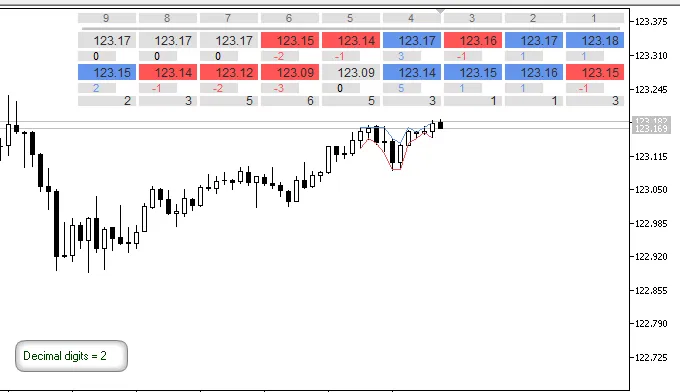
Fig.1. Indicator lines, marks and differences in points between High and Low prices, rounded to 2 decimal digits, on a 3-digit chart
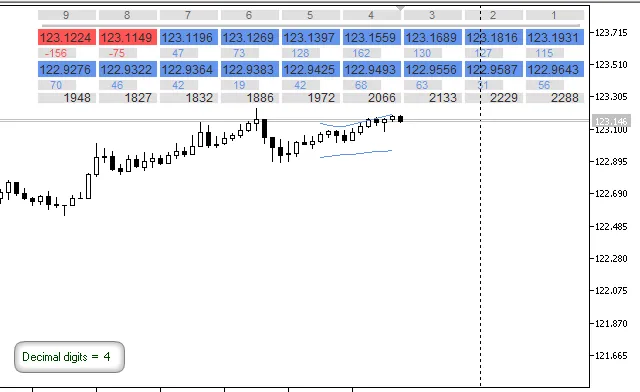
Fig.2. Marks and differences in points between 2 moving averages, extended to 4 decimal digits, on a 3-digit chart
Note: If you’ve added this indicator on a chart alongside standard Moving Averages and haven’t set offsets or rounding in the ID Lite Info MA input parameters, but the lines of this indicator don’t line up with the standard MAs (using the same parameters), don’t rush to conclusions about the calculation accuracy.
Check the Data Window to see the number of displayed digits for the standard Moving Average (for instance, it may use 4 decimal digits on a 3-digit chart).
This behavior is completely normal and, in my opinion, convenient because moving averages are based on average values. For example: (1.2052 + 1.2057 + 1.2073)/3 = 1.2060667. Hence, calculated values with rounded or extended digits open up more possibilities.
If the lines should perfectly align (with identical parameters), you can choose a higher number of decimal digits from the Decimal digits dropdown in the ID Lite Info MA input parameters.
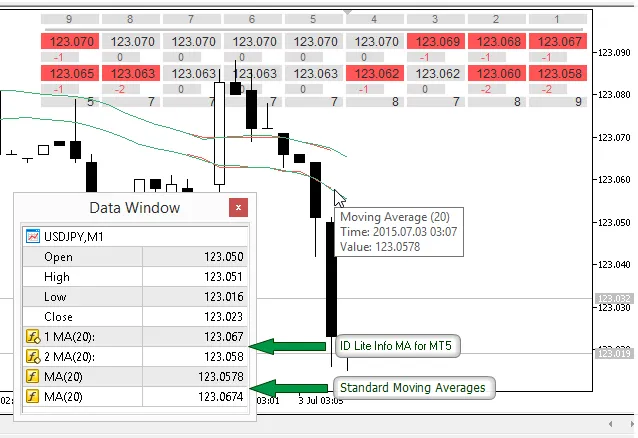
Fig.3. Built-in Moving Average and ID Lite Info MA (with Decimal digits = current chart) on a 3-digit chart
Version 1.11 from 25.09.2015:
- Increased the maximum Moving Averages periods value from 500 to 3000 bars. You can set this value freely in the function:
bool CheckInput(int period,string text)
- Minor code corrections and optimizations.




Comments 0