
Overview of the Positions Info Panel
The Positions Info Panel is a handy indicator designed for MetaTrader 5. This panel gives you a clear view of your position's direction, complete with the resulting lot size and easy-to-read up or down arrows.
When to Use the Positions Info Panel
This tool shines in hedge accounts, especially when you're juggling multiple open positions across different directions and volumes. The panel conveniently displays the total position volume specifically for the symbol of the chart it’s attached to.
Practical Example
Let’s say you have the following open positions:
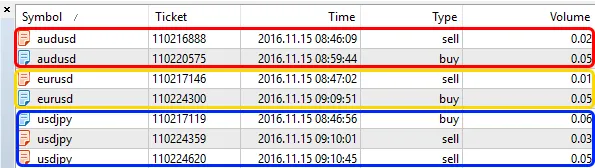
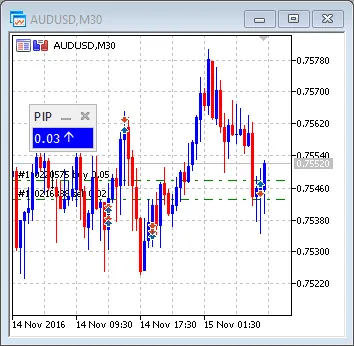
- AUDUSD: Sell 0.02 + Buy 0.05 = Buy 0.03
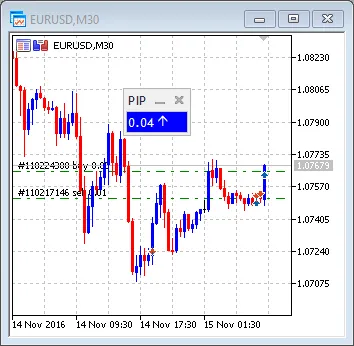
- EURUSD: Sell 0.01 + Buy 0.05 = Buy 0.04
- USDJPY: Buy 0.06 + Sell 0.03 + Sell 0.05 = Sell 0.02
Here’s how the resulting positions look:

Pro Tip for Traders
To streamline your trading setup, attach the Positions Info Panel indicator to your chart and save the template. Just right-click on the chart, go to Templates, and select Save Template. Call it default.tpl. Now, every time you open a new chart, the Positions Info Panel will be right there, ready for action!
Related Posts
- Unlocking the Power of Master Tools for MetaTrader 4
- Unlocking MetaCOT 2: Your Ultimate CFTC Indicator Toolkit for MT4
- Mastering the Open Range Breakout Indicator for MetaTrader 5
- Visualize Current Trends Across All Time Frames with This MetaTrader 4 Indicator
- Unlock Trading Insights with Volume Profile + Range v6.0 for MetaTrader 5