
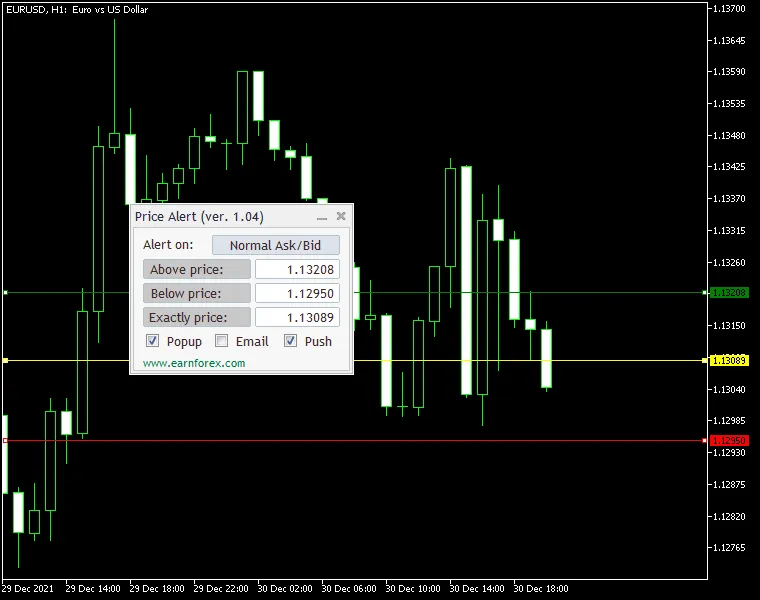
Price Alert MT4 Indicator is your go-to tool for staying on top of price movements. It allows you to set alerts based on specific price levels tailored to your trading strategy. You'll have three price levels to work with:
- Above Level - Triggered when the price rises above a certain point, marked with a green line on your chart.
- Below Level - Activated when the price drops below a set level, indicated by a red line.
- Exact Level - Notified when the price hits a specific value, highlighted with a yellow line.
The alert options include native alerts (popup), email notifications, and push notifications. To get email and push notifications, make sure to configure your email or MetaQuotes ID in the MetaTrader platform settings.
This handy indicator works on both MT4 and MT5 platforms and comes with an intuitive control panel, making it easy to set your desired alert levels and types.
Input Parameters
Main Settings
- PriceGoesAbove (default = 0.0) - Set this to trigger an alert when the price exceeds this value.
- PriceGoesBelow (default = 0.0) - Set this to trigger an alert when the price falls below this value.
- PriceIsExactly (default = 0.0) - Set this to trigger an alert when the price is exactly at this value.
- NativeAlert (default = false) - If set to true, you'll get a native platform alert (popup with sound).
- SendEmail (default = false) - If set to true and your email settings are correctly configured, you'll receive an email alert.
- SendPush (default = false) - If set to true and your MetaQuotes ID is configured, you'll get a push notification on your mobile device.
- AlertOnPrice (default = Normal Ask/Bid) - Choose the type of price for alerts: normal Ask/Bid, only Ask, only Bid, or Close of the previous candle.
- PanelOnTopOfChart (default = true) - If set to true, the alert panel will display in the foreground; setting it to false will reveal the chart behind the panel.
Line Settings
- Above Line Color (default = clrGreen) - Choose the color for the above level line.
- Below Line Color (default = clrRed) - Choose the color for the below level line.
- Exactly Line Color (default = clrYellow) - Choose the color for the exact level line.
- Above Line Style (default = STYLE_SOLID) - Set the style for the above line.
- Below Line Style (default = STYLE_SOLID) - Set the style for the below line.
- Exactly Line Style (default = STYLE_SOLID) - Set the style for the exact line.
- Above Line Width (default = 1) - Determine the width of the above line.
- Below Line Width (default = 1) - Determine the width of the below line.
- Exactly Line Width (default = 1) - Determine the width of the exact line.
Position Settings
- PanelPositionX (default = 0) - Sets the default horizontal distance from the corner you selected for the panel.
- PanelPositionY (default = 15) - Sets the default vertical distance from the corner you selected for the panel.
- PanelPositionCorner (default = CORNER_LEFT_UPPER) - Determines the default corner where the panel will be placed.




Comments 0