
Unlock the Power of the Candle Counter
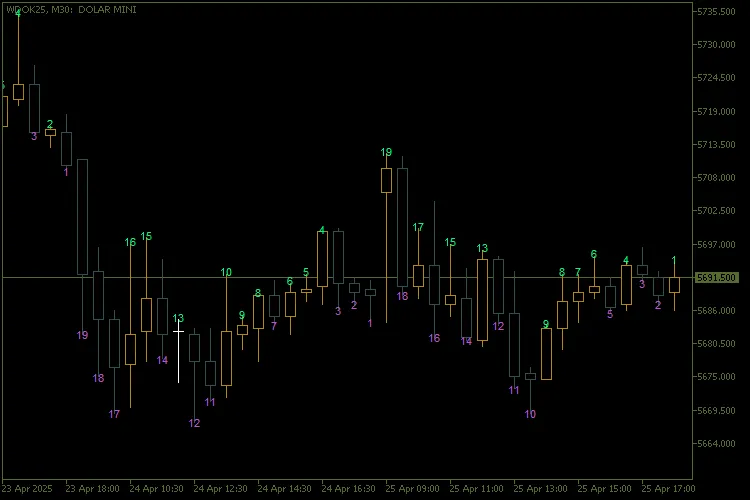
Hey there, fellow traders! If you're looking to enhance your MetaTrader 5 experience, let’s dive into the world of the Candle Counter. This nifty tool can help you keep track of your candles like a pro, ensuring you never miss a beat in your trading game.
Key Features
Week Selection:
The SelectedWeek parameter lets you choose which week of the month to number.
If you set SelectedWeek to 0, it will number all weeks, keeping everything in sight.
For specific weeks, just use a non-zero value to limit the numbering to that week’s candles.
Reverse Count:
With NumberFirstCandle set to false, the counting starts from the last candle of the day and goes backwards.
Dynamic Filtering:
This feature filters candles based on your selected week, so you can focus on what matters.
Dynamic Text Positioning:
The numbers will appear above or below the candles based on their bullish or bearish nature.
Control the spacing with the PriceOffsetFactor parameter for a cleaner look.
Visual Customization:
Personalize colors, fonts, text sizes, and anchor types to enhance your trading charts.
Optimized Performance:
This indicator removes old chart objects before creating new ones, keeping your workspace neat and efficient.
Input Parameters
PriceOffsetFactor | Spacing factor between text and candle. | 0.5 |
InpTextColourAbove | Text color above bullish candles. | clrSpringGreen |
InpTextColourBelow | Text color below bearish candles. | clrMediumOrchid |
InpFont | Font type for the numbers. | "Arial" |
InpFontSize | Font size. | 8 |
Anchor | Text positioning anchor type (center, top, bottom, etc.). | ANCHOR_CENTER |
NumberFirstCandle | Start count on first (true) or last (false) candle of the day. | true |
SelectedWeek | Week selected for counting (0 = every week). | 1 |
Detailed Features
1. Filtering by Week:
The GetWeekOfMonth() function calculates which week each candle falls into.
With the condition if(SelectedWeek != 0 && currentWeek != SelectedWeek), only candles from your chosen week are processed.
2. Sequential Counting:
The count resets with each new day when candleDay != previousDay.
If NumberFirstCandle is true, it starts counting from the first candle.
If set to false, it counts down from the last candle of the day.
3. Text Positioning:
Text positions above bearish candles (closing price
Text appears below bullish candles (closing price > opening price).
4. Creating and Updating Chart Objects:
The CreateText() function creates or updates chart objects on your chart.
These objects are uniquely named with the ObjectPrefix to avoid any naming conflicts.
5. Automatic Cleaning:
The DeleteObjects() function removes all graphical objects created by the indicator when it’s removed or reinitialized.
Happy trading!
Feel free to share your thoughts or questions in the comments below!




Comments 0