
If you’re trading with MetaTrader 5, you’re probably always on the lookout for tools that can give you an edge. One such tool is the CandlesticksBW_x10 indicator, which provides a unique view of candlestick colors across ten different timeframes based on your settings.
How the CandlesticksBW_x10 Indicator Works
The CandlesticksBW_x10 indicator displays the candlestick colors from various timeframes, allowing you to quickly assess market trends and make informed trading decisions. Here’s a quick breakdown of how you can set it up:
//+----------------------------------------------+//| Indicator input parameters |//+----------------------------------------------+inputENUM_TIMEFRAMES TimeFrame0=PERIOD_H1; //chart 1 periodinputENUM_TIMEFRAMES TimeFrame1=PERIOD_H2; //chart 2 periodinputENUM_TIMEFRAMES TimeFrame2=PERIOD_H3; //chart 3 periodinputENUM_TIMEFRAMES TimeFrame3=PERIOD_H4; //chart 4 periodinputENUM_TIMEFRAMES TimeFrame4=PERIOD_H6; //chart 5 periodinputENUM_TIMEFRAMES TimeFrame5=PERIOD_H8; //chart 6 periodinputENUM_TIMEFRAMES TimeFrame6=PERIOD_H12; //chart 7 periodinputENUM_TIMEFRAMES TimeFrame7=PERIOD_D1; //chart 8 periodinputENUM_TIMEFRAMES TimeFrame8=PERIOD_W1; //chart 9 periodinputENUM_TIMEFRAMES TimeFrame9=PERIOD_MN1; //chart 10 periodinputuint SignalBar=1; //Bar number to receive a signal (0 - current bar)//---- Indicator drawing parametersinputcolor CpColor=clrBlueViolet; //indicator name colorinputcolor UpUpColor=clrDeepSkyBlue; //color of growing trend and growing candlestickinputcolor UpDnColor=clrBlue; //color of growing trend and falling candlestickinputcolor NonUpColor=clrTeal; //color without trend and falling candlestickinputcolor NonDnColor=clrRed; //color without trend and growing candlestickinputcolor DnUpColor=clrPurple; //color of falling trend and growing candlestickinputcolor DnDnColor=clrMagenta; //color of falling trend and falling candlestickinputint FontSize=11; //font sizeinput type_font FontType=Font14; //font typeinputENUM_BASE_CORNER WhatCorner=CORNER_LEFT_LOWER; //location cornerinputuint Y_=20; //vertical locationinputuint X_=5; //horizontal location//+----------------------------------------------+
Setting Up the Indicator
To get the CandlesticksBW_x10 up and running, you’ll need to ensure that the CandlesticksBW.ex5 file is placed in the <terminal_data_directory>\MQL5\Indicators folder on your system. This will allow it to function properly.
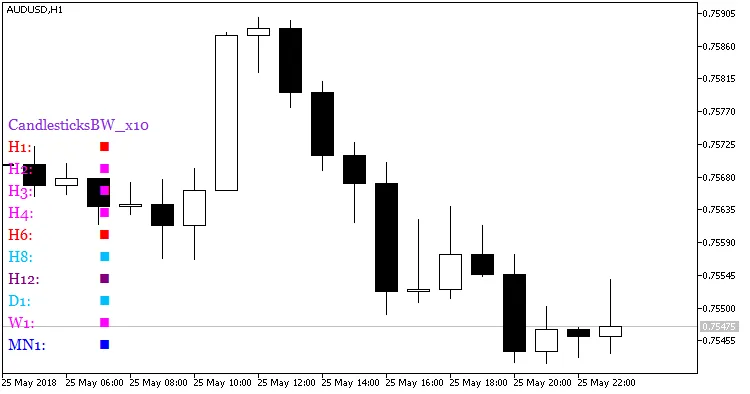
Fig.1. Indicator CandlesticksBW_x10
With the CandlesticksBW_x10 indicator in your toolkit, you’ll be well-equipped to analyze market trends more effectively. Happy trading!




Comments 0