
Description
The CFractalsOnRingBuffer class is crafted for calculating the Fractals technical indicator using a ring buffer algorithm. For more details on the Fractals indicator, check out the official documentation here.
Class Declaration
class CFractalsOnRingBufferIncluding the Header File
#include <IncOnRingBuffer\CFractalsOnRingBuffer.mqh>Make sure to place the CFractalsOnRingBuffer.mqh file in the IncOnRingBuffer folder, which should be created in MQL5\Include\. You'll find two example files in this folder that utilize the class. Additionally, the ring buffer class file should also be included here.
Class Methods Overview
//--- initialization method:bool Init( // returns false on error, true on success
   int bars_right = 2, // bars right of the extremum
   int bars_left = 2, // bars left of the extremum
   int size_buffer = 256, // ring buffer size
   bool as_series = false// true for time series
   );
//--- calculation method based on time series or indicator buffers:int MainOnArray( // returns number of processed elements
   constint rates_total, // array size
   constint prev_calculated, // previously processed elements
   constdouble& high[], // array of max values
   constdouble& low[] // array of min values
   );
//--- up fractal calculation based on high array elements:double MainOnHigh( // returns up fractal value
   constint rates_total, // array size
   constint prev_calculated, // processed elements
   constint begin, // start of significant data
   constdouble high, // current bar max
   constint index // current bar index
   );
//--- down fractal calculation based on low array elements:double MainOnLow( // returns down fractal value
   constint rates_total, // array size
   constint prev_calculated, // processed elements
   constint begin, // start of significant data
   constdouble low, // current bar min
   constint index // current bar index
   );
//--- data access methods:int BarsRequired(); // returns bars needed to draw the indicatorstring Name(); // returns indicator namestring NameUpper(); // returns up fractals namestring NameLower(); // returns down fractals nameint BarsRight(); // returns bars to the right from extremumint BarsLeft(); // returns bars to the left from extremumint Size(); // returns ring buffer size
You can access the calculated data from the ring buffers just like you would from a standard array. For example:
//--- class for calculating the Fractals indicator:#include <IncOnRingBuffer\CFractalsOnRingBuffer.mqh>
CFractalsOnRingBuffer fractals;

...

//+------------------------------------------------------------------+//| Custom indicator iteration function |//+------------------------------------------------------------------+intOnCalculate(constint rates_total,
                constint prev_calculated,
                constdatetime& time[],
                constdouble& open[],
                constdouble& high[],
                constdouble& low[],
                constdouble& close[],
                constlong& tick_volume[],
                constlong& volume[],
                constint& spread[]) {
//--- calculation of the indicator based on price time series:
   fractals.MainOnArray(rates_total, prev_calculated, high, low);

...

//--- use the data from the ring buffers:
   for(int i=start; i<rates_total - BarsRight() && !IsStopped(); i++) {
     UpperBuffer[i] = fractals.upper[rates_total - 1 - i]; // up fractals
     LowerBuffer[i] = fractals.lower[rates_total - 1 - i]; // down fractals
   }

...

//--- return value of prev_calculated for next call:
   return(rates_total);
  }
Note: Indexing in the ring buffers follows the same logic as in the time series.
Examples
- The Test_Fractals_OnArrayRB.mq5 file calculates the indicator based on the price time series, utilizing the MainOnArray() method.
- The Test_Fractals_OnValueRB.mq5 file illustrates the use of the MainOnValue() method. Initially, the Fractals indicator is calculated and plotted, followed by drawing another Fractals using the indicator's ring buffer.
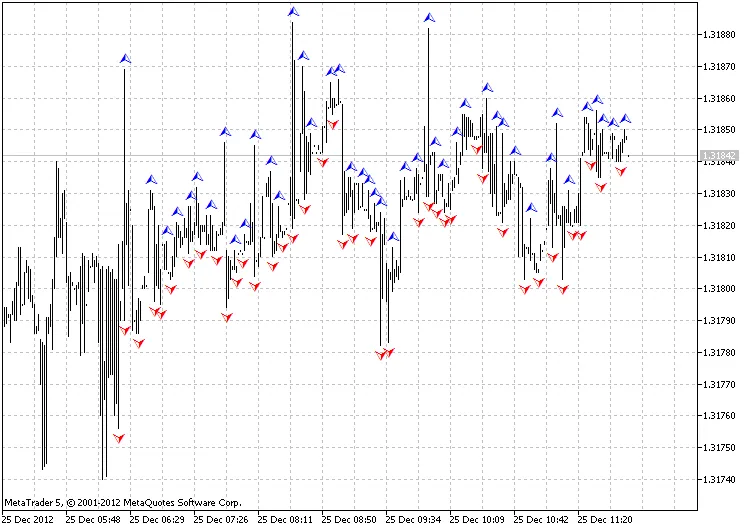
Output from Test_Fractals_OnArrayRB.mq5 using a ring buffer of 256 elements
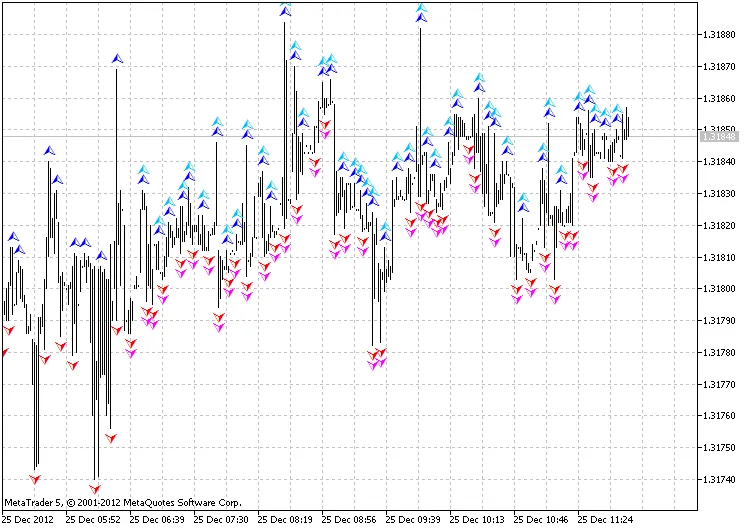
Output from Test_Fractals_OnValueRB.mq5 using a ring buffer of 256 elements
Credits to the development by MetaQuotes Software Corp., Integer, and GODZILLA.




Comments 0