
Hey there, fellow traders! If you're looking to enhance your trading strategy, you might want to check out the semaphore indicator that highlights identical candles on your chart. This nifty tool shows you candles moving in the same direction across your selected timeframes—think of it as your own personal trading assistant that points out bullish or bearish patterns.
What’s great is that you can use this across all timeframes. Just toggle it on or off for the ones you want to focus on. Plus, it comes with an alert feature that beeps whenever a new arrow appears on your chart, keeping you in the loop without constantly staring at the screen.
Here’s a quick rundown of what you can do in the settings:
- Filter Arrows: You can choose to display only the first arrow for each direction, eliminating the clutter from extra arrows that might confuse you.
- Signal Timing: Decide whether you want the signal based on the current candle (index 0) or the previous one (index 1). Just a heads up: if you opt for the current candle, be cautious as it may not be fully formed, which could lead to false signals.
Important! If you get a signal from the current candle, it's wise to test it on the indicator tester. Historical data can yield different results, so it's better to be safe than sorry!
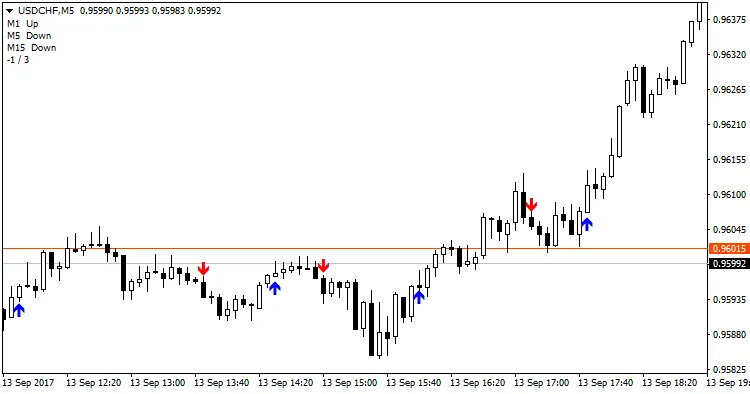
Example: TF: M1, M5, M15 with shift = 1, Only signal change = true
Customizing Your Indicator Settings
- Alerts: Turn the beep on or off to suit your trading style.
- Shift: Set the candle index for signals: 0 for the current candle, 1 for the previous candle.
- Only Signal Change: This option clears out any unnecessary arrows, showing you only when the direction changes.
- TF M1: Include the M1 timeframe in your calculations.
- TF M5: Include the M5 timeframe in your calculations.
- TF M15: Include the M15 timeframe in your calculations.
- TF M30: Include the M30 timeframe in your calculations.
- TF H1: Include the H1 timeframe in your calculations.
- TF H4: Include the H4 timeframe in your calculations.
- TF D1: Include the D1 timeframe in your calculations.
- TF W1: Include the W1 timeframe in your calculations.
- TF MN: Include the MN timeframe in your calculations.
- Comments: Turn comments on or off based on your preference.
- clrBUY: Choose your preferred color for Buy signals.
- clrSELL: Choose your preferred color for Sell signals.




Comments 0