
If you’re diving into the world of trading, pattern recognition is one of those skills that can really set you apart. Today, we're going to explore an invaluable tool: the Search Patterns Indicator. This nifty tool helps you identify key patterns on your charts, particularly highlighting the end points of the D and C formations.
Input Parameters
Let’s look at some of the customizable settings you can tweak to fit your trading style:
- FuturePattern: Set this to
trueif you want the indicator to actively search for patterns ahead of time. This is especially useful for advanced traders looking to make moves before the pattern completes! - ExtSave: If you want to save your drawings on the chart, switch this to
true. - ExtDepth: This parameter controls the depth for your zigzag patterns. A value of
0enables full pattern search, while other values refine the search. - ExtPoint: The number of zigzag points to consider. If you set this above
5, patterns will also appear in the historical data. - minDepth and maxDepth: These parameters help define the range of depth for your pattern searches.
- ExtDopusk: This setting allows for slight variations in pattern parameters. You can set a margin of
0.05. - TimeDopusk: Similar to ExtDopusk, but this one applies to timing differences.
- Gartley: Enable this to look for Gartley patterns.
- Pattern_50: Switch this on if you want to include the 5-0 pattern in your scans.
- ABCD: This will activate searches for the AB=CD pattern.
- WolfWaves: Set to
trueif you wish to include WW patterns. - SweetZoneStart and SweetZoneEnd: These parameters allow you to visualize the SweetZone for the relevant points.
- Color Customization: You can also customize colors for different patterns, like
SZScolorfor SweetZoneStart andExtColorGartleyfor Gartley patterns.
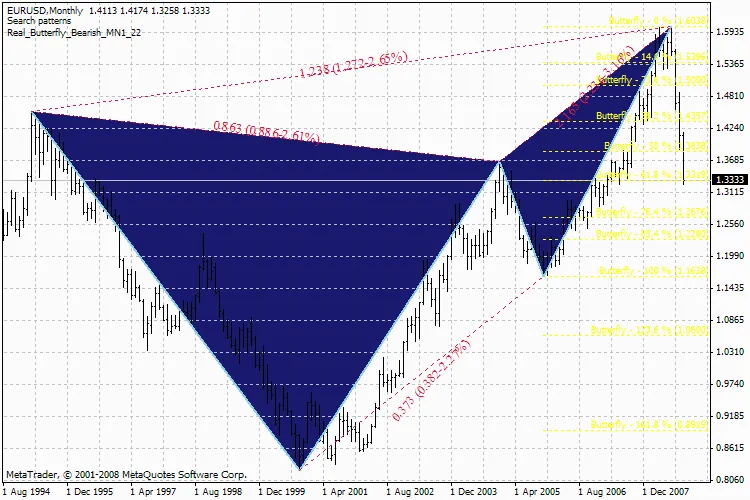
Search Patterns Indicator




Comments 0