
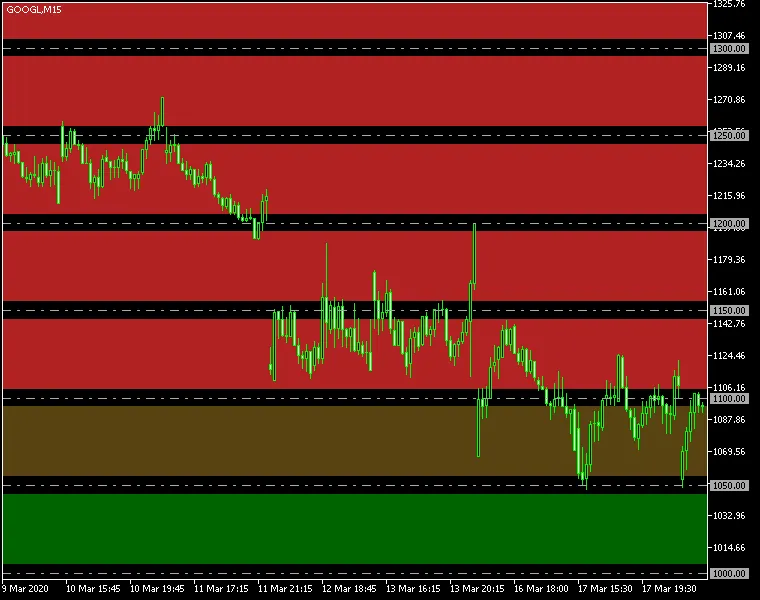
Round Levels Indicator for MetaTrader 4 – This nifty MT4/MT5 tool allows you to visualize round levels and the zones surrounding them, tailored to your trading setup. Utilizing this indicator can significantly enhance your trading strategy by leveraging those psychological support and resistance levels that many traders naturally gravitate towards. Plus, it provides alerts when the price hits either a support or resistance zone, keeping you in the loop!
Input Parameters Explained
- Levels (default = 5) – This sets the number of round levels to be processed in both directions (up and down).
- Interval (default = 50) – This is the point interval between each round level. For instance, a default of 50 means a level will appear every 50 points.
- ZoneWidth (default = 10) – This defines the width of the support/resistance zones in points.
- ColorUp (default = clrFireBrick) – This is the color for the round level zones above the current price.
- ColorDn (default = clrDarkGreen) – This is the color for the round level zones below the current price.
- InvertZones (default = false) – When enabled, inverted zones are highlighted outside the boundaries, unlike non-inverted zones.
- ZonesAsBackground (default = true) – If set to true, round number zones will be displayed behind the chart plot (candlesticks, bars, or lines).
- DrawLines (default = false) – If this is true, lines will be drawn at the round levels in addition to the zones.
- LineColor (default = clrDarkGray) – This defines the color of the round level lines.
- LineWidth (default = 1) – This sets the width of the round level lines.
- LineStyle (default = STYLE_DASHDOT) – This is the style applied to the round level lines.
- LinesAsBackground (default = false) – If true, these lines will be drawn behind the chart plot.
- ShowLineLabels (default = false) – If true, each line will have a label marking its price level.
- LineLabelColor (default = clrWhite) – This defines the color of the line labels.
- ObjectPrefix (default = "RoundLevels") – This prefix is added to chart object names. Only change this if there are conflicts with other indicators.
- EnableNotify (default = false) – If true, the indicator will send notifications when the price (Bid) enters a zone.
- SendAlert (default = true) – If true and notifications are enabled, the indicator will trigger built-in popup alerts.
- SendApp (default = false) – If true and notifications are enabled, push-notification alerts will be sent.
- SendEmail (default = false) – If true and notifications are enabled, email alerts will be sent.
- AlertDelay (default = 5) – This sets the delay in seconds between consecutive alerts.




Comments 0