
If you're looking to enhance your trading strategy, the 3-in-1 MTF Stochastic Indicator for MetaTrader 5 could be your new best friend. This nifty tool combines three stochastic indicators into one, complete with smoothing options and clear signal pointers. Let’s dive into how it can boost your trading game!
One of the key features of this indicator is its 24 adjustable parameters, which give you plenty of room for customization:
- First Stochastic %K Period - Sets the calculation period for the first stochastic %K line.
- First Stochastic %D Period - Sets the calculation period for the first stochastic %D line.
- First Stochastic Slowing - Determines the slowing calculation period for the first stochastic.
- First Stochastic %K Smoothing Type - Choose how to smooth the first stochastic %K line:
- Simple - Basic smoothing method.
- Exponential - More weight to recent data.
- Fast - Quick response smoothing.
- First Stochastic %D Smoothing Type - Similar options for %D line smoothing:
- Simple - Basic smoothing method.
- Exponential - More weight to recent data.
- Second Stochastic Timeframe - Specify the timeframe for the second stochastic indicator.
- Second Stochastic %K Period - Sets the calculation period for the second stochastic %K line.
- Second Stochastic %D Period - Sets the calculation period for the second stochastic %D line.
- Second Stochastic Slowing - Determines the slowing calculation period for the second stochastic.
- Second Stochastic %K Smoothing Type - Choose how to smooth the second stochastic %K line:
- Simple - Basic smoothing method.
- Exponential - More weight to recent data.
- Fast - Quick response smoothing.
- Second Stochastic %D Smoothing Type - Similar options for %D line smoothing:
- Simple - Basic smoothing method.
- Exponential - More weight to recent data.
- Third Stochastic Timeframe - Specify the timeframe for the third stochastic indicator.
- Third Stochastic %K Period - Sets the calculation period for the third stochastic %K line.
- Third Stochastic %D Period - Sets the calculation period for the third stochastic %D line.
- Third Stochastic Slowing - Determines the slowing calculation period for the third stochastic.
- Third Stochastic %K Smoothing Type - Choose how to smooth the third stochastic %K line:
- Simple - Basic smoothing method.
- Exponential - More weight to recent data.
- Fast - Quick response smoothing.
- Third Stochastic %D Smoothing Type - Similar options for %D line smoothing:
- Simple - Basic smoothing method.
- Exponential - More weight to recent data.
- Overbought Level - Set your overbought threshold.
- Oversold Level - Set your oversold threshold.
- Bigger Timeframes Drawing Mode - Choose how to display data from larger timeframes:
- Steps - Displays in steps.
- Slope - Displays with sloping lines.
- Show Clouds - Visualize the cloud between the main and signal lines of the stochastics from larger timeframes (Yes/No).
- Show Alerts - Enable alerts for signals.
- Send Mail - Get email notifications.
- Send Push - Receive push notifications on your mobile.
Keep in mind that the data from the first stochastic is always based on the current timeframe. The second and third stochastic data can reference specified timeframes, but they cannot be smaller than the current chart's timeframe.
- When the main line crosses above the signal line of the first stochastic and the %K line is above the %D line of the larger timeframe stochastics, you'll see an up-pointer signal.
- Conversely, when the main line crosses below the signal line and the %K line is below the %D line of the larger timeframe stochastics, a down-pointer signal is generated.
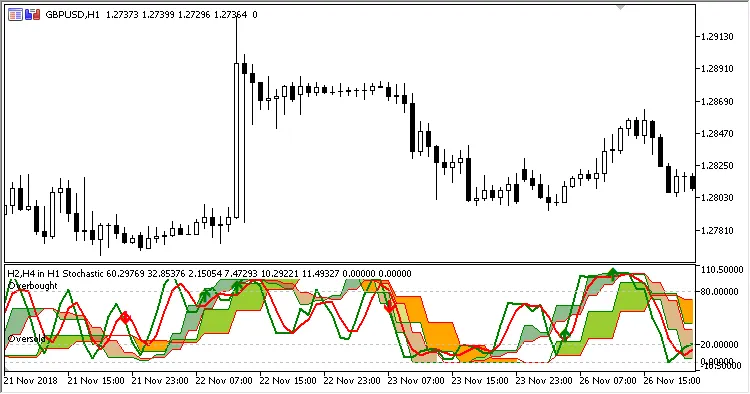
Fig. 1. 3 in 1 MTF Stochastic, Bigger timeframes drawing mode = Steps
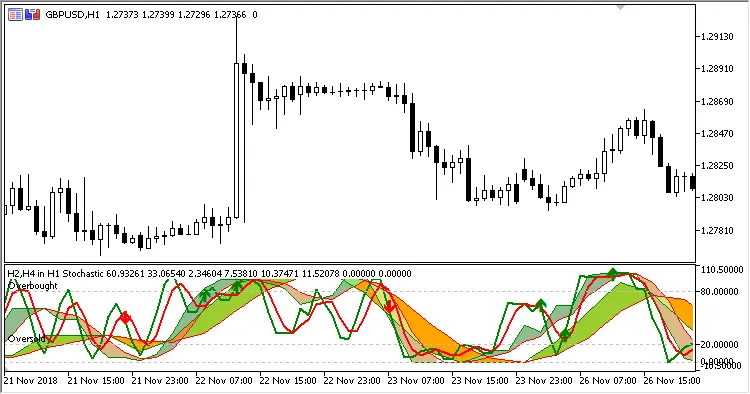
Fig. 2. 3 in 1 MTF Stochastic, Bigger timeframes drawing mode = Slope




Comments 0