
Hey fellow traders! Today, let’s dive into the Average Range Indicator for MetaTrader 5 and see how it can help you pinpoint target levels based on average price movements.
This nifty tool calculates levels on various timeframes—be it yearly, monthly, weekly, or even on a 4-hour chart. Let’s break down how these levels are set up:
- Open Buffer: This is simply the price at the beginning of the period:
OpenBuffer[i] = PeriodOpenPrice; - High Buffer: This level shows the average range added to the opening price:
HighBuffer[i] = PeriodOpenPrice + adr/2; - Low Buffer: Conversely, this is the average range subtracted from the opening price:
LowBuffer[i] = PeriodOpenPrice - adr/2; - Max High Buffer: This indicates the extreme high for the period:
MaxHighBuffer[i] = PeriodOpenPrice + adr; - Min Low Buffer: This one shows the extreme low:
MinLowBuffer[i] = PeriodOpenPrice - adr;
With these levels, you can better gauge potential price movements and make more informed trading decisions.
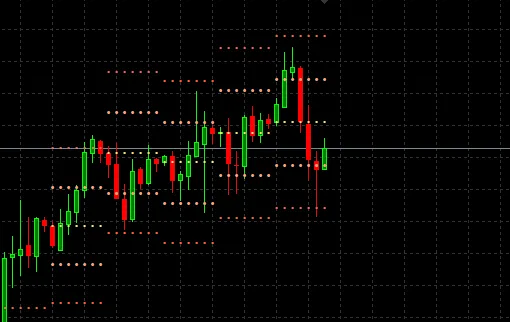
So, give the Average Range Indicator a shot in your trading strategy! It might just be the edge you’ve been looking for.




Comments 0