
Description
Today, we're diving into the CEROnRingBuffer class, a handy tool for calculating the Efficiency Ratio (ER) in the Adaptive Moving Average (AMA) using a ring buffer algorithm. This class is perfect for traders looking to enhance their technical analysis with this dynamic indicator.
Declaration
class CEROnRingBuffer : public CArrayRing
Title
#include <IncOnRingBuffer\CEROnRingBuffer.mqh>Make sure to place the CEROnRingBuffer.mqh file in the IncOnRingBuffer directory under MQL5\Include\. Attached to this guide, you'll find two example files that demonstrate how to utilize this class. Don’t forget, the ring buffer file must also be in the same folder.
Class Methods
//--- initialization method:
bool Init(                                  // returns false if there's an error, true if successful
   int            period        = 34,       // period for calculating the ER
   int            size_buffer   = 256,      // size of the ring buffer, number of data points stored
   bool           as_series     = false     // true if a time series, false for standard indexing of input data
   );
//--- calculation method based on time series or indicator buffer:
int MainOnArray(                  // returns the number of processed elements
   const int     rates_total,     // size of the array
   const int     prev_calculated, // processed elements from the previous call
   const double &array[]          // array of input values
   );
//--- calculation method based on specific elements of the array:
double MainOnValue(              // returns the ER value for the specified element
   const int    rates_total,     // size of the array
   const int    prev_calculated, // processed elements of the array
   const int    begin,          // starting index for significant data in the array
   const double value,           // element value of the array
   const int    index            // element index
    );
//--- methods to access data:
int    BarsRequired();   // Returns the number of bars needed to draw the indicator
string Name()            // Returns the name of the indicator
int    Period()          // Returns the period for ER calculation
int    Size();           // Returns the size of the ring buffer
To retrieve the calculated data from the indicator using the ring buffer, you can access it like a standard array. For instance:
//--- class with methods to calculate the ER indicator:
#include <IncOnRingBuffer\CEROnRingBuffer.mqh>
CEROnRingBuffer er;

...
//+------------------------------------------------------------------+
//| Custom indicator iteration function                              |
//+------------------------------------------------------------------+
int OnCalculate(const int    rates_total,
                const int    prev_calculated,
                const int    begin,
                const double &price[])
  {
//--- calculation of the indicator based on price time series:
   er.MainOnArray(rates_total,prev_calculated,price);

...
//--- use data from the ring buffer "er",
//    for example, copy data into the indicator buffers:
   for(int i=start;i<rates_total;i++)
     {
      ER_Buffer[i]   = er[rates_total-1-i];          // indicator line
     }
//--- return value of prev_calculated for next call:
   return(rates_total);
  }
Keep in mind that indexing in the ring buffer follows the same logic as in the time series.
Examples
- The
Test_ER_OnArrayRB.mq5file calculates the indicator using the price time series and demonstrates the application of the MainOnArray() method. - The
Test_ER_OnValueRB.mq5showcases the MainOnValue() method. Initially, the ER indicator is calculated and displayed. Then, based on this indicator's ring buffer, another ER is plotted.
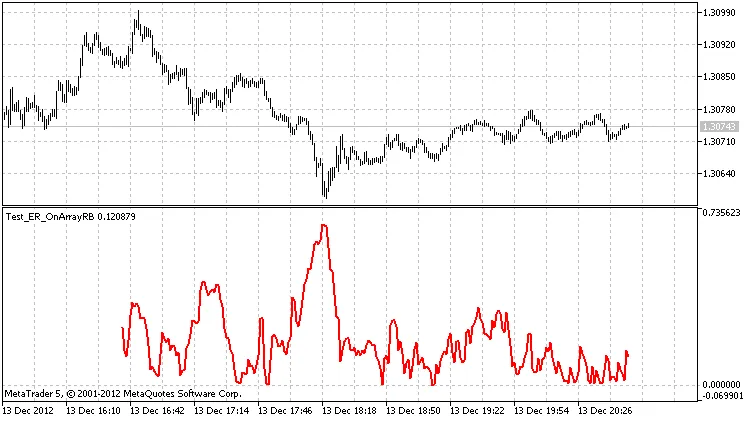
Output from the Test_ER_OnArrayRB.mq5 with a ring buffer size of 256 elements
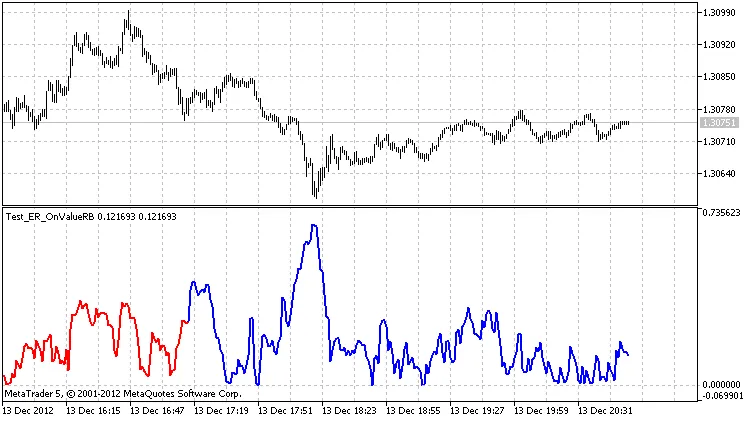
Results from the Test_ER_OnValueRB.mq5 with a ring buffer size of 256 elements
Special thanks to MetaQuotes Software Corp., Integer, and GODZILLA for their contributions.




Comments 0