
Hey there, fellow traders!
Today, I’m excited to share with you my creation: the FE Fibonacci Expansion indicator for MetaTrader 4. This nifty tool is designed using two objects in an array that represent properties for two directions: UP and DOWN.
How It Works
Let's break it down. Each direction will have three prices: A, B, and C, which correspond to the upper, lower, and mid-range prices. The variables aa, bb, and cc indicate the bar locations for their respective prices.
class FEExpansion
{
   public:
     int aa, bb, cc;
     double A, B, C;
     FEExpansion():
       aa(0), bb(0), cc(0),
       A(0.0), B(0.0), C(0.0)
   {}
   ~FEExpansion() {}
} P[2];
Each direction is determined using a fractal formula with a bit of tweaking to pinpoint the three key points: upper, lower, and a price in between, all along with their directions.
Looping Through Bars
Here’s how I loop through the recent bar locations:
//---
  int i=0;
  int m=0, n=0;
  bool stop=false;
  double hi=0.0, lo=0.0;
//---
  A=0.0;
  B=0.0;
  C=0.0;
  for(m=0, n=0, i=0; i<Bars-5&&!stop; i++)
     {
      hi=(
            iHigh(_Symbol,0,i+2)>=iHigh(_Symbol,0,i+0) &&
            iHigh(_Symbol,0,i+2)>=iHigh(_Symbol,0,i+1) &&
            iHigh(_Symbol,0,i+2)>=iHigh(_Symbol,0,i+3) &&
            iHigh(_Symbol,0,i+2)>=iHigh(_Symbol,0,i+4))
         ?iHigh(_Symbol,0,i+2):0.0;
      lo=(
            iLow(_Symbol,0,i+2)<=iLow(_Symbol,0,i+0) &&
            iLow(_Symbol,0,i+2)<=iLow(_Symbol,0,i+1) &&
            iLow(_Symbol,0,i+2)<=iLow(_Symbol,0,i+3) &&
            iLow(_Symbol,0,i+2)<=iLow(_Symbol,0,i+4))
         ?iLow(_Symbol,0,i+2):0.0;
      //---
      //---
      //--------------------------------------------------------------------------------------------------------------------
      //--------------------------------------------------------------------------------------------------------------------
      if(hi!=0.0)// ------------up------------
      {
         if(P[1].C!=0.0)
           {
            if(n==2)
              {
                if(P[1].B<hi&&P[1].C<P[1].B)
                 {
                  P[1].B=hi;   //this modify B[1] before A[1] exist
                P[1].bb=i+2;
              }
            if(n==1)
              {
                if(P[1].C<hi)
                 {
                  P[1].B=hi;   //this B[1] dn
                  P[1].bb=i+2;
                  n++;
                 }
                else
                 {
                  n--;
                  P[1].C=0.0;
                 }
              }
      }
      //---
      if(P[0].C==0.0)
       {
        if(m<1)
          {
            P[0].C=hi;   //initial C[0] up
            P[0].cc=i+2;
            m++;
          }
      }
      else
       {
        if(m==2)
          {
            if(P[0].C<hi)
                 {
                P[0].A=hi;   //this A[0] up
                P[0].aa=i+2;
                m=0;
                stop=true;
                 }
              }
            if(m==1)
          {
            if(P[0].C<hi)
                 {
                P[0].C=hi;   //this modify C[0] before B[0] exist
                P[0].cc=i+2;
                 }
              }
      }
      //---
      }
      //else
      if(lo!=0.0)// ------------dn------------
      {
         if(P[0].C!=0.0)
       {
            if(m==2)
              {
                if(P[0].B>lo&&P[0].C>P[0].B)
                 {
                  P[0].B=lo;   //this modify B[0] before A[0] exist
                P[0].bb=i+2;
                 }
              }
            if(m==1)
          {
            if(P[0].C>lo)
                 {
                  P[0].B=lo;   //this B[0] up
                  P[0].bb=i+2;
                  m++;
                 }
                else
                 {
                  m--;
                  P[0].C=0.0;
                 }
              }
      }
      //---
      if(P[1].C==0.0)
       {
        if(n<1)
          {
             P[1].C=lo;   //initial C[1] dn
             P[1].cc=i+2;
             n++;
              }
      }
      else
       {
        if(n==2)
          {
               if(P[1].C>lo)
                 {
                  P[1].A=lo;   //this A[1] dn
                  P[1].aa=i+2;
                n=0;
                stop=true;
                 }
              }
            if(n==1)
              {
               if(P[1].C>lo)
                 {
                  P[1].C=lo;   //this modify C[1] before B[1] exist
                P[1].cc=i+2;
                 }
              }
      }
      }
      //---
      }
      //else
      //
      //---
      //---
      //---
      if((P[0].C==0.0&&P[1].C==0.0)||(hi==0.0&&lo==0.0))
        {
         continue;
        }
      }
// loop
If the loop finds three points indicating either an upward or downward direction, it breaks out of the loop.
Finalizing the Expansion
Now, let’s pull out the three points:
  if(P[0].A!=0.0&&P[0].B!=0.0&&P[0].C!=0.0)
     {
      DrawExpansion(tool,"FE ->",Time[P[0].aa],P[0].A,Time[P[0].bb],P[0].B,Time[P[0].cc],P[0].C,-1);
     }
//---
  if(P[1].A!=0.0&&P[1].B!=0.0&&P[1].C!=0.0)
     {
      DrawExpansion(tool,"FE ->",Time[P[1].aa],P[1].A,Time[P[1].bb],P[1].B,Time[P[1].cc],P[1].C,1);
     }
Finally, we use the OBJ_EXPANSION object to draw our expansion with a single function call, DrawExpansion(...).
void DrawExpansion(string name,string label,datetime t1,double p1,datetime t2,double p2,datetime t3,double p3,int fl=0)
{
  //---
   ObjectDelete(name);
   color wrn=(fl>0)?clrSkyBlue:(fl<0)?clrTomato:clrWhite;
   if(ObjectFind(0,name)!=0)
      ObjectCreate(name,OBJ_EXPANSION,0,t1,p1,t2,p2,t3,p3);
   ObjectSet(name,OBJPROP_FIBOLEVELS,5);
   ObjectSet(name,OBJPROP_FIRSTLEVEL+0,0.618);
   ObjectSet(name,OBJPROP_FIRSTLEVEL+1,1.000);
   ObjectSet(name,OBJPROP_FIRSTLEVEL+2,1.618);
   ObjectSet(name,OBJPROP_FIRSTLEVEL+3,2.618);
   ObjectSet(name,OBJPROP_FIRSTLEVEL+4,4.236);
   //---
   ObjectSet(name,OBJPROP_LEVELCOLOR,clrMediumPurple);
   ObjectSet(name,OBJPROP_LEVELWIDTH,1);
   ObjectSet(name,OBJPROP_LEVELSTYLE,0);
   ObjectSet(name,OBJPROP_COLOR,wrn);
   //---
   ObjectSetFiboDescription(name,0,label+"  "+DoubleToStr(0.618*100,1"  ");
   ObjectSetFiboDescription(name,1,label+"  "+DoubleToStr(1.000*100,1"  ");
   ObjectSetFiboDescription(name,2,label+"  "+DoubleToStr(1.618*100,1"  ");
   ObjectSetFiboDescription(name,3,label+"  "+DoubleToStr(2.618*100,1"  ");
   ObjectSetFiboDescription(name,4,label+"  "+DoubleToStr(4.236*100,1"  ");
   //---
  }
In this function, I set levels at 0.618, 1.000, 1.618, 2.618, and 4.236, creating a comprehensive Fibonacci expansion.
Here’s a quick glance at what it looks like:
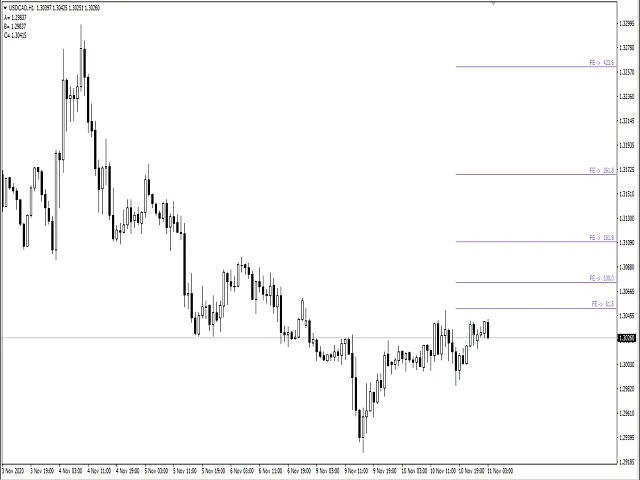
In Conclusion: The FE Fibonacci Expansion indicator is a powerful tool for traders looking to make informed decisions based on Fibonacci levels. Give it a try in your trading strategy!




Comments 0