
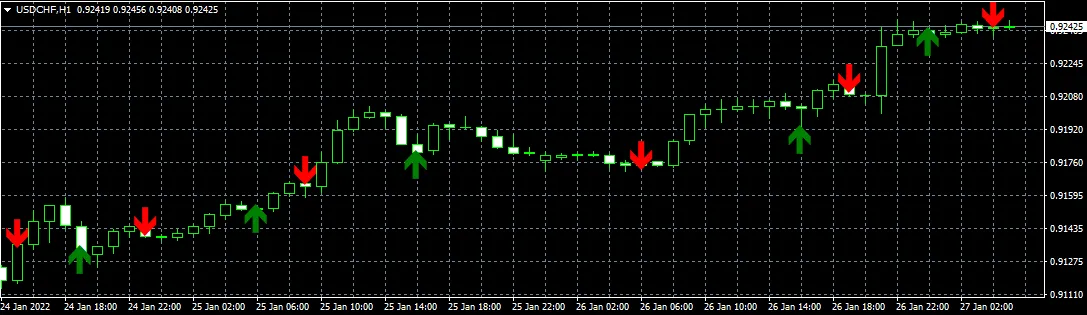
Are you looking to sharpen your trading strategy? The MA Crossover Indicator is a powerful tool that can help you make informed decisions in the fast-paced world of trading. Whether you're a newbie or an experienced trader, understanding how to effectively use this indicator can give you a significant edge.
What is the MA Crossover Indicator?
Simply put, the MA Crossover Indicator tracks the relationship between two moving averages – typically a shorter-term and a longer-term MA. When the short-term MA crosses above the long-term MA, it signals a potential buying opportunity (often referred to as a bullish crossover). Conversely, when the short-term MA crosses below the long-term MA, it indicates a possible selling point (bearish crossover).
Why Use the MA Crossover Indicator?
This indicator is favored by many traders because it helps identify trends and reversals, allowing you to ride the waves of the market more effectively. It’s especially handy in volatile markets where quick decisions can make or break your trade.
How to Implement the MA Crossover Indicator in MetaTrader 4
- Step 1: Open your MetaTrader 4 platform.
- Step 2: Click on the 'Insert' tab, navigate to 'Indicators,' and select 'Trend.'
- Step 3: Choose 'Moving Average' and set your desired periods for both the short-term and long-term MAs.
- Step 4: Monitor the crossovers on your chart for potential trading signals.
Tips for Success
While the MA Crossover Indicator is a great asset, remember that no single indicator is foolproof. It's essential to combine it with other tools like RSI or MACD for confirmation before entering a trade. Always keep an eye on the broader market context and news that might affect price movements.
Happy trading, and may your charts be ever in your favor!




Comments 0