
If you're looking to sharpen your trading edge, the SuperTrend indicator is a valuable tool to have in your arsenal. It helps you spot market trends by leveraging Average True Range (ATR) volatility, making it a go-to for many traders. Plus, it's available for free under the MIT license, so you can use it without any strings attached!
Core Formula
- Upper Band: Source Price + (Multiplier × ATR)
- Lower Band: Source Price - (Multiplier × ATR)
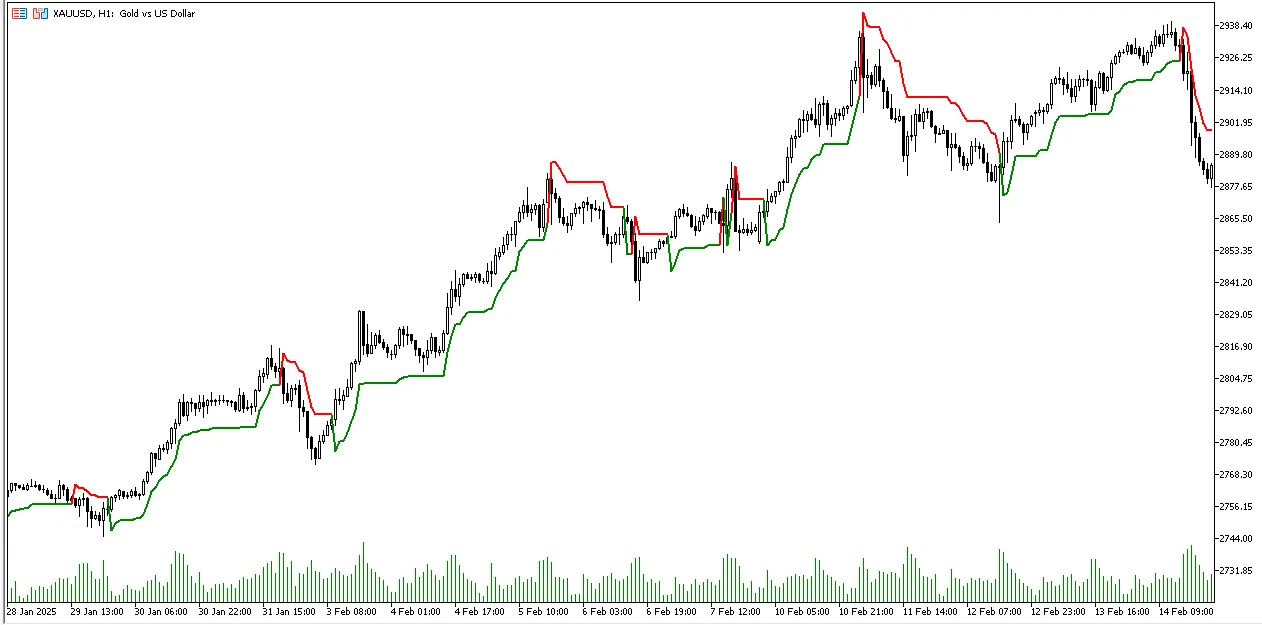
- In an uptrend: SuperTrend = Lower Band (green)
- In a downtrend: SuperTrend = Upper Band (red)
How to Use the SuperTrend Indicator
- The green line shows an uptrend, signaling potential buying opportunities.
- The red line indicates a downtrend, which can point to potential selling opportunities.
- It's versatile; you can use it for trend-following strategies or to identify market reversals.
- Additionally, it works excellently as a trailing stop mechanism.
Installing the SuperTrend Indicator
- Copy the SuperTrend file into your MetaTrader 5 indicators folder (usually found at Terminal_Directory/MQL5/Indicators/).
- Restart your MetaTrader 5 or refresh the Navigator panel to see the changes.
- Simply drag the indicator onto any chart to get started!
Key Parameters
- ATRPeriod: This defines the period for ATR calculation (default is 22).
- Multiplier: Adjusts sensitivity of the indicator (default is 3.0).
- SourcePrice: The type of price used for calculations.
- TakeWicksIntoAccount: Determines whether to include price wicks in the calculations.




Comments 0