
Written by: Profitrader, enhanced by Tor.
In the world of futures trading, data on trade volumes often comes with a one-day lag. To bridge this gap, many traders turn to the tick volume indicator (often referred to as tick volume™). This handy tool helps you monitor changes in volume throughout the trading day.
So, what exactly is tick volume? It counts the number of trades executed over a specific intraday period, but here’s the catch: it doesn’t reveal how many contracts were traded in those deals. For instance, you might see 50 trades in an hour. However, were those 50 one-lot orders or 50 hundred-lot orders? While tick volume may not give you the complete picture, it’s still a valuable indicator because it provides a quicker snapshot of volume changes, albeit with some loss of precision.
This post dives into the Ticks Volume Indicator (TVI). I've worked on it extensively and figured out how to maximize its potential. As a result, I've added alerts and arrows on the chart to help you identify potential entry points.
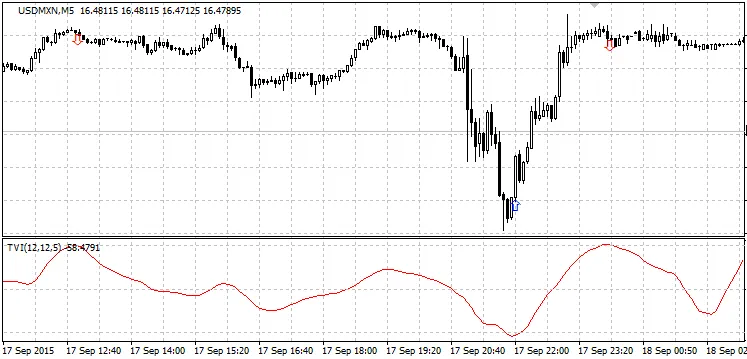
Tips for Using the Ticks Volume Indicator:
- For major currency pairs, set your chart to the M5 timeframe. Use levelUP = 4 and levelDOWN = -4 to make your buy/sell decisions. It's wise to trade with the trend, but keep in mind that many signals may suggest counter-trend moves during corrections. The indicator also helps identify reversals, which you can verify through backtesting.
- If you’re trading gold (XAUUSD) on the M5 chart, adjust the levels to levelUP = 40 and levelDOWN = -40 (the usual *10).
- Remember, these levels vary across different timeframes. Incorporating money management and averaging strategies can enhance your trading system. Just be cautious when entering against the trend.
Custom Variables:
externbool alerts = false; // alert for potential tradesexternbool play = false; // sound notificationsexternbool strelka = true; // enable/disable arrow drawingexternbool searchHight = true; // look for chart breaksexternbool NaOtkrytieSvechi = true; // only on candlestick openingexternbool AllHights = false; // all breaks or only those beyond specified levelsexternint barp = 0; // which candlestick to check: 0 or 1 (1 - no redraw)externint levelUP = 4; // for gold *10externint levelDOWN = -4; // *10 for gold




Comments 0