
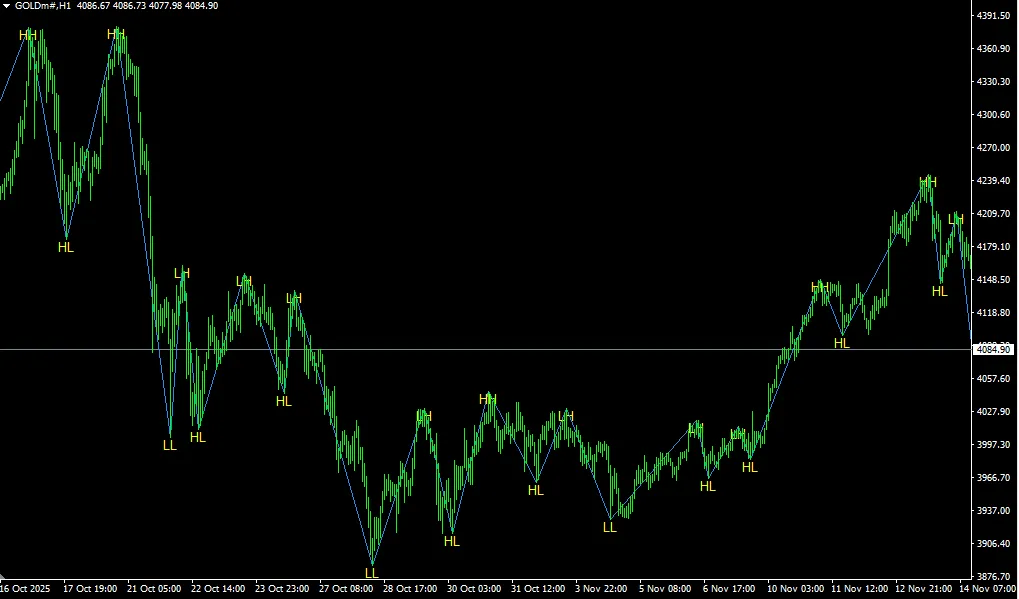
If you're diving into the world of trading, understanding patterns is crucial, and one of the most popular tools in a trader's toolbox is the ZigZag indicator. Today, we're going to talk about the ZigZag HH, HL, LH, and LL pattern label indicator specifically for MetaTrader 4 (MT4).
What is the ZigZag Indicator?
The ZigZag indicator helps traders filter out market noise by highlighting significant price movements. It connects the peaks and troughs of price action, making it easier to identify trends and reversals. This tool is particularly useful in spotting higher highs (HH), higher lows (HL), lower highs (LH), and lower lows (LL).
Why Use the ZigZag Pattern?
- Trend Identification: Easily spot the overall direction of the market.
- Clear Signals: Helps in identifying entry and exit points.
- Noise Reduction: Filters out minor price fluctuations for clearer analysis.
Setting Up the Indicator in MT4
Setting up the ZigZag indicator in your MetaTrader 4 platform is a breeze. Here’s how to do it:
- Open your MT4 platform.
- Navigate to the 'Insert' tab.
- Select 'Indicators' and then click on 'Custom.'
- Find and select the ZigZag indicator from the list.
- Adjust the settings to suit your trading style.
Final Thoughts
The ZigZag HH, HL, LH, LL pattern label indicator can be a game changer in your trading strategy. By using this tool effectively, you can gain a clearer perspective on market trends and make more informed trading decisions. Remember, practice makes perfect, so give it a go and see how it fits into your trading routine!




Comments 0