
Author: PozitiF
If you're looking to enhance your trading strategy, the MultiLineMovingAverage indicator is a must-have tool for your MetaTrader 5 platform. This powerful indicator displays six moving averages across different time frames directly on your active chart, providing a comprehensive overview of market trends.
Each moving average can be customized for specific periods, and you have the flexibility to enable or disable whichever time frames you prefer. This level of customization allows you to tailor your analysis to fit your unique trading style.
Originally developed in MQL4, the MultiLineMovingAverage was first shared on the Code Base back on June 3, 2011. It has since become a favorite among traders for its versatility and ease of use.
Input Parameters
//+------------------------------------------------+//| Indicator input parameters |//+------------------------------------------------+inputstring level_name="MultiLineMovingAverage 1"; // Name of the levelinputstring level_comment="MultiLineMovingAverage";// Comment for the levelinput ENUM_TEXT_POSITION TxtPos=Right; // Position of the textinputuint TextSize=15; // Size of the textinputcolor Up_levels_color=Lime; // Color for up moving averagesinputcolor Fl_levels_color=Gray; // Color for flat moving averagesinputcolor Dn_levels_color=Red; // Color for down moving averagesinputuint CandleCount=10; // Number of candles to display//---inputbool display_MA1=true; // Show MA Level 1inputENUM_TIMEFRAMES Timeframe1=PERIOD_M5; // Timeframe for MA 1inputENUM_MA_METHOD MA1_SMethod=MODE_EMA; // Smoothing method for MA 1inputuint MA1_Length=10; // Length of MA 1inputuint MA1_Signal_Bar=1; // Signal bar for MA 1inputENUM_APPLIED_PRICE AppliedPrice1=PRICE_CLOSE; // Applied price for MA 1inputENUM_LINE_STYLE level1_style=STYLE_SOLID; // Line style for MA 1input ENUM_WIDTH level1_width=w_2; // Width of MA 1//---inputbool display_MA2=true; // Show MA Level 2inputENUM_TIMEFRAMES Timeframe2=PERIOD_M30; // Timeframe for MA 2inputENUM_MA_METHOD MA2_SMethod=MODE_EMA; // Smoothing method for MA 2inputuint MA2_Length=10; // Length of MA 2inputuint MA2_Signal_Bar=1; // Signal bar for MA 2inputENUM_APPLIED_PRICE AppliedPrice2=PRICE_CLOSE; // Applied price for MA 2inputENUM_LINE_STYLE level2_style=STYLE_SOLID; // Line style for MA 2input ENUM_WIDTH level2_width=w_2; // Width of MA 2//---inputbool display_MA3=true; // Show MA Level 3inputENUM_TIMEFRAMES Timeframe3=PERIOD_H2; // Timeframe for MA 3inputENUM_MA_METHOD MA3_SMethod=MODE_EMA; // Smoothing method for MA 3inputuint MA3_Length=10; // Length of MA 3inputuint MA3_Signal_Bar=1; // Signal bar for MA 3inputENUM_APPLIED_PRICE AppliedPrice3=PRICE_CLOSE; // Applied price for MA 3inputENUM_LINE_STYLE level3_style=STYLE_SOLID; // Line style for MA 3input ENUM_WIDTH level3_width=w_2; // Width of MA 3//---inputbool display_MA4=true; // Show MA Level 4inputENUM_TIMEFRAMES Timeframe4=PERIOD_H4; // Timeframe for MA 4inputENUM_MA_METHOD MA4_SMethod=MODE_EMA; // Smoothing method for MA 4inputuint MA4_Length=10; // Length of MA 4inputuint MA4_Signal_Bar=1; // Signal bar for MA 4inputENUM_APPLIED_PRICE AppliedPrice4=PRICE_CLOSE; // Applied price for MA 4inputENUM_LINE_STYLE level4_style=STYLE_SOLID; // Line style for MA 4input ENUM_WIDTH level4_width=w_2; // Width of MA 4//---inputbool display_MA5=true; // Show MA Level 5inputENUM_TIMEFRAMES Timeframe5=PERIOD_H12; // Timeframe for MA 5inputENUM_MA_METHOD MA5_SMethod=MODE_EMA; // Smoothing method for MA 5inputuint MA5_Length=10; // Length of MA 5inputuint MA5_Signal_Bar=1; // Signal bar for MA 5inputENUM_APPLIED_PRICE AppliedPrice5=PRICE_CLOSE; // Applied price for MA 5inputENUM_LINE_STYLE level5_style=STYLE_SOLID; // Line style for MA 5input ENUM_WIDTH level5_width=w_2; // Width of MA 5//---inputbool display_MA6=true; // Show MA Level 6inputENUM_TIMEFRAMES Timeframe6=PERIOD_D1; // Timeframe for MA 6inputENUM_MA_METHOD MA6_SMethod=MODE_EMA; // Smoothing method for MA 6inputuint MA6_Length=10; // Length of MA 6inputuint MA6_Signal_Bar=1; // Signal bar for MA 6inputENUM_APPLIED_PRICE AppliedPrice6=PRICE_CLOSE; // Applied price for MA 6inputENUM_LINE_STYLE level6_style=STYLE_SOLID; // Line style for MA 6input ENUM_WIDTH level6_width=w_2; // Width of MA 6
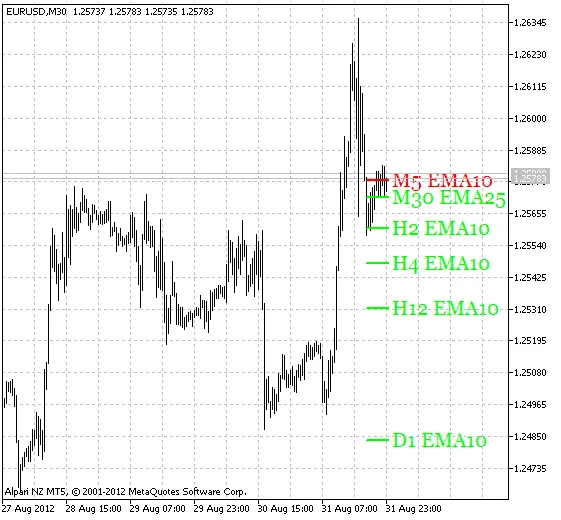
Fig.1 The MultiLineMovingAverage Indicator




Comments 0