
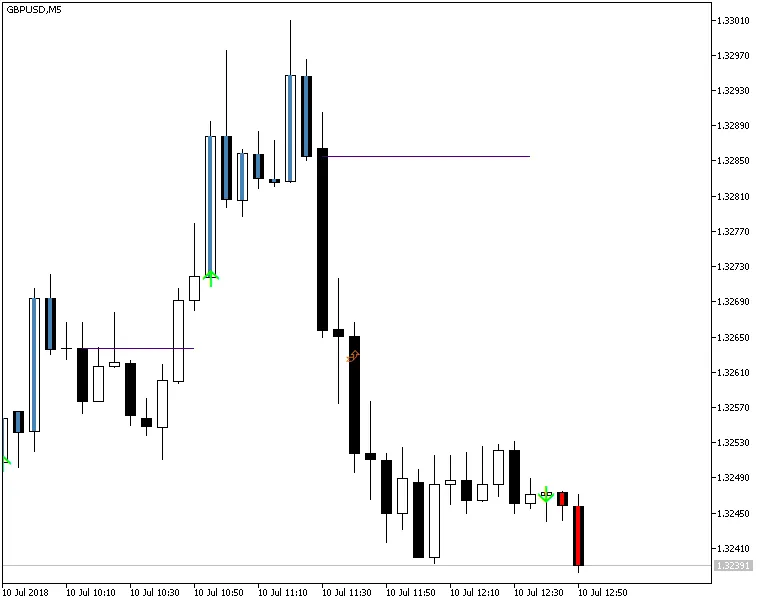
Easy Trend Visualizer is a nifty indicator for MetaTrader 5 that does exactly what it promises. It identifies where trends start and end, as well as areas where there’s no trend at all. This tool, based on the standard ADX (Average Directional Movement Index) indicators, works like a charm and is quick to respond. You’ll find it displayed right in the main chart window, making it easy to spot trends at a glance.
What’s more, the Easy Trend Visualizer comes packed with a variety of alerts. You can set notifications for horizontal line appearances, crossovers, and directional arrows, ensuring you never miss a key moment in the market. This indicator is available for both MT4 and MT5 platforms, giving you flexibility depending on your trading setup.
Input Parameters
- ADXperiod1 (default = 10) — This sets the period for the first ADX indicator.
- ADXperiod2 (default = 14) — This establishes the period for the second ADX indicator.
- ADXperiod3 (default = 20) — This defines the period for the third ADX indicator.
- UseAlertHorizontalLine (default = false) — Toggle alerts for when a horizontal line starts.
- UseAlertUpDownArrows (default = false) — Activate alerts when an up or down arrow appears on your chart.
- UseAlertHorizontalLineCrossCurrent (default = false) — Set alerts for when a candle crosses the current horizontal line.
- UseAlertHorizontalLineCrossPrevious (default = false) — Enable alerts for when a candle crosses any of the previous horizontal lines.
- NumberPHLtoTrack (default = 0) — This defines how many previous horizontal lines to track for alerts. You’ll get alerts when the price crosses and closes above or below one of these lines.
- IgnorePHLShorterThan (default = 2) — Set the minimum length for previous horizontal lines to be considered for alerts. Lines shorter than this will be ignored to prevent confusion.
- PHLC_Arrow_Color (default = clrChocolate) — This sets the color for alert arrows on previous horizontal line crosses.
- CHLC_Arrow_Color (default = clrFireBrick) — This chooses the color for alert arrows on current horizontal line crosses.
- NativeAlerts (default = true) — If true, the indicator will generate native pop-up alerts.
- SendEmails (default = true) — If true, alerts will also be emailed. Make sure your email settings are configured correctly in MetaTrader under Tools -> Options -> Email.
- SendNotifications (default = true) — If true, alerts will be sent as push notifications to your mobile device. Ensure your notifications are set up in MetaTrader via Tools -> Options -> Notifications.




Comments 0