
Hey there, fellow traders! If you're looking to enhance your trading strategy, the PriceSpeed indicator for MetaTrader 5 might just be your new best friend. This nifty tool measures the speed at which price changes, expressed in points per minute. It builds on the foundations of the Average Speed indicator, but with some serious upgrades and expanded features.
What makes PriceSpeed particularly interesting is its ability to capture not just the average price speed—useful for trend evaluation—but also the peak speed. This is a game changer for those who employ breakout and pulse trading strategies.
So, how does it work? The peak speed is calculated based on the difference between the high and low prices of each candle, which indicates the maximum distance the price has traveled during a given timeframe. Keep in mind, this is more of an estimate than a precise figure. Usually, the time it takes to move between high and low is much shorter than the overall candle duration, meaning the actual speed is likely higher. Note that the indicator doesn’t analyze smaller timeframes, so it focuses on higher timeframes for better accuracy.
But wait, there’s more! The PriceSpeed indicator also identifies false peak speeds. These can occur during the initial move from open to the first extremum (which could be a high or low, depending on the candle's direction) and from the second extremum back to the close—both in the opposite direction of the candle's real movement.
Here's a quick rundown of what the indicator displays:
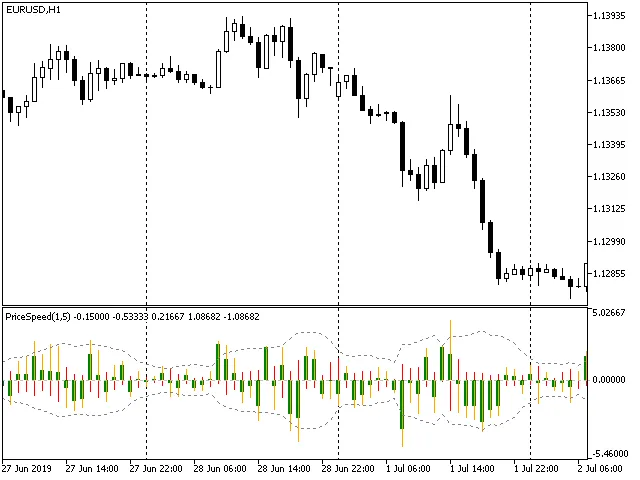
- Average Price Speed: shown as a thick green line based on the original algorithm.
- Peak Real Price Speed: depicted by a thin orange line, representing the actual peak speed.
- Peak False Price Speed: illustrated by a thin red line, showing false peaks.
To help you make informed decisions regarding the significance of real and false peak speeds, the indicator also calculates the standard deviation of peak speeds over a specified number of bars. This is displayed as a corridor of dotted lines, giving you better insight into price movements.
Parameters
- Averaging Bars: This parameter lets you set the number of bars for averaging price speed. For peak speeds, you might want to keep this at 1 for the best results.
- Price: This determines the price type used for calculating average price speed, though it's not applicable for peak speeds.
- Peak Deviation Period: This is the number of bars used to calculate the standard deviation of peak speeds.




Comments 0