
SL+TP-OE Pip Calculation Indicator v2
Hey fellow traders! If you're looking to streamline your trading process, the SL+TP-OE Pip Calculation Indicator v2 for MetaTrader 4 is a game changer. This handy tool helps you accurately calculate the pip difference between your Order Execution (OE) price and your Stop Loss (SL) and Take Profit (TP) prices.
Latest Updates:
- Improved order type discrimination
- Enhanced SL & TP and OE price calculations
- More customizable user-defined labels
Key Features
- Calculates the pip difference between the OE price and SL & TP prices.
- Displays text labels at SL & TP lines, including Order Type, Ticket Number, SL & TP prices, and pip calculations.
- Shows text labels at OE lines, detailing Order Type, Ticket Number, and OE price.
- Compatible with MT4 defaults and other suitable applications.
Customizable Labels
You can define your own labels through the input window. Check out the options to tailor them to your trading style!
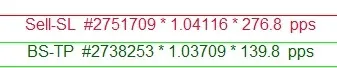
User-Defined Examples:
- Sell-SL #2751709 * 1.04116 * 276.9 pips
- Sell-SL #2751709 * 2769 f-pips *
- #2751709 * 276.9
- Sell-SL * 2769
- 1.04116 * 276.9
- 2769
- BS-OE #2738254 * 1.02311
* Non-digit symbols will default to pips regardless of whether fractional pips (f-pips) are enabled.
Pip Calculation Test & Check
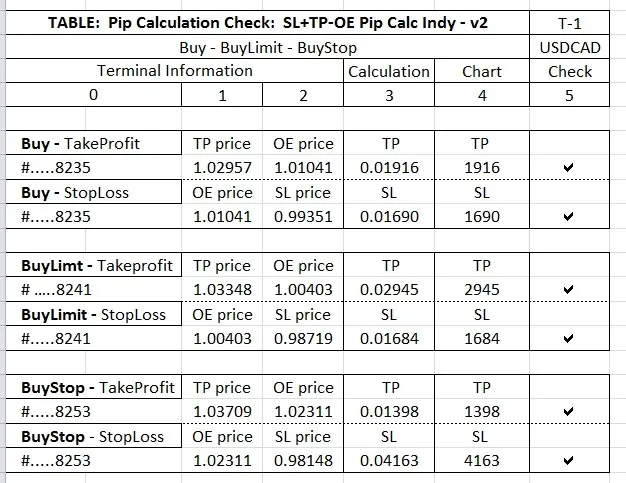
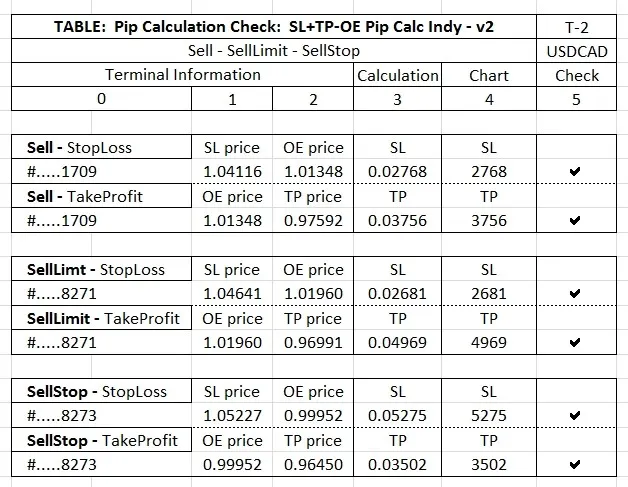
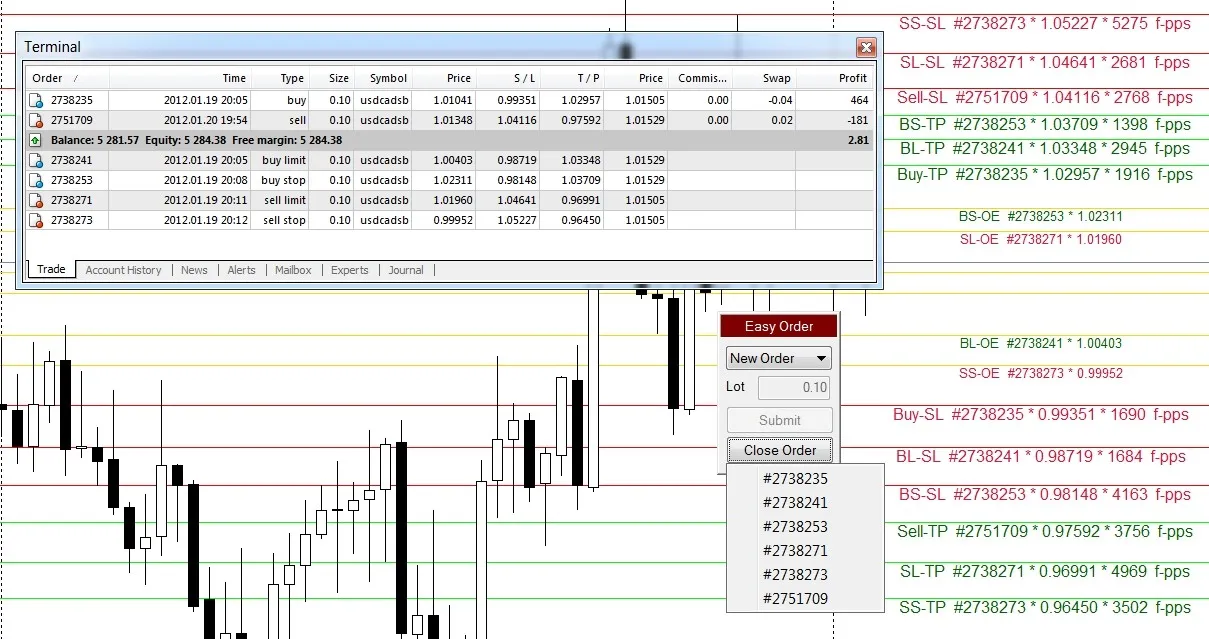
To ensure everything is functioning correctly, cross-reference the tables and charts with the terminal image included. Here’s how:
- Columns 0-2 in the terminal show values taken at the moment of the screenshot.
- Column 3 contains an Excel calculation of the relevant values.
- Column 4 shows the values indicated on the chart.
- Column 5 confirms that the values match.
- Columns 6, 7, and 8 detail the OE price, SL, and TP, respectively.
- Column 9 shows the current Bid and Ask.
Notes
- The SL+TP-CP Pip Distance Indicator v2 operates independently of the Easy Order and does not attach text to Easy Order SL & TP lines.
- Easy Order is a free MT4 script available for download here.
Streamline Your Settings
To avoid repetitive tasks and enhance your workflow, you can permanently change the default settings. Here’s how:
- Open MT4, go to the top left of the menu, click View, and select Navigator.
- The Navigator window will pop up on your screen. Expand the Custom Indicators section if it’s not already open.
- Find SL+TP-CP DIST INDI - v2, right-click it, and choose Modify.
- You’ll enter the MetaEditor with the indicator loaded. Close any other indicators for clarity.
- You can now begin to edit. Remember to run Compile after each change to check for errors.
Tip: If you encounter any issues with compilation, use the undo feature to revert to a previous version that compiled successfully.
Disclaimer
All downloads and documentation are provided AS IS for educational purposes. Use at your own risk!




Comments 0