
Unlock the Power of Candle Wicks with the Candle Wicks Length Display Indicator
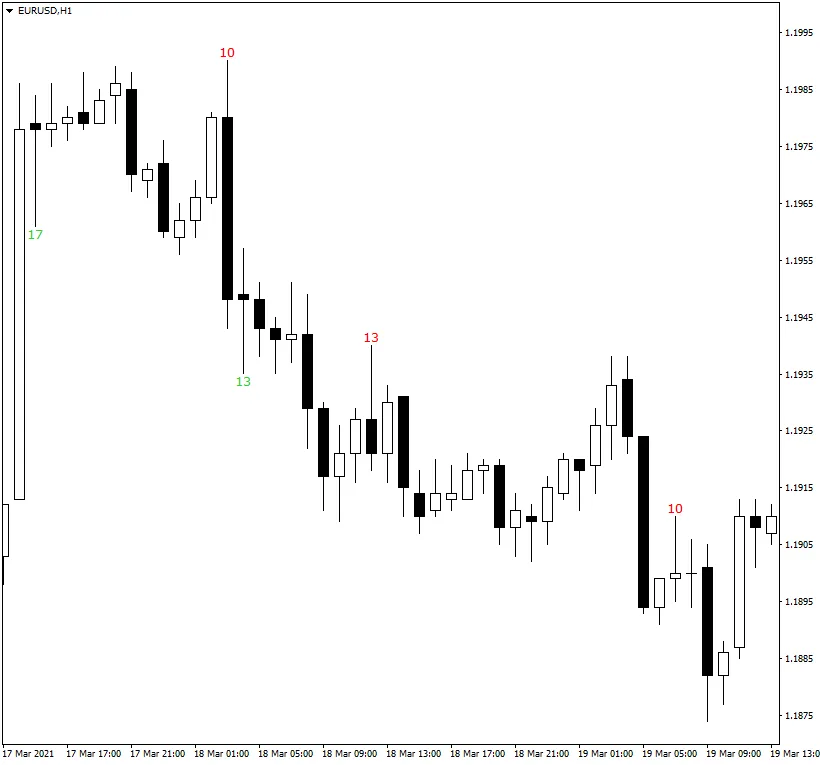
The Candle Wicks Length Display Indicator for MetaTrader 5 is a game-changer for traders who rely on candle wicks for their trading strategies. This handy tool allows you to view the length of candle wicks directly on your chart in pips, making it easier to spot potential entry and exit points. You can customize it to show only wicks that meet your specific length criteria, ensuring you focus on the signals that matter most.
If long wicks are part of your trading strategy, this indicator is a must-have. It helps you stay informed about significant price movements and the precise lengths of those wicks, giving you the edge you need in the market.
Key Features of the Candle Wicks Length Display Indicator
- Units (default = Pips) — Measure wick lengths in standard pips or percentage points.
- DisplayWickLimit (default = 5) — Set the minimum wick length to display on your chart.
- DisplayHighWickColorBullish (default = clrRed) — Choose the display color for bullish candle wicks.
- DisplayHighWickColorBearish (default = clrFireBrick) — Set the color for bearish candle wicks.
- DisplayLowWickColorBullish (default = clrLimeGreen) — Select the color for the lower wick on bullish candles.
- DisplayLowWickColorBearish (default = clrGreen) — Customize the color for the lower wick on bearish candles.
- UpperWickLimit (default = 10) — Minimum upper wick length for alerts.
- LowerWickLimit (default = 10) — Minimum lower wick length for alerts.
- WaitForClose (default = true) — Wait for candles to close before measuring wick lengths.
- TopBottomPercent (default = 0) — Display lengths only for candles where open and close are within a specific percentage.
- LessThan (default = false) — Mark wicks that are less than or equal to the specified limits.
- SoundAlert (default = false) — Enable sound alerts when wick limits are reached.
- VisualAlert (default = false) — Use MetaTrader's pop-up alerts when limits are reached.
- EmailAlert (default = false) — Get email notifications when limits are breached (requires setup).
- NotificationAlert (default = false) — Receive push notifications on your device when limits are reached.
- AlertOnLimit (default = false) — Alerts for wicks exceeding specified limits.
- AlertOnEqualTopBottomWicks (default = false) — Alerts when upper and lower wicks are of equal length.
- IgnoreAlertsOnFirstRun (default = true) — Ignore alerts when first attached to the chart.
- FontFace (default = "Verdana") — Choose the font for wick length display.
- FontSize (default = 10) — Set the font size for visibility.
- MaxCandles (default = 500) — Number of candles to process, or set to 0 to process all.
- UseRawPips (default = false) — Use raw pips instead of calculated values when necessary.
- ShowAverageWickSize (default = false) — Display the average wick size for better analysis.
- AvgCandles (default = 50) — Number of candles to analyze for the average wick size.
- AverageWickSizeColor (default = clrLightGray) — Color of the average wick size display.
- Corner (default = CORNER_LEFT_UPPER) — Position of the average wick size display on your chart.
- Distance_X (default = 3) — Horizontal distance from the corner for display.
- Distance_Y (default = 12) — Vertical distance from the corner for display.
- DrawTextAsBackground (default = false) — Display the average wick size as background text.
- RemoveOldLabels (default = false) — Continuously remove text labels beyond the specified limit.
- ObjectPrefix (default = "CWLD-") — Prefix for chart objects for compatibility.




Comments 0