
Let’s cut to the chase: MetaTrader 5's built-in economic calendar isn't perfectly synced with historical quotes. This can create discrepancies that you need to be aware of, especially if you're serious about your trading strategies.
When quotes are generated, they come with timestamps that reflect the server's time zone at that moment. Once those bars are set, their timestamps don’t budge. Meanwhile, the economic calendar provides insights into events—past, present, and future—based on the server's current time zone. Since brokers often have specific time zone policies, including adjusting for daylight saving time, you might find that timestamps for historical events can be off by an hour compared to the corresponding bars for about half the year.
But it gets trickier. Brokers sometimes switch time zones more dramatically than just toggling daylight saving time. This can leave historical quotes appearing several hours out of sync with the timing of the economic events that occurred. With news coming in from various countries, each with their own daylight saving rules, the timing of news releases can seem to bounce around on your charts, particularly during spring and autumn.
It may seem like a minor detail when trading live, but what if you want to backtest a news-driven strategy? While it’s true that the calendar isn't natively supported in the MetaTrader tester, many traders rely on news to make informed decisions or to step back before the market reacts. That’s why incorporating the calendar into your backtesting is crucial. Exporting the calendar for external storage and importing it into the tester is a smart move, and we covered a useful archiving tool for this in our algotrading book.
However, we faced a challenge: the historical quotes and events were out of sync. This issue was left unresolved in the book, but now it's addressed with the extended version of CalendarCache.mqh and the new CalendarMonitorCachedTZ.mq5 indicator. This isn’t just any indicator; it keeps an eye on news events and dynamically updates an on-chart table with past and upcoming events.
All the time correction work happens behind the scenes, thanks to the TimeServerDST.mqh library. If you're keen to understand how the time correction works, you can use the CalendarCSVForDates.mq5 script to compare CSV files with and without the correction side by side.
Here’s how the library is integrated into both programs:
#include <TimeServerDST.mqh> // including before Calendar cache enables timezone fix-up support#include <MQL5Book/CalendarFilterCached.mqh>
#include <MQL5Book/CalendarCache.mqh>
Just like in the original indicator, there's a string input called CalendarCacheFile, where you can specify a name for the calendar file to read from or write to.
When you attach the indicator to an online chart with an empty CalendarCacheFile, it will use the built-in calendar live. If you run the indicator with a specific name in CalendarCacheFile and the file doesn’t exist, it will export the calendar records into the cache file (creating the file) and exit. This is also the point where timestamps can be corrected (see FixCachedTimesBySymbolHistory below).
When the indicator runs with the name of an existing cache file in CalendarCacheFile, it loads the cache and operates on this copy just like it would with the built-in calendar. This feature is particularly useful for backtesting.
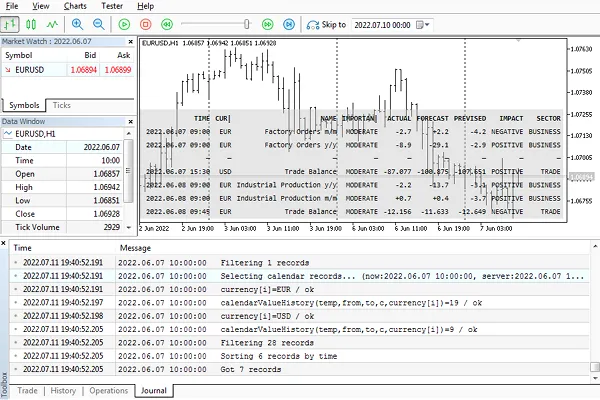
Remember, the tester requires you to specify additional files—specifically, the prepared online calendar file—in the directive #property tester_file or ensure the calendar file is in the common folder: C:/Users/<User>/AppData/Roaming/MetaQuotes/Terminal/Common/.
Of course, the cache can also be loaded into an EA during backtests and optimizations.
The input string FixCachedTimesBySymbolHistory is processed in a specific manner:
If it’s left empty, the indicator saves the cache without making time corrections.
To enable time corrections during export, you must specify a symbol for empirical detection of historical time zones on the server. It’s best to use “XAUUSD” or “EURUSD” for this.
With this input, only a few lines are added to the new version of the indicator:
         if(StringLen(FixCachedTimesBySymbolHistory))
            cache[].adjustTZonHistory(FixCachedTimesBySymbolHistory, true);
The adjustTZonHistory method is specifically designed for adjusting timestamps and utilizes the internals of TimeServerDST.mqh.
This method should only be called online (not in the tester). Typically, it should be called on cache objects filled from the built-in calendar immediately after filling. Otherwise, if the cache is loaded from a calendar file, or if the method has been called already, the cache contents may already be adjusted. Then you’ll end up applying a fix to an already fixed timestamp, which is not what you want.
The second parameter (true) tells the method to log the boundaries of applied changes. Here’s an example of what that log might contain:
Time fix-up started at 2021.07.1900:30:002021.07.1900:30:00: 148786 -10800 diff=-36002021.11.0801:50:00: 135918 -7200 OK
2022.03.1404:30:00: 161085 -10800 diff=-36002022.11.0704:00:00: 165962 -7200 OK
2023.03.1301:50:00: 168500 -10800 diff=-36002023.11.0601:50:00: 169270 -7200 OK
2024.03.1101:50:00: 181258 -10800 diff=-36002024.11.0402:30:00: 208469 -7200 OK
Each line in the log shows the time and ID of the event where a discrepancy was found, the server time offset at that event, and the difference that needs to be applied to all future timestamps to eliminate the bias in server time at the time of calendar caching.
The attached mqh-files (CalendarFilter.mqh, CalendarCache.mqh, QuickSortStructT(Ref).mqh) come with bug fixes and enhancements compared to their original versions from the book.
Updates
11.11.2024 - small bug fix and updates in CalendarFilter.mqh, CalendarCache.mqh;
22.11.2024 - small bug fixes and improvements in CalendarCache.mqh.




Comments 0