
Description:
The Spread Monitoring indicator is a handy tool that displays a histogram to visualize spread values. It categorizes spreads into minimal (red), average (green), and maximal (blue) on corresponding bars.
This monitoring is incredibly beneficial for comparing broker spreads and analyzing spread dynamics over time.
Image:
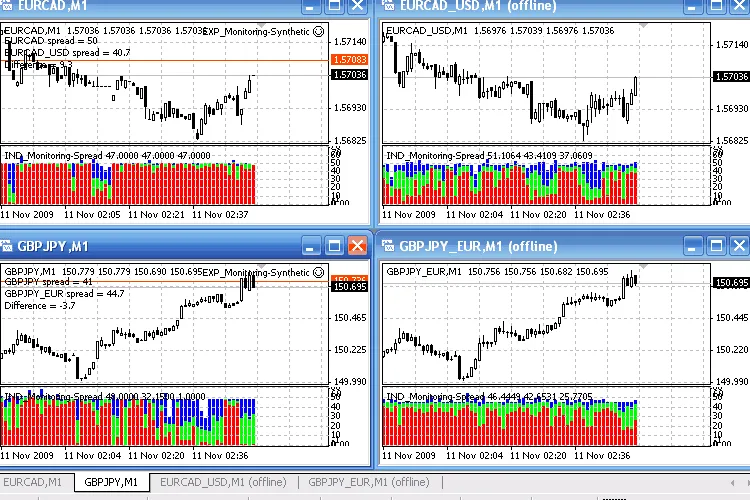
Fig 1. Indicator functionality with real and synthetic currency pairs. Broker X.
The great thing is that the data collected by the indicator isn't lost after you remove it; you can simply reattach it to the chart to view your historical data.
Additionally, this indicator can visualize spreads for synthetic currency pairs.
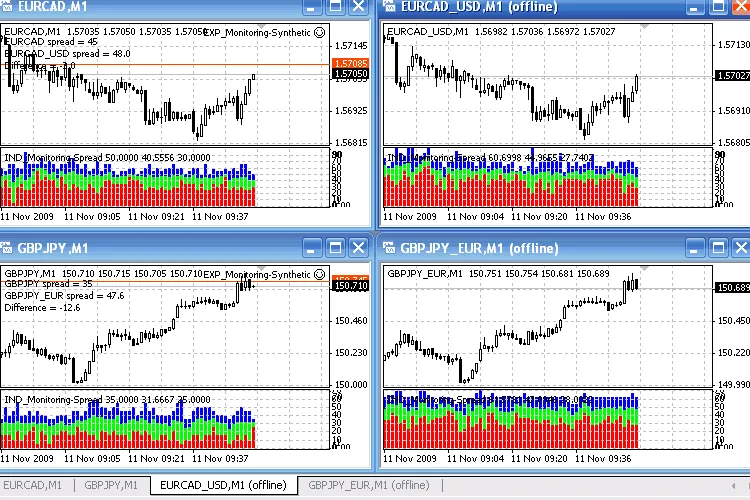
Fig 2. Indicator functionality with real and synthetic currency pairs. Broker Y.
Recommendations:
To effectively use synthetic currency pairs, follow these steps:
- Run the attached EXP_Monitoring-Synthetic expert on a real pair (to serve as synthetics). Ensure to specify the currency (Currency property) for the synthetic pair calculation;
- Open the offline chart for the constructed (XXXYYY_ZZZ) synthetic pair (the chart updates automatically with any new bar);
- Attach the IND_Monitoring-Spread indicator to the opened offline chart;
In the figures above, you'll see synthetic pairs like EURCAD (calculated through USD, using EURUSD and USDCAD) and GBPJPY (calculated through EUR, using EURGBP and EURJPY).
For each of these pairs, the IND_Monitoring-Spread indicator illustrates the spread dynamics of the corresponding synthetic pair. You can even use these synthetic pairs in the Strategy Tester as if they were real, which allows you to leverage generated historical data and spread characteristics for future trading.
The EXP_Monitoring-Synthetic is a loopback-type expert, meaning it can run as a script (it automatically removes from the chart when you close the terminal). Just like the indicator, this expert retains the historical data of synthetic pairs.
The proposed code can be adjusted for real-time updates of the offline chart, though it would demand more computing resources than the current version, which only updates with new bars. Remember to enable DLL use in your client terminal for auto-updating offline charts.
Editor's Note:
Please note that this is a mirror translation of the original Russian version.
If you have any questions for the author, suggestions, or comments, it's best to post them there.
If you find this code useful for trading or educational purposes, don't forget to thank the author!




Comments 0