
Cuando llamas al iStochastic estándar desde tu EA, siempre se mostrarán dos niveles, 80.0 y 20.0 en el Tester Visual. Pero esto no es lo más óptimo si tu EA usa otros niveles, como 75.0 y 25.0. ¡Vamos, eso no ayuda!
Por eso, hemos modificado el indicador estándar: el Stochastic Custom ahora cuenta con dos nuevos parámetros que te permitirán ajustar mejor tus estrategias de trading:
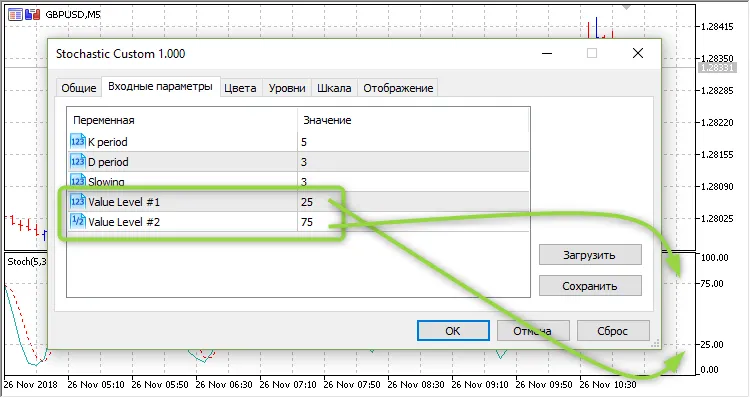
Aquí tienes un ejemplo de cómo llamar al indicador desde tu EA:
***
inputint            Inp_STO_KPeriod= 5;        // STO: K periodoinputint            Inp_STO_DPeriod= 3;        // STO: D periodoinputint            Inp_STO_Slowing= 3;        // STO: Slowinginputint            Inp_STO_Level1 = 25.0;     // STO: Valor Nivel #1inputdouble         Inp_STO_Level2 = 75.0;     // STO: Valor Nivel #2
***
//--- crear handle del indicador iCustom
   handle_iStochastic=iCustom(m_symbol.Name(),Period(),"Stochastic Custom",
                              Inp_STO_KPeriod,Inp_STO_DPeriod,Inp_STO_Slowing,Inp_STO_Level1,Inp_STO_Level2);
//--- si el handle no se crea
   if(handle_iStochastic==INVALID_HANDLE)
     {
      //--- informar sobre el fallo y mostrar el código de error
      PrintFormat("No se pudo crear el handle del indicador iCustom para el símbolo %s/%s, código de error %d",
                  m_symbol.Name(),
                  EnumToString(Period()),
                  GetLastError());
      //--- el indicador se detiene de forma anticipada
      return(INIT_FAILED);
     }




Comentarios 0