
Hey fellow traders! Today, let's dive into the BW-Zone indicator for MetaTrader 4. If you’re looking to enhance your trading toolkit, this indicator is definitely worth your time.
At its core, the BW-Zone indicator is all about visually interpreting the fourth dimension of Chaos Theory, as proposed by B. Williams. To get a better grasp of how this theory applies to trading, you can check out more details here.
In a nutshell, the BW-Zone identifies market conditions based on two key indicators: the Awesome Oscillator (AO) and the Acceleration/Deceleration (AC). Both of these tools come standard with MetaTrader, so you won’t need to hunt for them. You can easily find them under Insert - Indicators - B. Williams.
Here’s how it works: when both the Awesome Oscillator and Acceleration/Deceleration indicators are moving in the same direction—whether that’s both green or both red—it means the market is not only trending but also gaining momentum.
Let’s break it down further:
- If both AO and AC are green, you’re in a green zone, indicating a strong bullish trend. You might want to color this bar green for easy identification.
- If both AO and AC are red, you find yourself in a red zone, which signals a strong bearish trend. Coloring this bar red will help you spot it quickly.
- However, if AO and AC are going in different directions, the bar gets a gray tint, indicating a gray zone. This is a sign of indecision in the market.
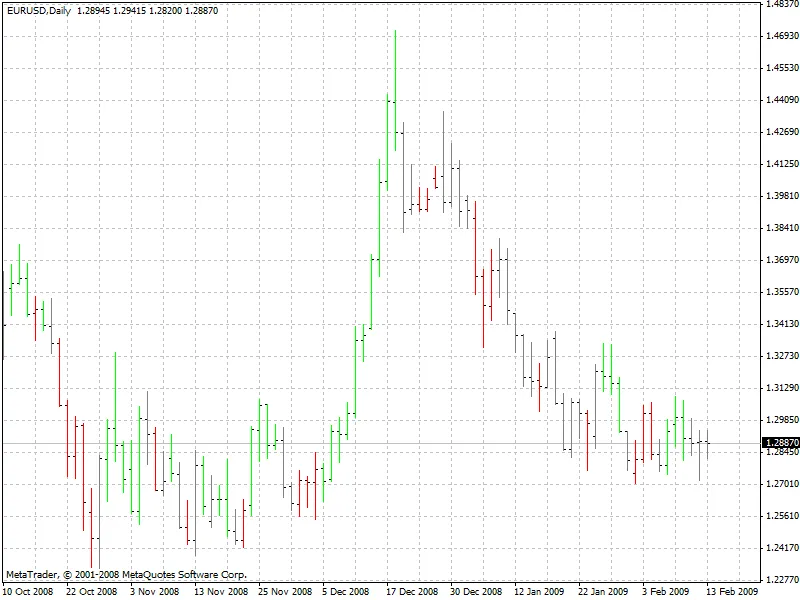
So there you have it! The BW-Zone indicator can provide valuable insights into market trends, helping you make more informed trading decisions. Happy trading!




Comments 0