
Are you looking to enhance your trading strategy? The Heat Map Indicator for MetaTrader 4 is a powerful tool that can help you identify the most active price zones in the market—those hot spots where significant trading activity occurs.
This indicator uses a gradient color scheme to display these zones, ranging from bright red (indicating the least activity) to dark red (indicating the highest activity). The darker the red, the hotter the zone!
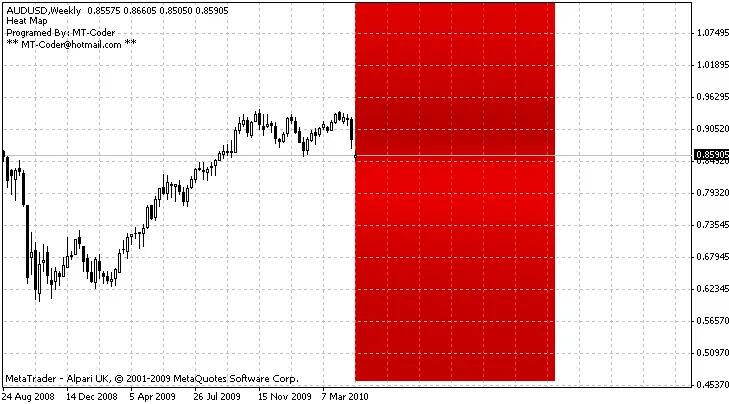
Now, let’s dive into the settings to make the most of this indicator:
Settings:
- HMPeriod: This defines the number of bars included in the count.
- Scale: Adjusts the size of each zone for better visualization.
- NbZone: Set the number of zones (or rectangles) you want to create.
If you’re seeing a blue rectangle, it’s a sign to check the availability of historical data for your selected period. Alternatively, try changing the period to see if that resolves the issue.
Update:
- A major bug has been fixed. If you downloaded this indicator before July 24, 2010, make sure to redownload it.
- The indicator now supports all timeframes.
- Initialization issues have been resolved.
Overall, the Heat Map Indicator is a valuable asset for traders looking to pinpoint critical price zones. By utilizing its settings effectively, you can gain insights that enhance your trading decisions.




Comments 0