
The iWPRSign_HTF_Signal indicator is a powerful tool for traders using MetaTrader 5. It helps you visualize trend directions and signals generated by the iWPRSign indicator at your chosen bar. With its graphical objects and colored trend indicators, it makes identifying trading opportunities a breeze. Plus, it can trigger alerts and play audio signals to keep you informed.
When a trend continues at the selected bar, you’ll see a right arrow displayed, with its color reflecting the trend direction. If the trend shifts, a diagonal arrow pops up, indicating the new deal direction. This visual representation makes it easier to spot potential trades at a glance.
Input Parameters Overview
All input parameters fall into three main categories:
- iWPRSign Indicator Settings:
//+------------------------------------------------+
//|  Indicator input parameters                    |
//+------------------------------------------------+
input string Symbol_="";  // Financial asset
input ENUM_TIMEFRAMES Timeframe=PERIOD_H4;  // Indicator timeframe
uint ATR_Period=14;
input uint WPRPeriod=14;
input int UpLevel=-30;  // Overbought level
input int DnLevel=-70;  // Oversold level
- Visualization Settings:
//---- indicator display settings
input uint SignalBar=0;  // Bar number for signal (0 - current bar)
input string Symbols_Sirname=INDICATOR_NAME"_Label_";  // Indicator labels
input color Upsymbol_Color=clrMediumSeaGreen;  // Uptrend color
input color Dnsymbol_Color=clrIndianRed;  // Downtrend color
input color IndName_Color=clrDarkOrchid;  // Indicator name color
input uint Symbols_Size=60;  // Symbol size
input uint Font_Size=10;  // Font size
input int X_1=5;  // Horizontal name offset
input int Y_1=-15;  // Vertical name offset
input bool ShowIndName=true;  // Display indicator name
input ENUM_BASE_CORNER WhatCorner=CORNER_RIGHT_UPPER;  // Corner to display symbol
input uint X_=0;  // Horizontal offset
input uint Y_=20;  // Vertical offset
- Alert Settings:
//---- Alert Settings
input ENUM_ALERT_MODE alert_mode=OnlySound;  // Alert triggering option
input uint AlertCount=0;  // Number of alerts
If you plan to use multiple iWPRSign_HTF_Signal indicators on the same chart, make sure each has its unique Symbols_Sirname value for the labels.
This indicator requires the compiled iWPRSign.mq5 file. Don’t forget to place it in your <terminal_data_folder>\MQL5\Indicators\ directory.
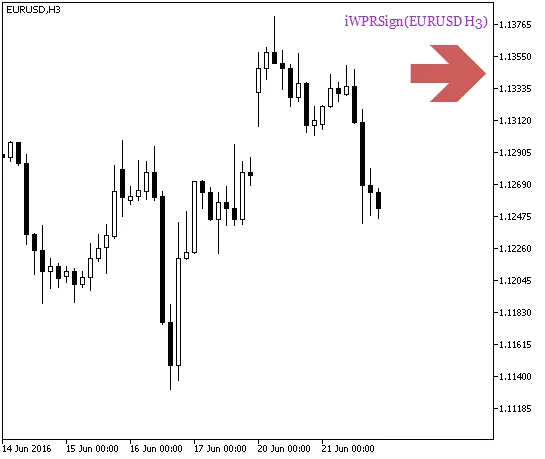
Fig.1. iWPRSign_HTF_Signal - Trend Continuation Signal
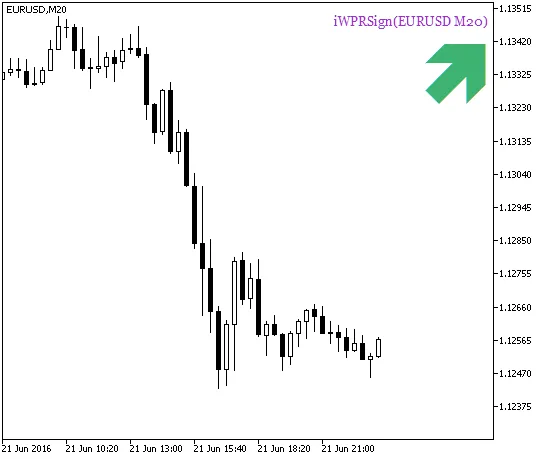
Fig.2. iWPRSign_HTF_Signal - Signal for a Deal
Related Posts
- Unlocking MetaCOT 2: Your Ultimate CFTC Indicator Toolkit for MT4
- Unlocking Trading Success with METRO_WPR_HTF_Signal for MetaTrader 5
- Mastering the Delta_WPR Indicator for MetaTrader 5: A Trader's Guide
- Maximize Your Trading Strategy with the Stalin_HTF_Signal Indicator for MetaTrader 5
- Customize Your Trading Experience with WPR Custom for MetaTrader 5