
Hey fellow traders! Today, let’s dive into the MACD in MA indicator and see how it can enhance your trading strategy on MetaTrader 4.
What is MACD in MA?
The MACD in MA indicator changes color based on the iMACD value. If the iMACD is above zero, it indicates an uptrend, while a value below zero signals a downtrend. This visual cue can make it much easier to spot trends in your trading pairs!
Why Use It?
This indicator is particularly useful for traders who want a straightforward way to see market movements at a glance. By using the MACD in MA, you can quickly identify potential trading opportunities without getting bogged down by complex analyses.
Parameters You Need to Know
- MA_Periods — This sets the period for the iMA.
- MA_Method — Choose the method for calculating the iMA.
- MACD_FastEMA — This is the fast EMA used in the MACD calculation.
- MACD_SlowEMA — This is the slow EMA for the MACD.
- MACD_SignalSMA — The SMA signal line for the MACD.
- MACD_AppliedPrice — This specifies the price type used for the MACD calculation.
- BarsCount — Indicates how many bars will display the line.
- ReverseSignals — This parameter allows you to reverse signals from uptrend to downtrend.
Check out the image below to see how the indicator looks in action:
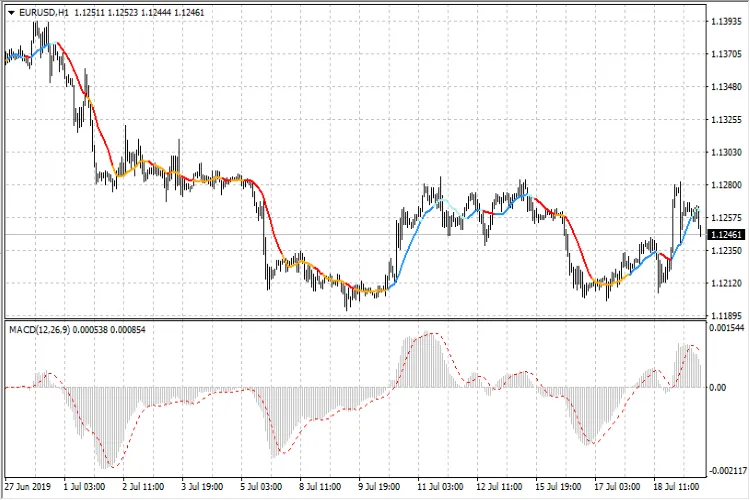
So there you have it! The MACD in MA indicator is a powerful tool that can help you identify trends quickly and efficiently. Give it a try in your trading strategy and see how it impacts your results!




Comments 0