
Open Position Indicators: Points and Pips
Hey fellow traders! Today, we're diving into the Open Position Indicators for MetaTrader 4. These handy tools streamline the way we view our open trades, giving us a clearer picture of our trading performance.
Essentially, these indicators are simplified versions of the exposure indicator, but they come with some unique tweaks:
- Both indicators function the same way, with one defaulting to show [p] = Pips and the other [p] = Points.
- You can easily toggle between displaying Pips or Points by adjusting the [p_as_Points] option.
When you trade on MT4, the terminal can show profit in three ways: a) Points, b) Term Currency, or c) Deposited Currency. While Points align with MT4’s default settings, many traders prefer seeing their gains in Pips.
Setting Up Your Indicator
Here’s how to get these indicators up and running:
- Place the indicator in a secondary window: You can do this in a MACD or Stochastics window. Note: It won’t show in the primary chart window.
- If you don’t have a second window available, attach Blank.mq4 as your secondary window. Check the download files above if you need it.
- Drag and drop the indicator onto your secondary window. It will only display when you have an active trade.
- Adjust column widths: Use the X_Distance_Multiplier option with small decimal increments. Be careful—large adjustments can shift the display off-screen.
Example: When [p] = Points
- Profit-Loss: [€]
- Lots - long: [10.00 L] German Bund & short: [-0.01 L] Dow-Industrial
- Points: [p]
- Symbols: [EuBundMar12...]

Example: When [p] = Pips
- Profit-Loss: [£]
- Lots - all positions long: [0.10 L]
- Pips: [p]
- Symbols: [EURUSD...]
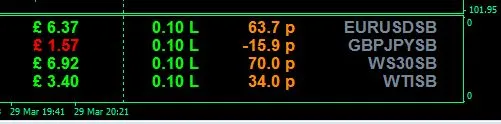
Customizing Your Indicator Defaults
If you want to make permanent changes to the default options, you can edit the highlighted code below:
Check out these examples—scroll toward the end of the SL+TP-CP Distance Indicator - v2.
//**** START OF DEFAULT OPTIONS
- extern color Symbols = LightSlateGray;
- extern bool p_as_Points = true;
- extern color Pips_or_Points = DarkOrange;
- extern color Lots_Long = Lime;
- extern color Lots_Short = Red;
- extern string Currency_Symbol = "£";
- extern color Prof_Gain = Lime;
- extern color Prof_Loss = Red;
- ------------------------------------------
- extern int corner = 1; //0 - top-left, 1 - top-right, 2 - bottom-left, 3 - bottom-right
- extern int Line1_Distance_Y = 1;
- extern double X_Distance_Multiplier = 1.5;
- extern int Font_Size = 8;
- extern string Font_Face = "Arial Bold";
//**** END OF DEFAULT OPTIONS
Special Thanks
A big shoutout to Daniel Kirstein for his contributions to the X_Distance_Multiplier and corner adjustments!




Comments 0