
If you're trading options and using MetaTrader 4, the Options Levels Indicator is a must-have tool for your trading arsenal. It helps you calculate and visualize the options levels right on your chart, making it easier to make informed decisions.
To get started, you can download the CME bulletin here: CME Daily Bulletin
Alternatively, you can access it directly from the FTP site: CME Bulletin FTP
Once you've got the indicator set up, simply fill in the input parameters to see the options levels displayed on your screen. The calculation of these levels is based on the following formulas:
- Call: Strike/1000 + Premium * Multiplier
- Put: Strike/1000 - Premium * Multiplier
Input Parameters for the Indicator:
inputdouble Call_1_Strike  = 1115;     // Call Strike Price 1inputdouble Call_1_Prem    = 7.6;      // Call Premium 1inputdouble Call_1_Vol     = 471;      // Call Volume 1inputdouble Call_1_OI      = 1513;     // Call Open Interest 1inputdouble Call_2_Strike  = 1120;     // Call Strike Price 2inputdouble Call_2_Prem    = 5.8;      // Call Premium 2inputdouble Call_2_Vol     = 419;      // Call Volume 2inputdouble Call_2_OI      = 3016;     // Call Open Interest 2inputdouble Call_3_Strike  = 1130;     // Call Strike Price 3inputdouble Call_3_Prem    = 3.1;      // Call Premium 3inputdouble Call_3_Vol     = 696;      // Call Volume 3inputdouble Call_3_OI      = 2738;     // Call Open Interest 3inputdouble Put_1_Strike   = 1080;     // Put Strike Price 1inputdouble Put_1_Prem     = 1.9;      // Put Premium 1inputdouble Put_1_Vol      = 694;      // Put Volume 1inputdouble Put_1_OI       = 2541;     // Put Open Interest 1inputdouble Put_2_Strike   = 1100;     // Put Strike Price 2inputdouble Put_2_Prem     = 6.2;      // Put Premium 2inputdouble Put_2_Vol      = 655;      // Put Volume 2inputdouble Put_2_OI       = 3148;     // Put Open Interest 2inputdouble Put_3_Strike   = 1090;     // Put Strike Price 3inputdouble Put_3_Prem     = 3.5;      // Put Premium 3inputdouble Put_3_Vol      = 286;      // Put Volume 3inputdouble Put_3_OI       = 7061;     // Put Open Interest 3inputdouble Multiplier     = 0.001;    // Premium Multiplierinputstring Line_Inputs="**** Line Inputs *****";

inputint    LineWidth      = 2;        // Line Widthinputint    LineStyle      = 0;        // Line Styleinputint    LineStart      = 0;        // Start bar of the lineinputint    LineEnd        = 15;       // End bar of the lineinputcolor  CallColor      = Red;      // Call Line Color inputcolor  PutColor       = Lime;     // Put Line Color inputstring Text_Inputs="**** Text_Inputs *****";

inputint    StartText      = 6;        // Start bar of the textinputint    FontSize       = 6;        // Font Sizeinputstring FontName       = "Arial";  // Font Name  inputcolor  CallText       = Blue;     // Call Text Colorinputcolor  PutText        = Blue;     // Put Text Color inputbool   ShowText       = true;     // Show Text
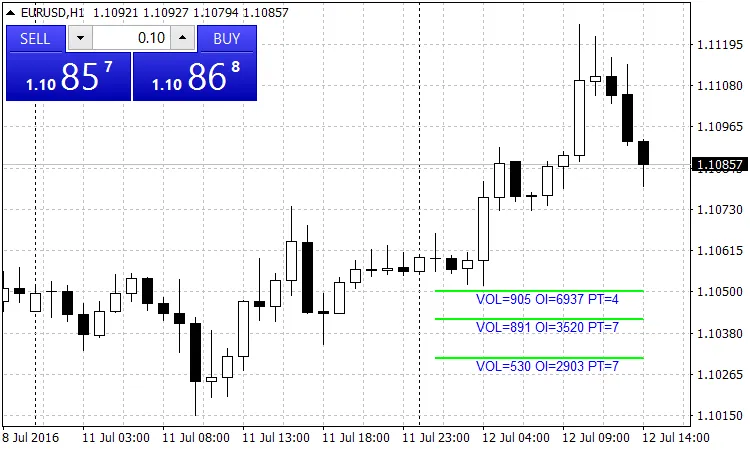
Fig.1. The indicator on the chart
Recommendations:
- Think of this indicator as your trusty trading assistant. It can provide valuable insights to guide your trades.




Comments 0