
The BinaryWave_HTF_Signal indicator is a powerful tool designed for MetaTrader 5 that helps traders identify trend directions and generates signals using the BinaryWaveSign indicator. With its easy-to-read graphical representation, it visually indicates the trend or trade direction with colors and shapes. Plus, it provides alerts and audio signals to keep you in the loop.
When the trend persists at your selected bar, you’ll see a right arrow. The color of this arrow matches the trend direction. If there's a shift in the trend at that bar, a diagonal arrow will appear, with its color and direction reflecting the new trade direction.
The input parameters for this indicator can be divided into three main groups:
- BinaryWaveSign Input Parameters:
inputstring Symbol_="";                               // Financial assetinputENUM_TIMEFRAMES Timeframe=PERIOD_H6;             // Timeframe for indicator calculation//--- indicators weight. If zero, the indicator doesn't take part in the wave calculationinputdouble WeightMA    = 1.0;
inputdouble WeightMACD  = 1.0;
inputdouble WeightOsMA  = 1.0;
inputdouble WeightCCI   = 1.0;
inputdouble WeightMOM   = 1.0;
inputdouble WeightRSI   = 1.0;
inputdouble WeightADX   = 1.0;
//---- Moving Average parametersinputint   MAPeriod=13;
input  ENUM_MA_METHOD   MAType=MODE_EMA;
inputENUM_APPLIED_PRICE   MAPrice=PRICE_CLOSE;
//---- MACD parametersinputint   FastMACD     = 12;
inputint   SlowMACD     = 26;
inputint   SignalMACD   = 9;
inputENUM_APPLIED_PRICE   PriceMACD=PRICE_CLOSE;
//---- OsMA parametersinputint   FastPeriod   = 12;
inputint   SlowPeriod   = 26;
inputint   SignalPeriod = 9;
inputENUM_APPLIED_PRICE   OsMAPrice=PRICE_CLOSE;
//---- CCI parametersinputint   CCIPeriod=14;
inputENUM_APPLIED_PRICE   CCIPrice=PRICE_MEDIAN;
//---- Momentum parametersinputint   MOMPeriod=14;
inputENUM_APPLIED_PRICE   MOMPrice=PRICE_CLOSE;
//---- RSI parametersinputint   RSIPeriod=14;
inputENUM_APPLIED_PRICE   RSIPrice=PRICE_CLOSE;
//---- ADX parametersinputint   ADXPeriod=14;
//---- wave smoothinginput Smooth_Method bMA_Method=MODE_JJMA; // Averaging methodinputint bLength=5;  // Smoothing depth                    inputint bPhase=100; // Smoothing parameter
                                       // for JJMA it varies within the range -100 ... +100 and influences the quality of the transient process;
- Indicator Visualization Settings:
//---- indicator display settingsinputuint SignalBar=0; // Bar number for getting a signal (0 - current bar)inputstring Symbols_Sirname=INDICATOR_NAME"_Label_"; // Indicator labels namesinputcolor Upsymbol_Color=clrLimeGreen; // Uptrend symbol colorinputcolor Dnsymbol_Color=clrMagenta; // Downtrend symbol colorinputcolor IndName_Color=clrDarkOrchid; // Indicator name colorinputuint Symbols_Size=60; // Signal symbols sizeinputuint Font_Size=10; // Indicator name font sizeinputint X_1=5; // Horizontal name offsetinputint Y_1=-15 // Vertical name offsetinputbool ShowIndName=true; // Display the indicator nameinputENUM_BASE_CORNER WhatCorner=CORNER_RIGHT_UPPER; // Location cornerinputuint X_=0; // Horizontal offsetinputuint Y_=20 // Vertical offset
- Alert and Audio Signal Settings:
//---- alerts settingsinput ENUM_ALERT_MODE alert_mode=OnlySound; // Triggering optioninputuint AlertCount=0; // Number of alerts
If you plan to use multiple BinaryWave_HTF_Signal indicators on the same chart, make sure each one has a unique Symbols_Sirname value (indicator label name) to avoid confusion.
Don't forget, this indicator relies on the compiled indicator file BinaryWaveSign.mq5. You'll need to place it in your <terminal_data_folder>\MQL5\Indicators\ directory.
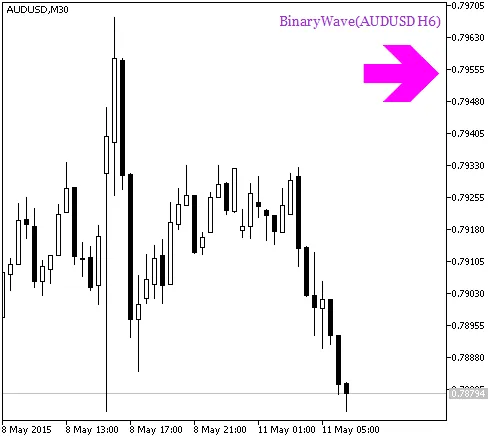
Fig.1. BinaryWave_HTF_Signal. Signal of trend continuation
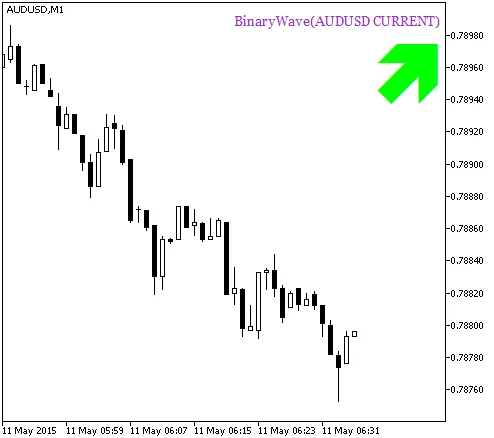
Fig.2. The BinaryWave_HTF_Signal indicator. Signal for trade




Comments 0