
Author: *** UPDATE *** see below
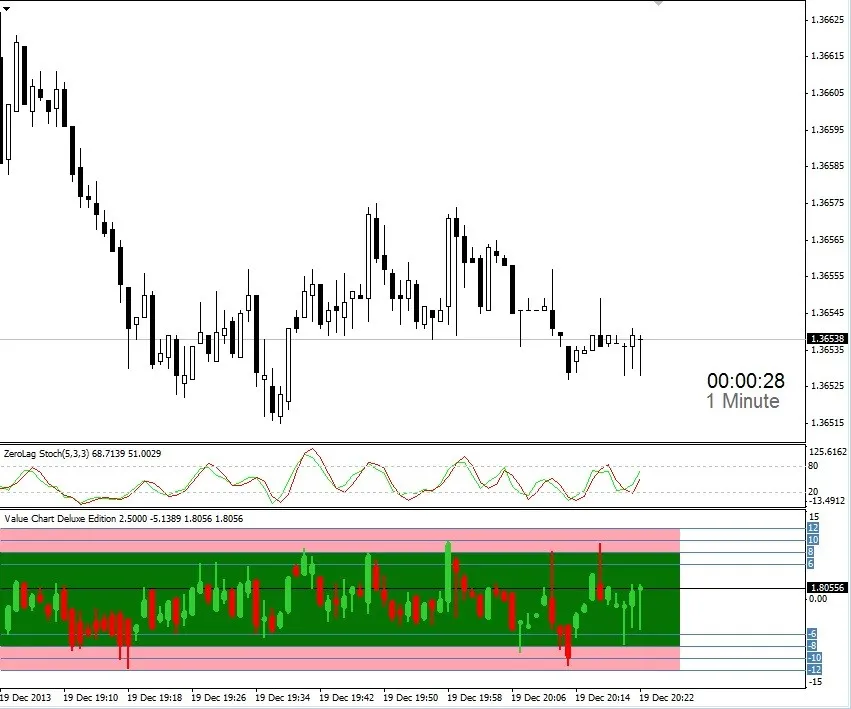
Designed by William Kreider (madhatt30), the Value Chart Deluxe Edition is based on the original concept created by David Stendhal. This powerful indicator is tailored to help you assess market valuation effectively.
The Value Chart functions as a DeTrended Oscillator, where the extremes in value signal a potential reversal in market direction. The higher the value on the chart, the greater the chance of a reversal, making it a vital tool in your trading arsenal.
Unlike other Value Chart indicators that can bog down your terminal by constantly creating and deleting all Value Chart bars with every tick, this version is optimized to work smarter. It updates only the bars that have changed, allowing you to run it on multiple charts without slowing down your system.
Key Features:
- Customizable bar and wick colors, as well as adjustable widths for bars and wicks.
- Overbought and oversold areas with customizable thresholds and colors.
- Built-in alerts with customizable alert levels.
- Compatible with any standard timeframe.
- Best used as a complement to your existing trading strategy.
For instance, you can enhance your trading by combining the Value Chart with the Zero Lag Stochastic set to 5,3,3. If you don’t have Zero Lag Stochastic, a standard Stochastic set to 3,3,5 will do just fine. When the Stochastic crosses above the 80 level and the Value Chart shows values between 8 and 10, it might be a good time to consider a sell. Conversely, if the Stochastic crosses below 20 and the Value Chart is between -8 and -10, it could be a signal to buy. I've been trading 60-second Binary options with this strategy, and it has performed exceptionally well.
Input Parameters:
- extern int NumBars=5;
- extern color Bullish_Color=LimeGreen;
- extern color Bearish_Color=Red;
- extern color Actual_Color=Yellow;
- extern string Note0="**** VC Bar Width ****";
- extern int Wick=2; * Width of the VC Candle Wick
- extern int Body=6; * Width of the VC Candle Body
- extern string Note1="**** OB/OS Levels ****";
- extern int OBHigh_Upper=12; * Top of the OverBought Area
- extern int OBHigh_Lower=8; * Bottom of the OverBought Area
- extern int OSLow_Upper=-8; * Top of the OverSold Area
- extern int OSLow_Lower=-12; * Bottom of the OverSold Area
- extern string Note2="**** OB/OS Level Colors ****";
- extern color OBHigh_Color=C'255,164,177'; * OverBought Area Color
- extern color Normal_Color=C'5,116,5'; * Normal Area Color
- extern color OSLow_Color=C'255,164,177'; * OverSold Area Color
- extern string Note3="**** Alert Settings ****";
- extern bool useAlerts=false;
- extern int NumLevels=4;
- extern int level1=10;
- extern int level2=-10;
- extern int level3=11;
- extern int level4=-11;
- extern int level5=10;
- extern int level6=-10;
Trading Recommendations:
Quick Strategy:
- Combine with a Keltner Channel using default settings.
- Use Stochastic 5,3,3 (preferably Zero Lag).
- Implement Value Chart Deluxe Edition with default settings.
Good luck! Feel free to drop me a message if you enjoy using this indicator or if you have another platform indicator that you’d like to see on MetaTrader 4.
*** UPDATE ***
I've released an updated version: Value Chart Deluxe Edition v1.0.2!
What’s New:
- The bug causing candles to draw past the current bar has been fixed. (I’ve back-tested and forward-tested this for a week—forward tests are excellent, though back-tests may vary.)
- You can now customize the normal area (green color). Set all color fields to NONE if you prefer no colors.
- Added a new parameter; BarsBack=1000 to specify how many bars back to draw colored areas. Set to 0 for all bars.
- New parameter; useExtern=false. Set to true to use this indicator externally via iCustom. Access the Value Chart from another indicator using iCustom.
- Additional code cleanup and optimizations.
Be sure to download the latest version, v1.0.2, for the best experience!




Comments 0