
Are you looking to enhance your trading game? The XFisher_org_v1_Vol_Supr_Zer indicator is here to help! This powerful tool not only tracks market signals but also sends you alerts via email and push notifications when those signals pop up. Here’s a quick rundown of what you can expect:
- The main indicator line crosses the zero line;
- The signal cloud changes color, indicating a shift in trend direction;
- Breakthrough of overbought or oversold levels;
- Exiting overbought or oversold zones.
Setting Up Your Alerts:
inputuint NumberofBar=1; // Specify the bar number for signal activationinputbool SoundON=true; // Turn on alertsinputuint NumberofAlerts=2; // Set the number of alertsinputbool EMailON=false; // Enable email notificationsinputbool PushON=false; // Enable mobile device notifications
To get started, make sure you have the SmoothAlgorithms.mqh library classes loaded (just copy them to your terminal_data_folder\MQL5\Include). If you want to dive deeper into how these classes work, check out the article "Averaging Price Series for Intermediate Calculations Without Using Additional Buffers".
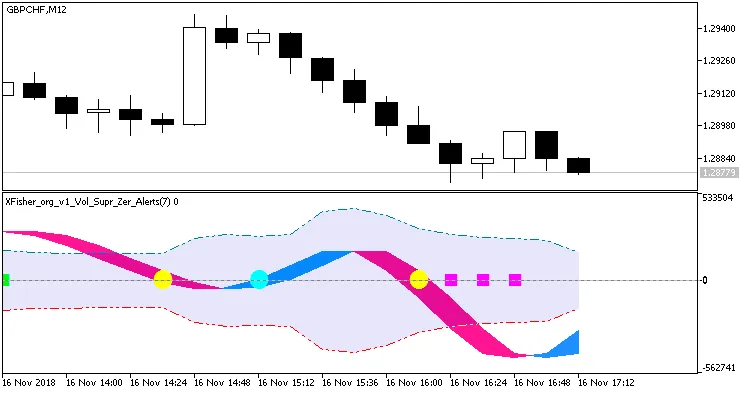
Fig.1. XFisher_org_v1_Vol_Supr_Zer_Alert. The color of the signal cloud changes at the first bar.
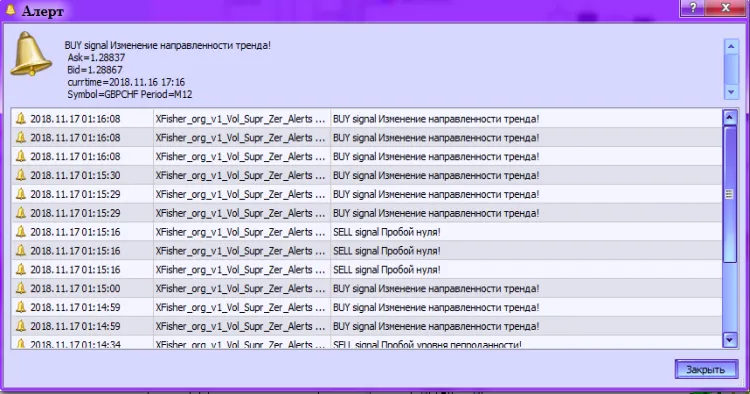
Fig.2. XFisher_org_v1_Vol_Supr_Zer_Alert. Alert.




Comments 0