
Author: Bassam Faramawi
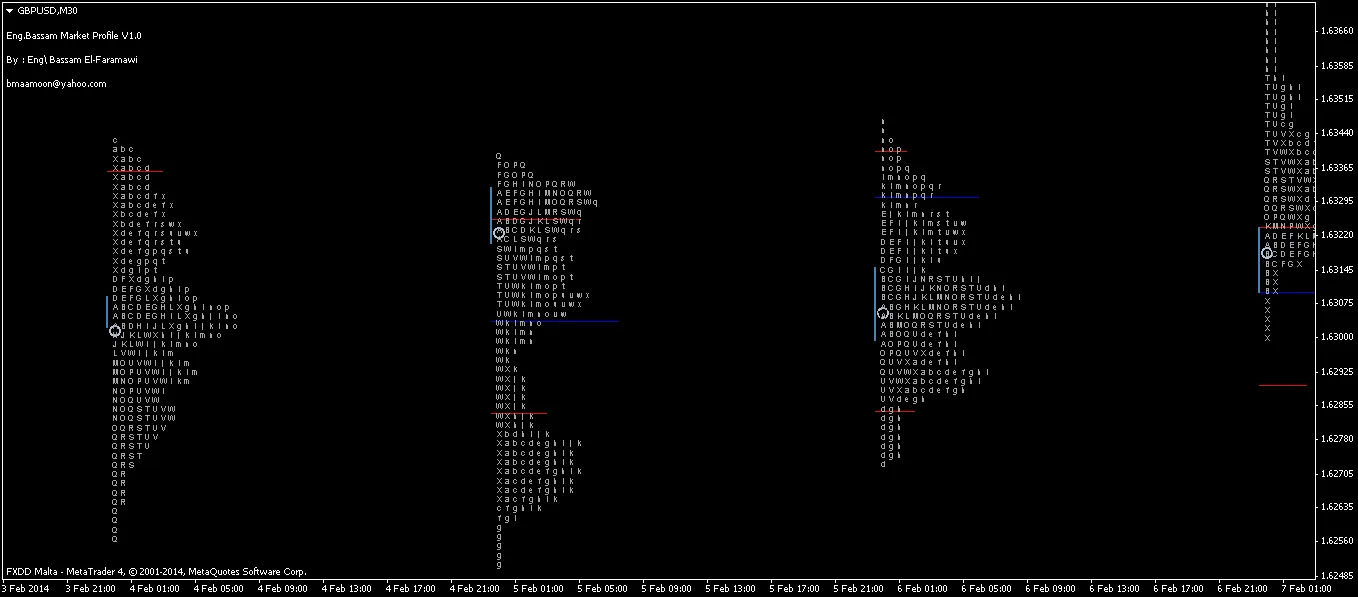
If you’re a day trader looking to refine your strategies, the Market Profile indicator for MetaTrader 4 is a game-changer. This powerful tool emulates the market profile system described by James Dalton in his book, "Mind Over Markets." It’s tailored for day traders, providing insights into TPOs, POC, RL, VA, and IB.
What sets this indicator apart is its ability to bring the entire market profile system right to your MT4 screen, similar to what you'd find with professional market profile service providers. It visualizes TPOs as letters or blocks—whichever you prefer—and identifies the TPO value area (not to be confused with volume VA) based on your specified percentage, with a default setting of 0.7. You’ll also see the Point of Control for the day, the Initial Balance, and the opening flag for multiple days.
One of the standout features is the ability to adjust parameters for future days, allowing you to create a clearer picture of the current trading environment. You can view profiles for different sessions—American, Euro, Asian, or even the entire day. Plus, there's a handy pointer that highlights the active TPO right now.
Important Note: This version is designed to work exclusively on the M30 time frame, so don’t switch to a different time frame!
Input Parameters:
- Step: The point step between each TPO.
- NumberOfDays: Selects how many current and past days to view.
- SessionHalfHours: Number of half-hours in one session (default = 48, which covers the whole day).
- ViewTPOs: Option to view TPOs or not.
- TPOs_as_Letters: Set to true to view TPOs as letters; false for blocks.
- ViewOpenFlag: Displays the opening of the session.
- View_Pointer: Shows the pointer indicating the active TPO.
- ViewrangeLine: Displays the range line of the day or session.
- rangeLine_Shift: Adjusts the range line to next days or sessions.
- ViewInitialBalanceLine: Shows the initial balance of the session.
- ViewValueArea: Visualizes the TPO Value Area with two limit lines.
- ValueArea_Shift: Shifts the Value Area to future days or sessions.
- ViewPocLine: Displays the Point Of Control for the day or session.
- PocLine_shift: Adjusts the POC line for future days or sessions.
- ViewInformationText: Prints the range, TPO Value Area, and Tick Volume of the session.
Curious about the effectiveness of the Market Profile? Check out the strategy tester image showcasing an impressive 1000% profit!




Comments 0