
Author: Avals
If you’re a futures trader, you’ve likely heard of the Market Profile, an invaluable tool for gauging market behavior. This indicator is specifically designed for MetaTrader 5, and it provides a statistical breakdown of price action over time, helping you identify key price areas and control values throughout the trading session.
Unlike traditional indicators on MetaTrader 5, the Market Profile focuses solely on price movement, giving you a clearer picture of market dynamics. It’s a straightforward yet powerful way to enhance your trading strategy.
For more in-depth insights into Market Profile, check out these resources:
- Erik L. Nayman, Master Trading. The Secret Materials (Russian)
- Erik L. Nayman, A Way to Financial Freedom. Professional Approach to Trading and Investments (Russian)
- J. Piper, The Way to Trade.
Also, don’t miss our article "The Price Histogram (Market Profile) and its implementation in MQL5" for additional insights.
In terms of visual representation, this indicator uses a color scheme to differentiate between trading sessions: green for the Asian session, blue for Europe, and violet for the American session. You can utilize M30 and M15 timeframes to get the best results.
Input Parameters:
- StartDate - sets the date for historical testing;
- lastdayStart - if true, extends drawing to the last day (ignores StartDate);
- CountProfile - defines the number of day profiles to be displayed.
The mode is indicated in gray.
This indicator was originally created in MQL4 and first published on Code Base at mql4.com on March 23, 2006. In MQL5, it’s available as the MarketProfile.mq5 file.
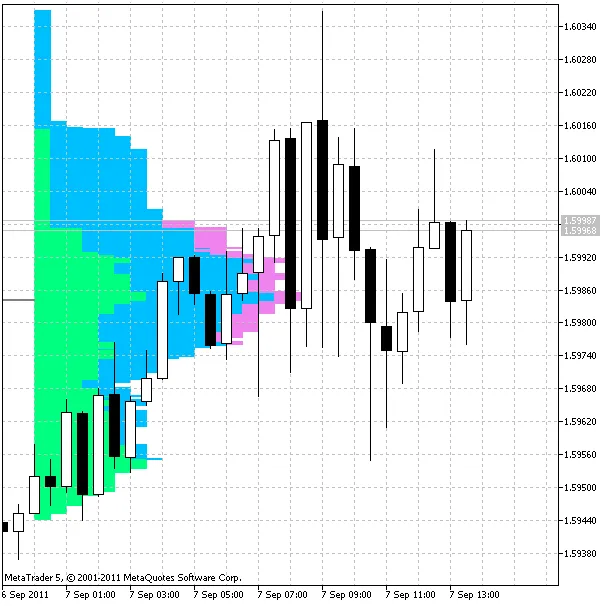
Additionally, a different version of this indicator (MarketProfile_.mq5) is also available.
You can apply this indicator to M5, M15, and M30 charts to visualize market profiles during trading sessions. While M5 offers more precision, M30 is generally recommended for clearer visuals. The indicator follows standard market profile calculation methods, and you can choose from three different color schemes for the profile blocks.
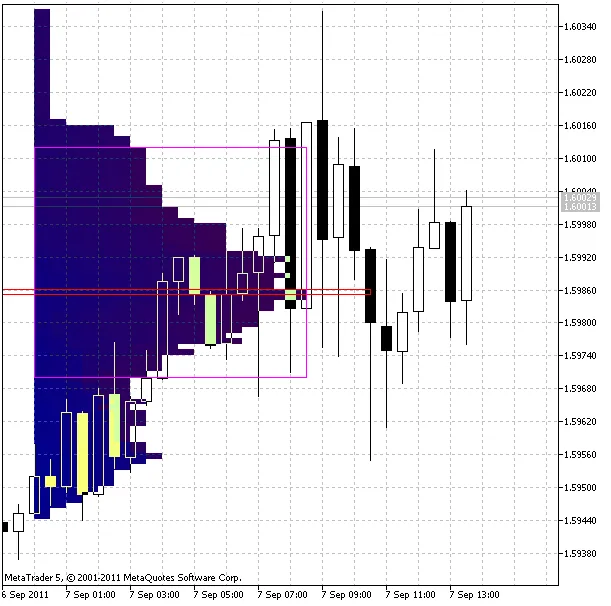
Input Parameters:
- StartFromDate (default = __DATETIME__) - if StartFromToday is false, profiles will start drawing from this date, going backward. For instance, if set to 2010.07.20 and DaysToCount to 2, profiles for 2010.07.20 and 2010.07.19 will be created;
- StartFromToday (default = true) - if true, starts drawing from today; otherwise, it starts from the specified StartFromDate;
- DaysToCount (default = 2) - determines the number of day sessions for which profiles will be drawn;
- ColorScheme (default = 0) - defines the color schemes for profile blocks:
- 0 - blue to red;
- 1 - red to green;
- 2 - green to blue.
- MedianColor (default = White) - color for the reference value (median);
- ValueAreaColor (default = White) - color for the price area border.




Comments 0