
What is the BB MACD Indicator?
The BB MACD MetaTrader indicator is a handy variation of the classic MACD (Moving Average Convergence Divergence) that helps traders spot potential trend changes and gauge the strength of ongoing trends. You'll find this indicator displayed in a separate window on your chart, featuring two lines (a blue line and a red line) along with dots that can appear in either green or magenta. A color change in the dots can signal trading opportunities, while the gap between the two lines shows how strong the current trend is. This tool is compatible with both MT4 and MT5.
Input Parameters
- FastLen (default = 12) — This is the period for the fast-moving average, which plays a crucial role in calculating the indicator's dots.
- SlowLen (default = 26) — This parameter sets the period for the slow-moving average, which is used for the same calculations as the fast moving average.
- Length (default = 10) — This is the period used for the moving average and standard deviation calculations that affect the indicator's lines.
- barsCount (default = 400) — This defines the maximum number of bars on the chart that the calculations will consider.
- StDv (default = 2.5) — This weight multiplier adjusts the impact of the standard deviation in relation to the moving average.
- EnableNativeAlerts (default = false) — Set this to true to receive MetaTrader's pop-up alerts when the BB MACD color changes.
- EnableSoundAlerts (default = false) — If you want sound alerts for color changes, set this to true.
- EnableEmailAlerts (default = false) — Set this to true to receive email alerts on BB MACD color changes. Make sure your email is configured correctly in MetaTrader under Tools -> Options -> Email.
- EnablePushAlerts (default = false) — If you wish to get push notifications on your device for BB MACD color changes, set this to true. Ensure notifications are set up in MetaTrader via Tools -> Options -> Notifications.
- SoundFileName (default = "alert.wav") — This is the name of the sound file that will play for alerts if EnableSoundAlerts is true.
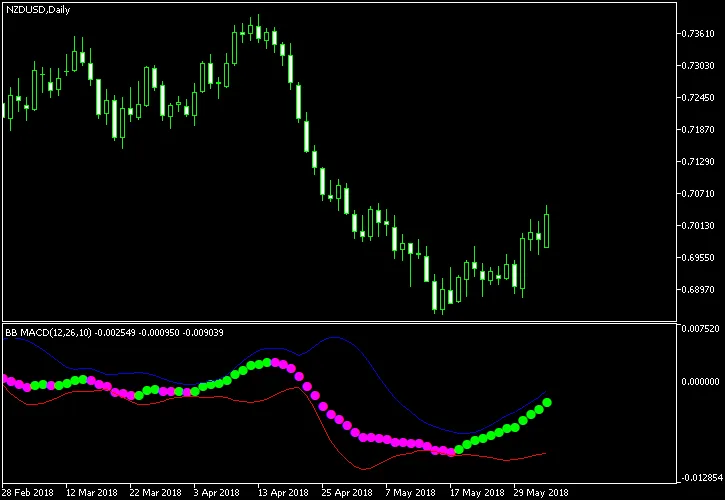
Looking at the chart example, you'll notice that a buy signal occurs when the magenta dots turn green, while a sell signal appears when the green dots switch back to magenta. It's generally best to trade when the blue and red lines are fairly wide apart, indicating a robust trend.




Comments 0