
Description:
The MAD, or Moving Average Delta, is a unique indicator designed to help traders visualize the differences between two points of a moving average. By plotting this difference in pips on a curve, it provides insights that might otherwise go unnoticed.
Imagine looking at a simple moving average curve under a microscope; that's the kind of clarity the MAD gives you. This tool can be instrumental in predicting potential trend changes before they occur. For instance, it can signal a shift from bullish to bearish trends.
Despite being a straightforward indicator, I still have a soft spot for moving averages. They reflect market behavior, which tends to shift gradually. When a trend shifts, it’s like a wave; it starts with a few traders making moves, which eventually snowballs into a larger market shift. As the curve starts to flatten, it hints at a potential reversal.
(I’m honestly surprised this type of indicator hasn’t been more widely utilized!)
Image:
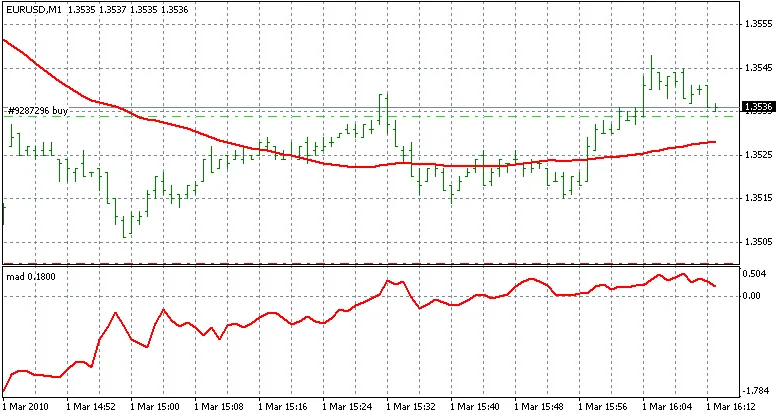
The MAD indicator
Interpretation:
- If the MAD curve is above 0, it indicates that the moving average is trending upwards.
- As a trend change approaches, the moving average will flatten out, and the MAD curve will trend toward zero.
- This indicator helps you gauge the maximum rise or fall of the moving average, allowing you to anticipate upcoming trend shifts.
Usage:
To get started, add a simple moving average (SMA) to your chart and adjust the period to best fit the price movements. There’s no one-size-fits-all setting for the SMA; feel free to double-click the MA line to modify the period as needed.
Next, apply the MAD indicator to your chart, ensuring it matches the period of your SMA for optimal results.




Comments 0