
If you're trading on MetaTrader 5, the Multi-Timeframe Moving Average (MTF MA) indicator is a powerful tool that can enhance your analysis. Let's dive into what it offers and how you can maximize its potential in your trading strategy.
This indicator comes with five key input parameters:
- Period - This is the calculation period for the moving average, which you can adjust based on your trading style.
- Method - Choose your preferred calculation method for the moving average, such as Simple or Exponential.
- Applied Price - This is the price point used for calculations. You can select options like Close, Open, or High.
- Timeframe - Specify the timeframe for your calculations, which allows you to analyze multiple timeframes simultaneously.
- Drawing Mode - Here, you can choose how the moving average is displayed:
- Steps - This mode displays the moving average as a ladder, making it visually distinct and easy to interpret.
- Slope - This mode connects the values of neighboring bars in an inclined manner, giving a smooth appearance to the moving average line.
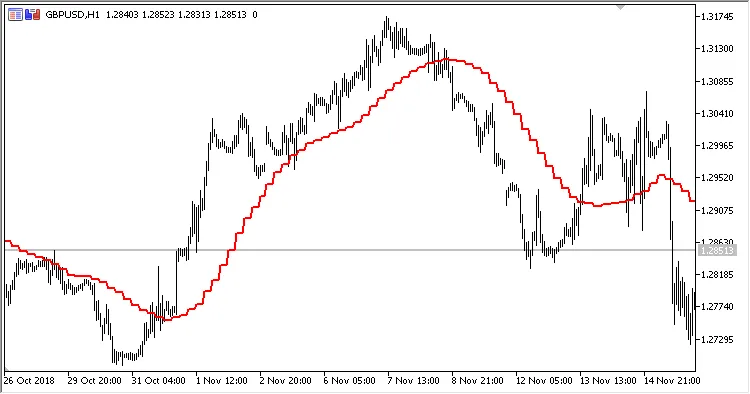
Fig.1. Multi-Timeframe Moving Average in Steps Mode. H4 data displayed on an H1 chart.
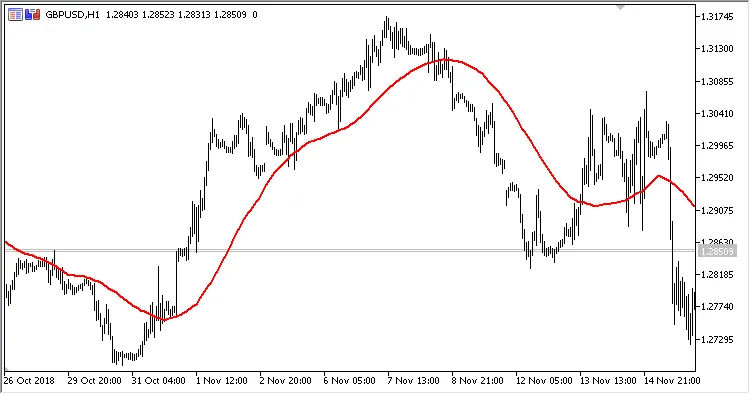
Fig.2. Multi-Timeframe Moving Average in Slope Mode. H4 data displayed on an H1 chart.
By utilizing the MTF MA indicator, you can gain deeper insights into market trends and make more informed trading decisions. Whether you’re a day trader or swing trader, this tool can be a game changer in your analysis toolkit.




Comments 0