
When it comes to gauging trend stability, J. Welles Wilder's Average Directional Index (ADX) is the go-to tool. This nifty indicator helps traders analyze market trends and make informed trading decisions, especially in the FOREX arena.
That said, the standard look of the ADX leaves much to be desired—it's not the most user-friendly option out there. Luckily, we have the ColorXADX.mq5 indicator to spice things up!
The ColorXADX improves upon the original by displaying the +DI and -DI lines in a visually appealing DRAW_FILLING style. The colors change based on the current trend direction, and the cloud width indicates trend strength. Meanwhile, the ADX line is represented by dots, with their colors reflecting the trend power based on their position relative to predefined levels, customizable via settings.
What’s more, the indicators utilize universal smoothing with two averaging methods, allowing you to pick from a range of options:
- SMA - Simple Moving Average;
- EMA - Exponential Moving Average;
- SMMA - Smoothed Moving Average;
- LWMA - Linear Weighted Moving Average;
- JJMA - JMA Adaptive Average;
- JurX - Ultralinear Smoothing;
- ParMA - Parabolic Smoothing;
- T3 - Tillson's Multiple Exponential Smoothing;
- VIDYA - Smoothing using Tushar Chande's algorithm;
- AMA - Smoothing using Perry Kaufman's algorithm.
Keep in mind that the Phase parameter varies significantly depending on the smoothing algorithm you choose:
- For JMA, it's an external Phase variable that ranges from -100 to +100.
- For T3, it's a smoothing ratio scaled by 100 for clarity.
- For VIDYA, it represents a CMO period, while for AMA, it indicates a slow EMA period.
- Notably, the fast EMA period in AMA is fixed at 2 by default, and the raising power ratio is also set to 2.
The indicators leverage classes from the SmoothAlgorithms.mqh library (which should be placed in the terminal_data_folder\MQL5\Include). For a detailed look at how these classes work, check out the article "Averaging Price Series for Intermediate Calculations Without Using Additional Buffers".
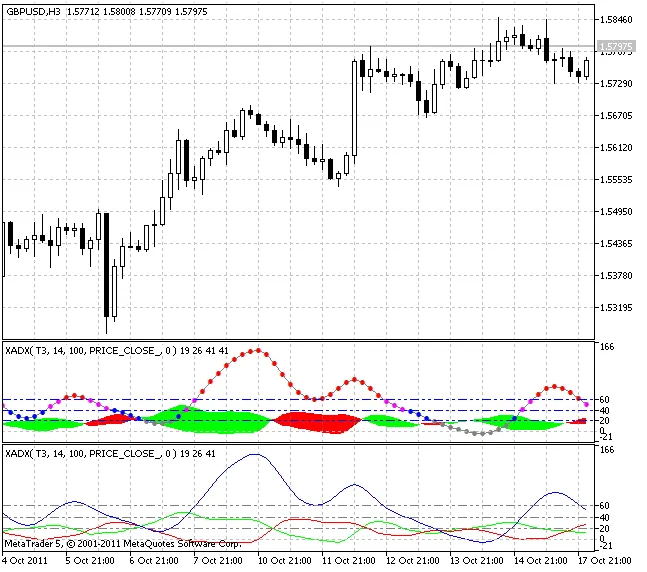
Input Parameters for ColorXADX Indicator:
//+----------------------------------------------+//| Indicator input parameters |//+----------------------------------------------+input Smooth_Method XMA_Method=MODE_T3; // Histogram smoothing methodinputint ADX_Period =14; // XMA smoothing periodinputint ADX_Phase=100; // XMA smoothing period [-100...+100]input Applied_price_ IPC=PRICE_CLOSE_; // Applied priceinputint Shift=0; // Horizontal shift of the indicator in barsinputint ExtraHighLevel=60; // Maximum trend levelinputint HighLevel=40; // Strong trend levelinputint LowLevel=20; // Weak trend levelinputENUM_LINE_STYLE LevelStyle=STYLE_DASHDOTDOT; // Levels lines styleinputcolor LevelColor=Blue; // Levels colorinputENUM_WIDTH LevelWidth=w_1; // Levels width




Comments 0