
Are you looking to enhance your trading experience with a powerful tool? Say hello to the PriceGrid1_Plus indicator for MetaTrader 5! This nifty tool provides a grid of round price levels that can really help you navigate the market.
Understanding the Indicator's Input Parameters
Let’s dive into the nitty-gritty of what makes the PriceGrid1_Plus tick. Here’s a breakdown of its input parameters:
//+----------------------------------------------+
//| Indicator input parameters                    |
//+----------------------------------------------+
input string  SirName="PriceGrid1_Plus";     // The first part of the name of graphical objects
input uint  Digits_=2;                       // Number of digits to round
input uint  Total=200;                       // Number of blocks in the grid above or below the price
//----
input color  Color_A = clrSlateBlue;         // The color of level 1
input bool ShowPriceLable_A = true;          // Display the value of price label 1 on the price chart
input color  Color_AL = clrBlueViolet;       // Color of price label 1
input STYLE  Style_A = DASHDOTDOT_;          // Style of level 1 line
input WIDTH  Width_A = Width_1;              // Width of level 1 line
//----
input color  Color_B = clrDarkOrange;        // The color of level 2
input bool ShowPriceLable_B = true          // Display the value of price label 2 on the price chart
input color  Color_BL = clrDarkOrange;       // Color of price label 2
input STYLE  Style_B = DASH_;                // Style of level 2 line
input WIDTH  Width_B = Width_1;              // Width of level 2 line
//----
input color  Color_C = clrMagenta           // The color of level 3
input bool ShowPriceLable_C = true          // Display the value of price label 3 on the price chart
input color  Color_CL = clrMagenta          // Color of price label 3
input STYLE  Style_C = SOLID_;              // Style of level 3 line
input WIDTH  Width_C = Width_1;              // Width of level 3 line
//----
input color  Color_D = clrRed               // The color of level 4
input bool ShowPriceLable_D = true          // Display the value of price label 4 on the price chart
input color  Color_DL = clrRed              // Color of price label 4
input STYLE  Style_D = SOLID_;               // Style of level 4 line
input WIDTH  Width_D = Width_1;              // Width of level 4 line
//----
input color  Color_E = clrLime              // The color of level 5
input bool ShowPriceLable_E = true          // Display the value of price label 5 on the price chart
input color  Color_EL = clrLime             // Color of price label 5
input STYLE  Style_E = SOLID_;               // Style of level 5 line
input WIDTH  Width_E = Width_1;              // Width of level 5 line
//----
input uint FontSize = 2;                     // The color of price labels
input int  Shift = 5                        // Horizontal shift of price labels in bars
input bool ShowLineInfo = true              // Display the value of level on the price chart
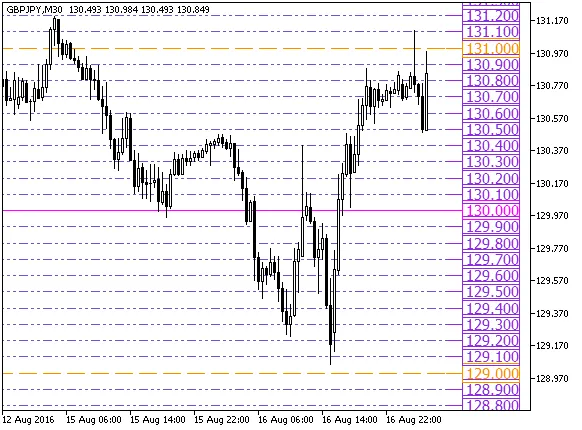
Fig.1. The PriceGrid1_Plus indicator
Related Posts
- Unlocking MetaCOT 2: Your Ultimate CFTC Indicator Toolkit for MT4
- Unlocking the Power of Master Tools for MetaTrader 4
- Visualize Current Trends Across All Time Frames with This MetaTrader 4 Indicator
- Unlock Trading Insights with Volume Profile + Range v6.0 for MetaTrader 5
- Mastering the Fibonacci ZigZag Indicator for MetaTrader 5