
Meet the Author:
Martingeil
Today, we’re diving into a modified version of the "Rabbit" indicator, crafted by JonKatana. This version shines without the clutter of fuzzy lines on your charts, making it easier to spot those critical trading signals.
The Rabbit indicator first made waves in the MQL4 community when it was published on Code Base at mql4.com back on March 14, 2011. It’s been a favorite for traders looking for clarity and precision!
Input Parameters
Here’s a look at the input parameters you can tweak to make the Rabbit indicator work for you:
//+----------------------------------------------+//| Indicator Input Parameters |//+----------------------------------------------+inputint Yesterday = 0; // Days shift: 0 - current, 1 - previous, 1 - futureinputint Levels = 7; // Number of levelsinputbool Comm = true; // Display comments on the chartinputbool Sublevel = true; // Show sublevels between basic levels//----inputcolor FontColor=Black; // Price level color//----inputcolor LineColor = DeepSkyBlue; // Basic line colorinput STYLE LineStyle = SOLID_; // Basic line styleinput Width LineWidth = Width_1; // Basic line width//----inputcolor MLineColor = Lime; // Sublevels line colorinput STYLE MLineStyle = DASHDOTDOT_; // Sublevels line styleinput Width MLineWidth = Width_1; // Sublevels line width//----inputcolor VlineColor = Black; // Vertical line colorinput STYLE VLineStyle = SOLID_; // Vertical line styleinput Width VLineWidth = Width_1; // Vertical line width//----inputcolor HL_lineColor = Lime; // Previous day range line colorinput STYLE HL_lineStyle = SOLID_; // Previous day range line styleinput Width HL_lineWidth = Width_5; // Previous day range line width//----inputbool Background=true; // Draw vertical lines as background
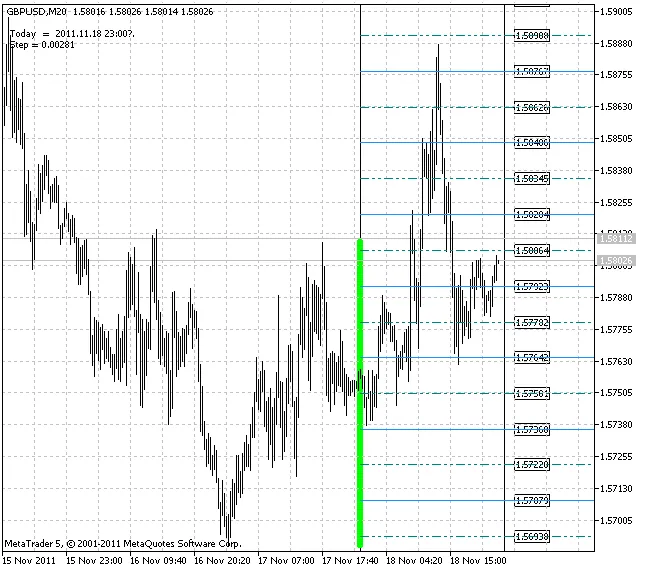
With these settings adjusted, you can fine-tune the Rabbit indicator to fit your trading style seamlessly. So, give it a whirl and watch your trading strategy hop to new heights!




Comments 0