
Author: Dmitriy.
Hey there, fellow traders! Today, we're diving into the UltraMFI indicator, a powerful tool for MetaTrader 5 that leverages the Money Flow Index (MFI) and its signal line analysis. If you're looking to sharpen your trading strategy, this might just be your new best friend!
Understanding the Basics
The UltraMFI indicator uses a few key parameters to give you insights:
- StartLength: The minimum initial value for the first signal line.
- Step: The increment for period changes.
- StepsTotal: The total number of period changes.
With these parameters, we can calculate the periods using a simple arithmetic progression:
SignalPeriod(Number) = StartLength + Number * Step,
Here, the Number variable runs from zero to StepsTotal. These calculated values help us create an array of smoothed Larry Williams' Percent Range indicator values.
Spotting Trends
The indicator identifies the trend direction through the cloud color, while its strength is indicated by the cloud's width. You can also set overbought (UpLevel) and oversold (DnLevel) levels based on a percentage of the indicator's maximum range.
Choosing Your Smoothing Algorithm
One of the standout features of UltraMFI is the ability to select from ten different smoothing algorithms:
- Simple Moving Average (SMA)
- Exponential Moving Average (EMA)
- Smoothed Moving Average (SMMA)
- Linear Weighted Moving Average (LWMA)
- JJMA - JMA adaptive average
- JJurX - ultralinear averaging
- ParMA - parabolic averaging
- T3 - Tillson's multiple exponential smoothing
- VIDYA - Tushar Chande's smoothing algorithm
- AMA - Perry Kaufman's adaptive moving average
Parameter Insights
Keep in mind that the Phase1 and Phase2 parameters have different meanings depending on the smoothing algorithm you choose. For example:
- For JMA, it varies between -100 and +100.
- For T3, it’s a smoothing ratio multiplied by 100.
- For VIDYA, it’s the CMO oscillator period.
- For AMA, it’s the slow EMA period.
This flexibility allows you to fine-tune your analysis for better results!
The UltraMFI indicator relies on the SmoothAlgorithms.mqh library classes, so make sure to copy them to your <terminal_data_directory>\MQL5\Include folder. You can find more details in the Averaging Price Series for Intermediate Calculations article.
//+----------------------------------------------+ //| Indicator input parameters | //+----------------------------------------------+ input int MFI_Period=13; // MFI indicator period input ENUM_APPLIED_VOLUME VolumeType=VOLUME_TICK; // MFI indicator volume //---- input Smooth_Method W_Method=MODE_JJMA; // Smoothing method input int StartLength=3; // Initial averaging period input int WPhase=100; // Smoothing parameter // for JJMA it varies from -100 to +100; // For VIDIA, it is the CMO period; // For AMA, it is the slow moving average period //---- input uint Step=5; // Period change step input uint StepsTotal=10; // Number of period changes //---- input Smooth_Method SmoothMethod=MODE_JJMA; // Smoothing method input int SmoothLength=3; // Smoothing depth input int SmoothPhase=100; // Smoothing parameter input uint UpLevel=80; // Overbought level in %% input uint DnLevel=20; // Oversold level in %% input color UpLevelsColor=Blue; // Color for overbought level input color DnLevelsColor=Blue; // Color for oversold level input STYLE Levelstyle=DASH_; // Style of the levels input WIDTH LevelsWidth=Width_1; // Width of the levels //+----------------------------------------------+
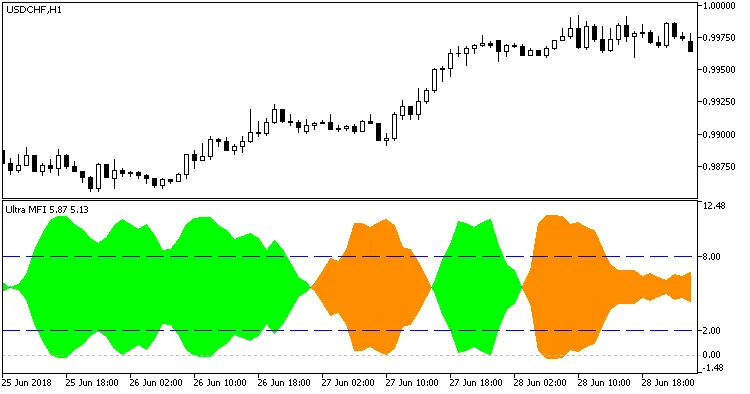
Fig. 1. The UltraMFI indicator




Comments 0