
Welcome back, fellow traders! Today, we're diving into the latest upgrade of the Bollinger Bands N Positions Expert Advisor (EA) designed for MetaTrader 5. If you're looking to enhance your trading strategy using the iBands (Bollinger Bands) indicator, this update is just what you need!
With this EA, you can automatically close opposite positions when a trading signal is received. Sounds simple, right? Let’s break down what’s new in version 2!
What’s New in Version 2
- Stop Loss – Set a Stop Loss value (0 to disable);
- Take Profit – Set a Take Profit value (0 to disable);
- Trailing Stop – Configure a Trailing Stop value (0 to disable);
- Trailing Step – Define your trailing step (make sure this is NOT set to zero if you enable Trailing Stop!);
- Max Positions – Limit the number of open positions (minimum allowed is 1 position).
Key Features
- Operates on a new bar;
- No limits on the number of positions;
- Closes all SELL positions upon receiving a BUY signal;
- Closes all BUY positions upon receiving a SELL signal;
- Checks for sufficient funds for a double lot before opening a trade.
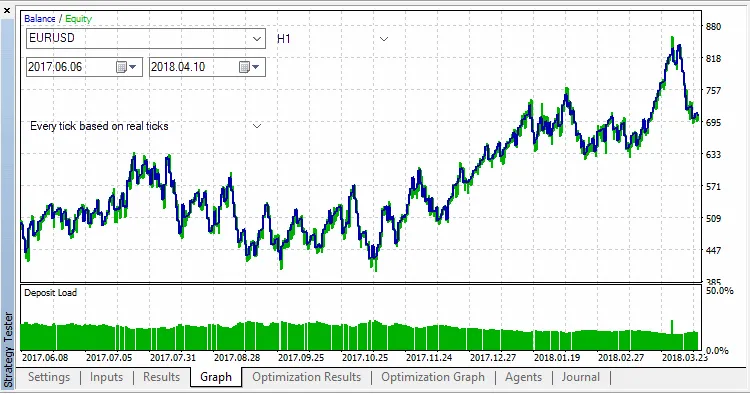
Here's a sneak peek of the performance during testing with default parameters on EURUSD, H1, from June 6, 2017, to April 10, 2018:
Input Values
- Trade Parameters:
- Lots – Volume of the position to open;
- Stop Loss (in pips) – Level for Stop Loss;
- Take Profit (in pips) – Level for Take Profit;
- Trailing Stop (in pips) – Value for trailing;
- Trailing Step (in pips) – Value for trailing step;
- Max Positions – Maximum allowed open positions at once.
- Bollinger Bands Parameters:
- Period of Moving Average – Period for calculating the average line;
- Shift – Horizontal shift of the indicator;
- Number of Standard Deviations – Number of deviations for the indicator;
- Type of Price – Price used for calculations.
- Arrow Parameters – Visualization settings for signals:
- Color for Buy signals;
- Color for Sell signals.




Comments 0