
Welcome to the world of automated trading! If you’re a trader looking to enhance your strategies using MetaTrader 5, you've come to the right place. In this post, we’ll dive into how to leverage the MQL5 Wizard to create Expert Advisors (EAs) based on the popular reversal candlestick patterns: Bullish Harami and Bearish Harami, along with the Relative Strength Index (RSI) for confirmation.
The MQL5 Wizard is a powerful tool that allows you to quickly generate EAs using the built-in classes provided in the Standard Library. This can be especially handy for testing new trading ideas without getting bogged down in the coding details. Here, we’ll focus on creating a trading signal class that integrates these popular candlestick patterns and the RSI indicator.
Understanding Bullish and Bearish Harami Patterns
1. Bullish Harami
The Bullish Harami pattern appears during a downtrend and consists of a larger bearish candle followed by a smaller bullish candle that is completely contained within the body of the first. This pattern suggests that the downward momentum could be reversing, making it a good entry point for a long position. The gap up on the second candle is key—if it’s smaller, the reversal is more likely.

Fig. 1. Bullish Harami candlestick pattern
The recognition of the Bullish Harami pattern is implemented in the CheckPatternBullishHarami() method of the CCandlePattern class.
// Function to check Bullish Harami pattern bool CCandlePattern::CheckPatternBullishHarami() { // Check conditions for Bullish Harami if ((Close(1) > Open(1)) && (Open(2) - Close(2) > AvgBody(1)) && (Close(1) Close(2)) && (MidPoint(2) 2. Bearish Harami
Conversely, the Bearish Harami forms during an uptrend, featuring a larger bullish candle followed by a smaller bearish candle that is contained within the larger candle's body. This signals a potential reversal in the uptrend, indicating a good opportunity for a short position. Again, a smaller second candle increases the likelihood of a reversal.

Fig. 2. Bearish Harami candlestick pattern
The Bearish Harami pattern is recognized using CheckPatternBearishHarami() within the same CCandlePattern class.
// Function to check Bearish Harami pattern
bool CCandlePattern::CheckPatternBearishHarami() {
// Check conditions for Bearish Harami
if ((Close(1) AvgBody(1)) && (Close(1) > Open(2)) && (Open(1) CloseAvg(2)))
return true;
return false;
}Confirming Signals with RSI
To ensure the validity of our trading signals, we’ll incorporate the RSI indicator. The RSI value will confirm our entry conditions, meaning:
- For a long position, the RSI must be below 40.
- For a short position, the RSI must be above 60.
Closing positions will depend on the RSI crossing critical levels:
- Close long positions when RSI reaches 70 or crosses below 30.
- Close short positions when RSI reaches 30 or crosses above 70.
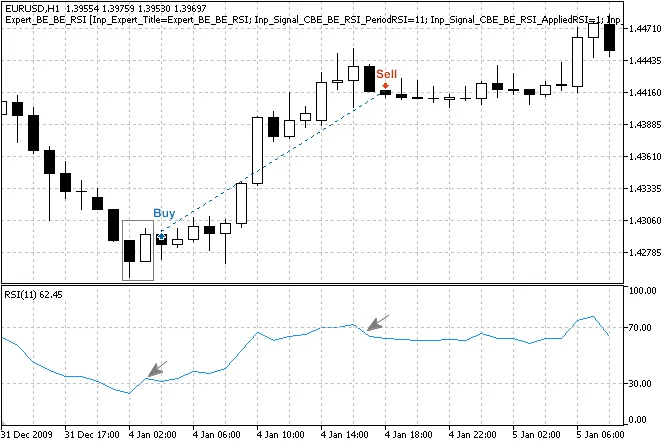
Fig. 3. Bullish Harami pattern confirmed by RSI indicator
Building the Expert Advisor
Once we have our signal conditions set, creating the EA in MQL5 Wizard is a breeze. Here’s a quick overview:
1. Launch the MQL5 Wizard.
2. Specify your EA name.3. Select the modules for your trading signals.
4. Set your trailing properties (we'll be using no trailing stop here).
5. Define your money management settings (we’ll stick with fixed trade volume).
6. Hit “Finish” to generate your EA code!
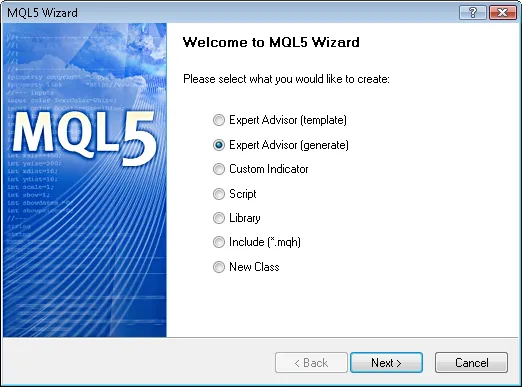
Fig. 4. Creating Expert Advisor using MQL5 Wizard
After setting up, you'll need to adjust the input parameters for optimal performance. For instance, we recommend setting the Signal_ThresholdOpen to 40 and Signal_ThresholdClose to 20.
Backtesting Your EA
Finally, don’t forget to backtest your EA using historical data to evaluate its performance. We tested it on the EUR/USD H1 chart using the Strategy Tester in the MetaTrader 5 client terminal. You’ll want to keep an eye on the results and tweak your parameters accordingly.

Fig. 11. Testing results of the Expert Advisor
And there you have it! By following this guide, you can create a robust Expert Advisor that utilizes Bullish and Bearish Harami patterns alongside RSI for confirmation. Happy trading!




Comments 0