
Description:
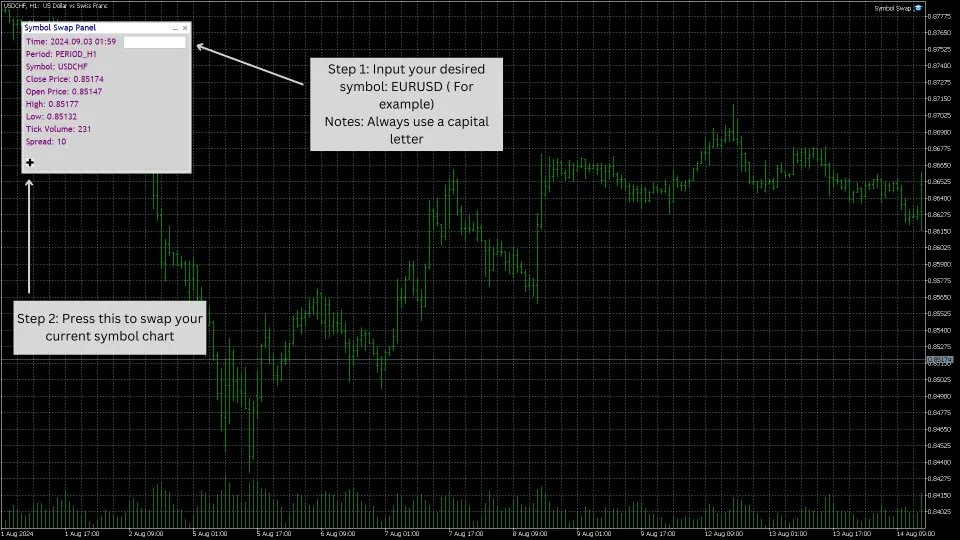
Are you tired of juggling multiple symbols and market data while trading? The Symbol Swap Panel is here to save the day! This handy utility is crafted for traders who want to manage their chart symbols and Market Watch efficiently. With this tool, you can effortlessly swap the current symbol on your chart and have the selected symbol added to Market Watch automatically. It’s perfect for those who need quick access to various symbols and real-time market data without breaking their stride.
Key Features:
1. Seamless Symbol Swapping:
- With just a click, you can instantly switch the active symbol on your chart. This feature is a game-changer for making quick adjustments to your trading strategy without having to wade through multiple settings.
2. Automatic Market Watch Integration:
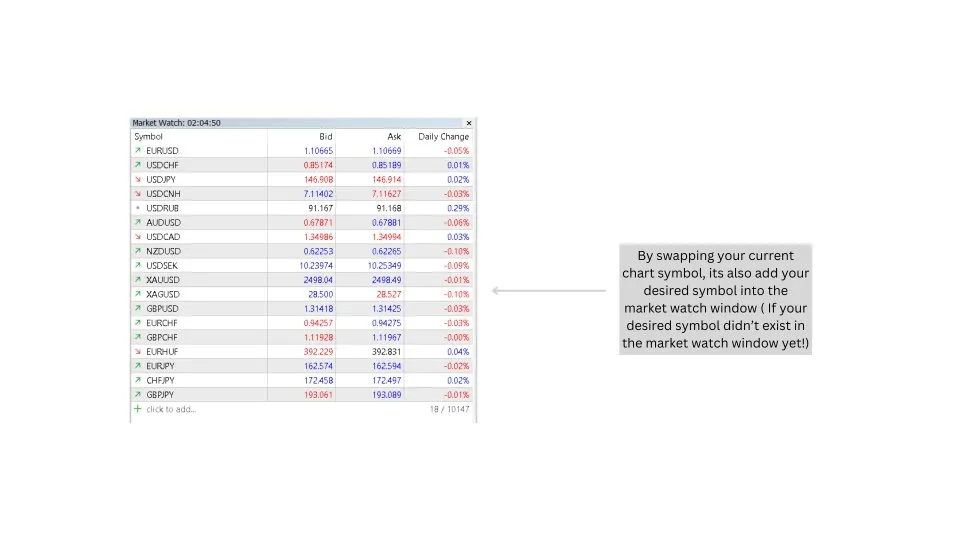
- Every time you swap a symbol on your chart, that new symbol gets automatically added to Market Watch. This ensures you have immediate access to real-time data and market insights.
3. Enhanced Trading Workflow:
- By linking symbol management with Market Watch, the panel streamlines your trading process. This means you can monitor and analyze multiple symbols more efficiently, saving you time and effort.
4. Historical Data Analysis:
- The panel allows for symbol swaps based on historical data, which helps traders review and analyze past market conditions. This leads to smarter decision-making.
5. Optimized for Accurate Data Loading:
- This tool is designed for efficient data synchronization. However, when changing timeframes, it’s best to switch back and forth to make sure all relevant data loads accurately for consistent performance.
Practical Use Case:
For traders who constantly keep an eye on multiple symbols, the Symbol Swap Panel offers a quick and efficient way to switch between charts and update Market Watch without disrupting your market analysis flow. Whether you’re diving into different currency pairs or stocks, this tool ensures all relevant data is at your fingertips, helping you respond promptly to market shifts.
This utility is perfect for active traders and analysts who need a streamlined method for managing symbols and Market Watch entries, providing a practical solution for maintaining focus and efficiency in fast-paced trading environments.
***NOTE***:
To personalize the button image in the Symbol Swap Panel Utility, just follow these simple steps:
- Place your BMP image (24-bit format) in the MQL5/Images folder.
- Modify the code to point to your custom image by changing the resource path.
- Ensure the image is formatted correctly and the path is accurate to avoid compilation errors.
This allows you to customize the panel with your own button images!
Links to the product:




Comments 0